

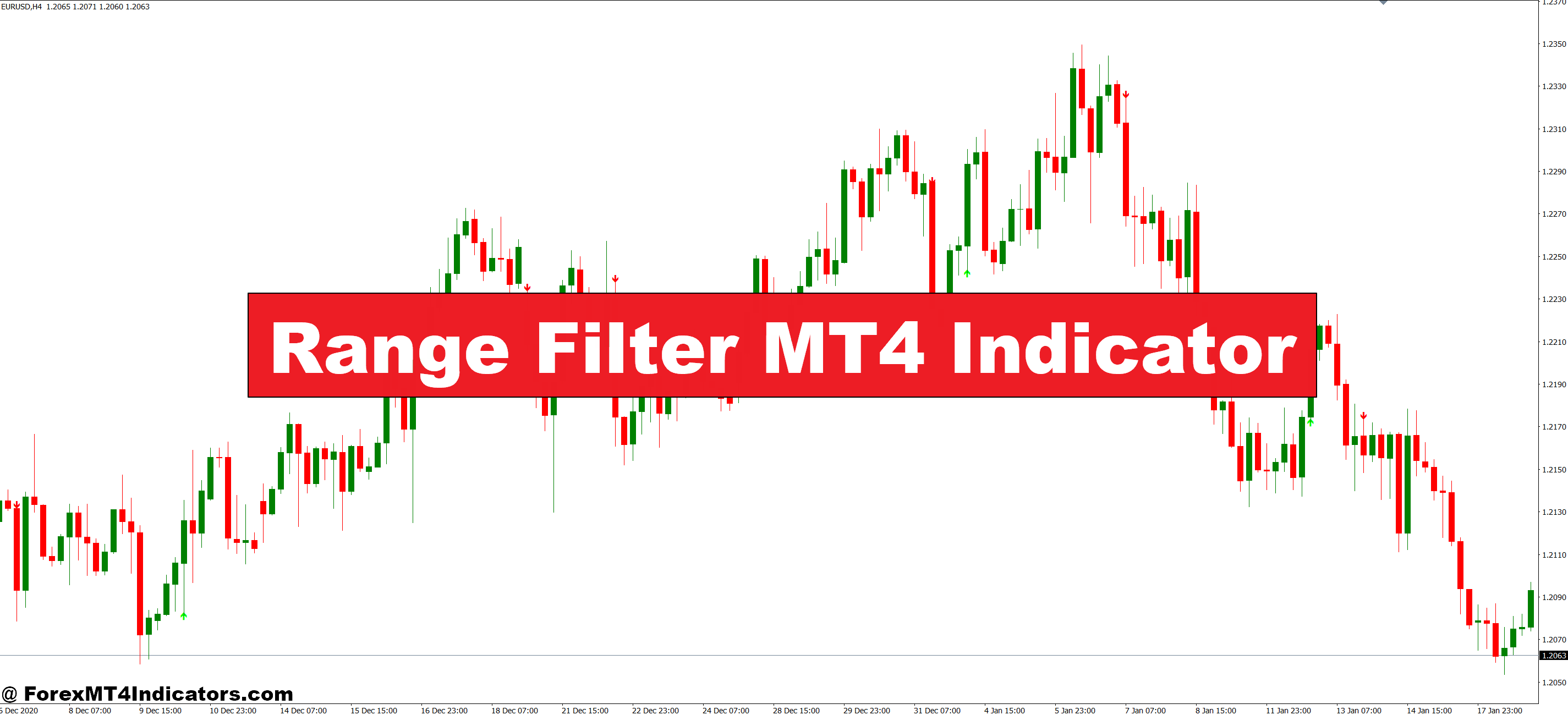
The Range Filter MT4 indicator tackles this head-on by filtering out market noise and highlighting periods when price is genuinely trending. Unlike standard moving averages that lag behind or oscillators that give conflicting signals, this tool creates a dynamic channel that adapts to current volatility. When price moves outside this channel with conviction, traders get a clearer signal that momentum has shifted. Let’s break down how this indicator actually works and whether it deserves a spot on your charts.
What Is the Range Filter Indicator?
The Range Filter is a volatility-based trend detection tool that creates an adaptive range around price action. Think of it as a smart moving average that widens during volatile periods and tightens when the market calms down. The indicator plots two lines that form a channel, and the real magic happens when price breaks and sustains movement outside this channel.
Unlike fixed-period moving averages that treat all market conditions the same, the Range Filter adjusts its sensitivity based on recent price movement. This means it won’t give you the same signal in a sleepy Asian session that it would during a volatile London open. The calculation uses a combination of price range measurements and smoothing techniques, though most traders don’t need to understand the math to use it effectively.
What makes this different from Bollinger Bands or Keltner Channels? The Range Filter responds faster to genuine trend changes while being more resistant to random price spikes. It’s designed specifically to catch the transition from ranging to trending conditions.
How the Range Filter Works in Practice

The indicator calculates an average true range over a specified period, then applies smoothing to create upper and lower boundaries. When price closes above the upper line, the indicator signals bullish momentum. When it closes below the lower line, bearish momentum takes over. The key is sustained breaks, not momentary spikes.
Here’s a real scenario: On the EUR/USD 1-hour chart during last month’s ECB announcement, price was chopping between 1.0850 and 1.0870 for three hours. The Range Filter lines were tight, hugging price action, with the indicator showing no clear directional bias. Standard MACD was crossing back and forth, generating four false signals in that period.
Then the news hit. Price spiked to 1.0895, breaking cleanly above the upper Range Filter line. But here’s the crucial part—the indicator didn’t just flash a quick signal and reverse. It held that bullish posture as price consolidated briefly at 1.0890, then continued to 1.0920 over the next two hours. Traders who waited for the Range Filter confirmation avoided the three fake-outs before the real move.
The indicator works best when you understand what it’s actually telling you. It’s not predicting the future; it’s confirming when market character has shifted from balanced to directional.
Trading Applications and Real Setups
Most traders use the Range Filter as a trend confirmation tool rather than a standalone entry system. Pair it with support and resistance levels for better results. When price breaks a key level AND the Range Filter confirms trend direction, you’ve got a higher-probability setup.
Take the USD/JPY on the daily chart last October. Price had been grinding higher but kept pulling back to the 148.50 zone. Each time it bounced, momentum felt weak. The Range Filter was showing choppy conditions—lines crossing frequently with no sustained directional signal. Smart traders stayed out.
Then on October 18th, price broke above 149.80 with a strong daily candle and the Range Filter flipped decisively bullish. That signal held for 12 trading days as USD/JPY climbed to 151.70. The indicator filtered out two minor pullbacks during that run that might have shaken out traders using tighter trend tools.
For exits, watch when price crosses back inside the Range Filter channel. That doesn’t always mean reverse your position, but it’s telling you the strong directional move is taking a breather. On shorter timeframes like 15-minute or 30-minute charts, you’ll get more signals but also more noise. The indicator works, but you need to match your timeframe to your trading style.
Settings and Customization
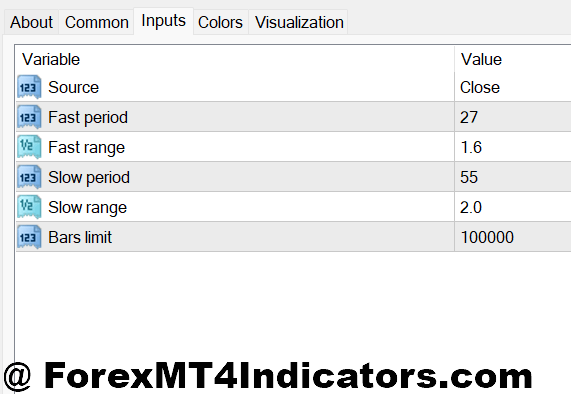
The default Range Filter settings on most MT4 versions use a period of 100 with a multiplier around 3.0. These work okay for daily charts but feel sluggish on anything below 4-hour. For day trading, try dropping the period to 50 or even 30, and experiment with multipliers between 2.0 and 2.5.
Currency pairs matter too. The GBP pairs (GBP/USD, GBP/JPY) are naturally more volatile than something like EUR/CHF. What works for cable might give you constant signals on a quieter pair. Start with standard settings, then adjust based on how many signals you’re getting. Too many? Increase the multiplier. Too few? Drop it down.
One trick experienced traders use: run two Range Filters with different settings. Set one faster (period 30, multiplier 2.0) and one slower (period 100, multiplier 3.0). When both agree on direction, you’ve got stronger confirmation. When they conflict, the market’s probably in transition—consider staying flat.
Don’t forget that settings that work during normal market conditions might fail during major news events or low-liquidity holiday periods. No indicator adapts to every situation perfectly.
Advantages and Honest Limitations
The Range Filter’s biggest strength is cutting through sideways chop. It keeps you out of messy ranges better than most momentum oscillators. During trending markets, it catches the meat of the move without getting you in too early or out too late. The visual simplicity helps too—green or red, bullish or bearish, no complicated interpretations needed.
But let’s be real about the downsides. In genuinely ranging markets with wide swings, the indicator can still generate false breakout signals. You’ll see price punch through the channel, get excited, take the trade, then watch it reverse back inside the range. Happens on consolidating triangles and rectangles all the time.
The indicator also lags during rapid reversals. If a trend suddenly shifts, you might give back profits waiting for the Range Filter to confirm the change. And like any technical tool, it works best when combined with proper risk management and market context. A bullish Range Filter signal doesn’t mean much if you’re buying into major resistance or ignoring fundamental developments.
Trading forex carries substantial risk. No indicator guarantees profits, and the Range Filter won’t save you from poor position sizing or revenge trading. It’s a tool, not a magic solution.
How to Trade with Range Filter MT4 Indicator
Buy Entry

- Price breaks above upper Range Filter line – Wait for a full candle close above the upper boundary on 1-hour or 4-hour charts; enter on the next candle open with a 20-30 pip stop loss below the filter line.
- Filter line changes from red to green – This color shift confirms bullish momentum; best taken when it occurs near support levels on EUR/USD or GBP/USD daily charts.
- Retest of the Range Filter after breakout – If price breaks above then pulls back to touch the upper line without crossing below it, enter long with stop 15 pips below the retest candle.
- Align with higher timeframe trend – Only take buy signals when the daily Range Filter is also bullish; this doubles your win rate on 1-hour chart entries.
- Volume confirmation on breakout – Skip the trade if price breaks the filter during low-volume Asian session hours (midnight-4am GMT); wait for London or New York confirmation.
- Avoid buying near major resistance – Don’t take Range Filter buy signals within 50 pips of round numbers (1.1000, 1.2000) or previous swing highs; risk of rejection is too high.
- Risk no more than 1-2% per signal – Even with Range Filter confirmation, limit position size so a 30-pip stop equals maximum 2% of your account; news events can trigger false breakouts.
- Wait for consolidation break – If price has been inside the Range Filter channel for 20+ candles on 4-hour charts, the first breakout above typically offers the cleanest entry.
Sell Entry

- Price breaks below lower Range Filter line – Enter short when candle closes completely below the lower boundary; place stop 25-30 pips above the filter line for GBP/USD trades.
- Filter line shifts from green to red – Color change to bearish confirms downtrend initiation; most reliable on 4-hour and daily timeframes during European trading hours.
- Failed rally back to the filter – When price breaks below then attempts to reclaim the lower line but gets rejected, enter short on the rejection candle with tight 15-20 pip stop.
- Multiple timeframe alignment – Only sell when both 1-hour and 4-hour Range Filters show red; single timeframe signals produce too many false entries in choppy conditions.
- Avoid selling into strong support zones – Skip Range Filter sell signals within 30 pips of major psychological levels or daily/weekly support; bounce probability is 60%+ in these areas.
- News event filter – Don’t take sell signals 30 minutes before or after high-impact news releases (NFP, rate decisions, CPI); the Range Filter can’t account for fundamental volatility spikes.
- Position size based on ATR – If average true range on EUR/USD is above 100 pips on the daily chart, reduce position size by 50%; wider ranges mean more stop-out risk.
- Ignore signals during tight consolidation – If the Range Filter lines are less than 20 pips apart on 1-hour charts, market is too compressed; wait for expansion before taking sell signals.
Wrapping It Up
The Range Filter MT4 indicator brings something valuable to the table for traders who struggle with choppy markets and false breakout signals. It creates an adaptive framework that identifies when price is genuinely trending versus just making noise. The volatility-based approach means it adjusts to current market conditions rather than applying the same rigid rules across all environments.
What makes it useful is the combination of trend detection and noise filtering in one visual package. You’re not juggling multiple indicators trying to confirm each other. That said, it’s not perfect—expect some false signals in ranging conditions and minor lag during sharp reversals. Use it as confirmation alongside your existing strategy, not as a replacement for sound trading principles.
The real test? Paper trade it for a month on your preferred pairs and timeframes. Adjust the settings, see how it performs during different market conditions, and decide if it actually improves your edge. Some traders swear by it; others find different tools work better for their style. The only way to know is to put in the screen time yourself.
Recommended MT4/MT5 Broker
XM Broker
- Free $50 To Start Trading Instantly! (Withdraw-able Profit)
- Deposit Bonus up to $5,000
- Unlimited Loyalty Program
- Award Winning Forex Broker
- Additional Exclusive Bonuses Throughout The Year
- Exclusive 90% VIP Cash Rebates for all Trades!

Already an XM client but missing out on cashback? Open New Real Account and Enter this Partner Code: VIP90
(Free MT4 Indicators Download)



Enter Your Email Address below, download link will be sent to you.