

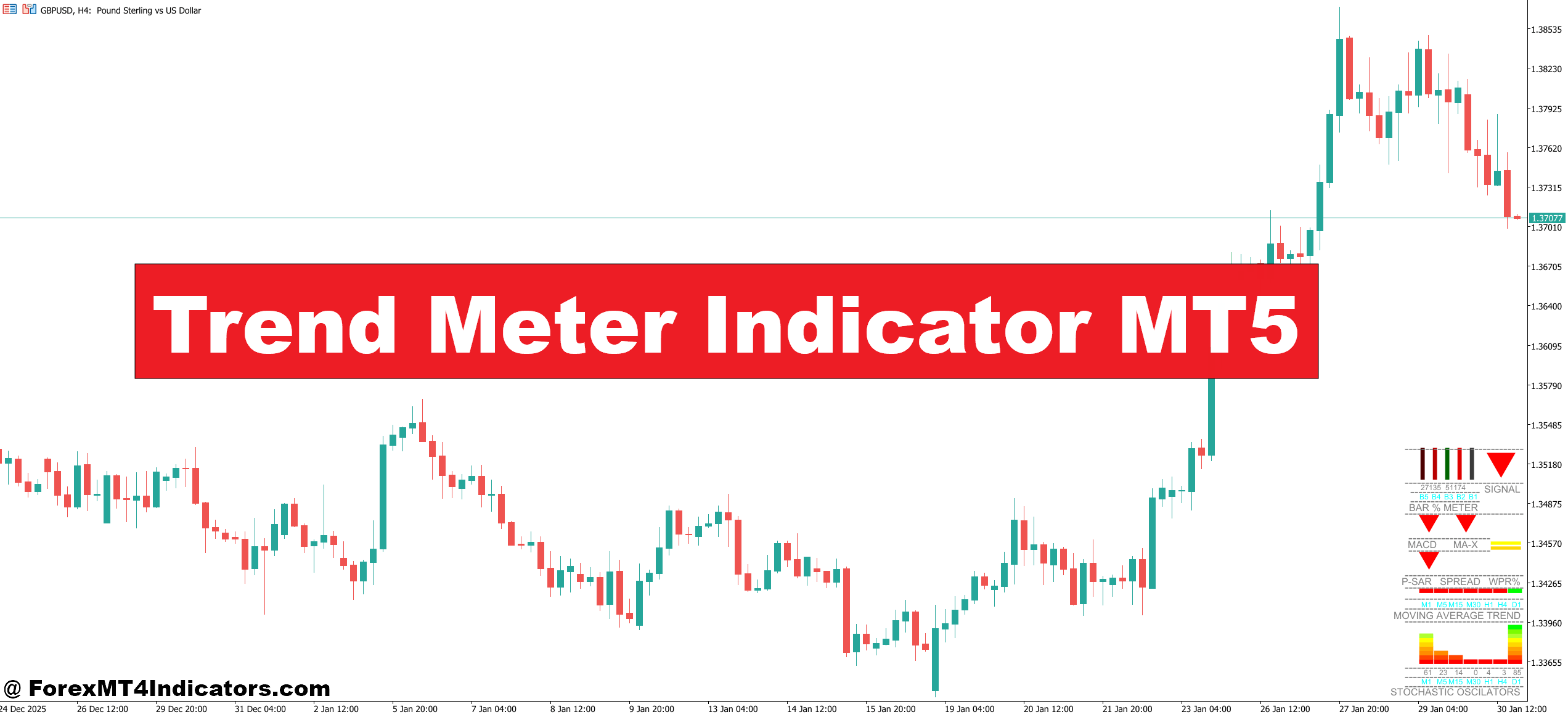
The Trend Meter is a multi-timeframe trend analysis tool designed for MetaTrader 5 that displays the current trend direction across eight different timeframes in a single panel. Unlike standard indicators that plot lines on your chart, this creates a dashboard showing whether each timeframe is bullish, bearish, or neutral. The visual representation typically uses color coding—green for uptrends, red for downtrends, and gray or yellow for ranging markets.
The indicator calculates trend direction using a combination of moving average slopes and price position relative to these averages. Most versions use the relationship between fast and slow moving averages on each timeframe, similar to how MACD functions but simplified for quick visual interpretation. When the faster MA crosses above the slower one and price trades above both, the indicator registers an uptrend for that specific timeframe.
How Traders Apply This in Real Market Conditions

Let’s get practical. Say you’re analyzing GBP/USD and considering a long position. You check the Trend Meter and notice that the 5-minute, 15-minute, and 30-minute timeframes show bearish signals while the 1-hour, 4-hour, and daily charts display bullish trends. This misalignment tells you something important: short-term pullback against a larger uptrend.
An experienced trader might use this setup to wait for the lower timeframes to flip bullish before entering, ensuring alignment across multiple timeframes. This approach reduces the chance of catching a falling knife during a correction. I’ve seen traders use this exact scenario on EUR/USD during the London session, waiting for the 15-minute chart to confirm the higher timeframe trend before pulling the trigger on a trade.
The indicator also helps identify when trends are losing steam. If you’re holding a long position on AUD/USD and notice the 1-hour and 4-hour timeframes starting to flip from bullish to neutral while daily remains bullish, that’s often your cue to tighten stops or consider taking profits. The market rarely moves in straight lines, and this early warning system can protect gains.
Trend Meter Indicator MT5 Settings

The Trend Meter’s effectiveness depends heavily on proper configuration. The default settings typically use 10 and 20 period moving averages, but scalpers trading 1-minute charts might reduce these to 5 and 10 periods for faster signals. Swing traders watching daily charts often increase them to 20 and 50 periods to filter out short-term noise.
One adjustment that makes a significant difference is the sensitivity setting for neutral zones. Some versions allow you to define a threshold—if the difference between fast and slow MAs falls below a certain percentage, the indicator shows neutral instead of bullish or bearish. Setting this threshold too tight creates constant flip-flopping between states. Too loose, and you miss early trend changes. For volatile pairs like GBP/JPY, a wider threshold (around 0.0015 to 0.0020) works better than for stable pairs like EUR/CHF.
You can also customize which timeframes display in the panel. Day traders might remove the weekly and monthly views, replacing them with 2-minute and 3-minute charts for finer granularity. Position traders do the opposite, focusing on 4-hour, daily, weekly, and monthly timeframes while ignoring anything below 1-hour.
Strengths and Real-World Limitations
The Trend Meter excels at providing quick market context. Before placing any trade, you get an instant snapshot of whether you’re swimming with or against various timeframe currents. This prevents many rookie mistakes, like going long on a 5-minute bullish candle while the hourly and daily trends point down.
But here’s the thing—no indicator predicts the future. The Trend Meter is purely reactive, meaning it confirms what already happened rather than forecasting what comes next. During major news events like NFP or central bank announcements, the indicator can flip rapidly across all timeframes, generating contradictory signals that paralyze decision-making rather than clarify it.
The tool also struggles in ranging markets. When price consolidates, you’ll see timeframes constantly switching between bullish, bearish, and neutral. This creates analysis paralysis rather than trading clarity. In these conditions, the indicator becomes background noise instead of actionable intelligence. That said, this limitation actually provides value—if most timeframes show neutral, maybe the best trade is no trade.
Another consideration: the Trend Meter doesn’t account for support and resistance levels, chart patterns, or fundamental factors. A strong bullish reading doesn’t mean much if price just hit a major resistance zone where sellers historically appear. Always combine this tool with other forms of analysis.
How It Compares to Alternative Approaches
Traders often compare the Trend Meter to using multiple charts manually. Opening eight different timeframe windows clutters your workspace and taxes your working memory. The Trend Meter condenses this information into one clean panel, saving screen real estate and mental bandwidth.
Compared to the standard MACD, which shows trend on a single timeframe, the Trend Meter provides broader context. However, MACD offers more nuanced information like momentum strength and divergences that the Trend Meter doesn’t capture. Many traders use both—MACD for detailed analysis on their primary trading timeframe and Trend Meter for overall market alignment.
The indicator also differs from traditional moving average crossover systems. While those require you to wait for the crossover to complete before getting a signal, the Trend Meter updates continuously based on the relationship between MAs and current price. This makes it more dynamic but also more prone to giving early signals that don’t pan out.
Risk Management and Realistic Expectations
Trading forex carries substantial risk. No indicator guarantees profits, and the Trend Meter is no exception. Some traders fall into the trap of waiting for perfect alignment across all timeframes before entering trades. In reality, perfect alignment is rare and often comes late in a trend when the best risk-reward setups have passed.
A more practical approach involves identifying alignment on your trading timeframe and the next two higher timeframes. If you trade the 15-minute chart, check that the 15-minute, 1-hour, and 4-hour trends align. Don’t worry if the 5-minute chart shows something different—that’s normal price fluctuation within the larger trend.
Position sizing matters more than any indicator signal. Even with all timeframes screaming bullish on USD/JPY, risking 10% of your account on one trade is a recipe for eventual disaster. The Trend Meter helps with entries, but proper risk management keeps you in the game long enough to benefit from those entries.
How to Trade with Trend Meter Indicator MT5
Buy Entry
- Triple timeframe alignment – Enter long only when your trading timeframe plus the next two higher periods all show bullish signals; for example, if trading the 15-minute chart, confirm that 15M, 1H, and 4H all display green.
- Lower timeframe pullback completion – Wait for the 5-minute or 15-minute chart to flip from red back to green while the 1-hour and 4-hour remain bullish; this indicates the pullback has ended and the main trend is resuming.
- Daily trend confirmation – Never take buy signals on EUR/USD or GBP/USD if the daily timeframe shows red or neutral; the higher timeframe trend stacks odds against you.
- 50-pip stop loss maximum – Place your stop below the most recent swing low, but if that requires more than 50 pips on major pairs, skip the trade as the risk-reward isn’t favorable.
- Avoid during high-impact news – Don’t enter buy positions 30 minutes before or after NFP, central bank decisions, or CPI releases even if all timeframes show bullish; the Trend Meter can’t predict volatility spikes.
- Wait for neutral zones to clear – If three or more timeframes display gray or yellow (neutral), hold off on entries; choppy markets produce false signals that lead to whipsaws.
- Confirm with price structure – Only take the buy signal if price hasn’t just hit a major resistance level; the indicator doesn’t recognize zones where selling pressure historically appears.
- Scale in on retest entries – After initial timeframe alignment, if lower timeframes briefly turn bearish then flip back to bullish without breaking structure, add to your position with 30-40% of your original size.
Sell Entry
- Bearish cascade from top down – Enter short when the daily flips to red first, followed by the 4-hour, then the 1-hour; this sequential breakdown signals strong momentum shift rather than a temporary dip.
- Rejection at multi-timeframe resistance – Take sell signals on GBP/USD when price reaches a known resistance zone and at least three timeframes simultaneously turn bearish within a 15-minute window.
- Lower timeframe divergence warning – If you’re already in a long trade and the 15-minute and 30-minute charts flip red while 4-hour stays green, exit immediately rather than waiting for higher timeframes to confirm.
- Maximum 2% account risk – Never risk more than 2% of your trading capital on any single short entry, regardless of how many timeframes show bearish alignment; over-leveraging kills accounts faster than bad signals.
- Skip during strong support zones – Don’t take sell signals on EUR/USD at major psychological levels like 1.1000 or 1.0500 even with full bearish alignment; support often holds multiple tests before breaking.
- Confirm bearish trend strength – Wait for at least four consecutive timeframes showing red before entering shorts during volatile sessions; three timeframes can flip back quickly during whipsaw conditions.
- Avoid counter-trend shorts in bull markets – If the weekly and monthly charts display solid green, don’t hold short positions on the 1-hour or 4-hour for more than 4-6 hours; you’re fighting the bigger picture.
- Watch for overnight gap risk – Close all short positions on GBP/JPY or other volatile pairs 2 hours before market close on Friday if holding through the weekend; gaps against your position can trigger catastrophic losses that bypass your stop.
Wrapping Up the Practical Picture
The Trend Meter Indicator for MT5 serves as a timeframe alignment tool that helps traders see the bigger picture before committing capital. It works best when confirming trend direction across multiple timeframes, identifying pullbacks within larger trends, and recognizing when markets lack clear direction. The indicator won’t replace a solid trading strategy, but it can enhance decision-making when used alongside proper price action analysis and risk management.
Don’t expect this tool to transform your trading overnight. It simply organizes information you could gather manually into an efficient format. The real skill lies in interpreting that information correctly and acting on it with discipline. Start by adding it to your demo account, test different settings against your preferred currency pairs and timeframes, and see if it complements your existing approach. Some traders find it invaluable; others barely use it after a few weeks. Your experience will depend on how well it fits within your specific trading methodology.
Recommended MT4/MT5 Broker
XM Broker
- Free $50 To Start Trading Instantly! (Withdraw-able Profit)
- Deposit Bonus up to $5,000
- Unlimited Loyalty Program
- Award Winning Forex Broker
- Additional Exclusive Bonuses Throughout The Year
- Exclusive 90% VIP Cash Rebates for all Trades!

Already an XM client but missing out on cashback? Open New Real Account and Enter this Partner Code: VIP90
(Free MT4 Indicators Download)



Enter Your Email Address below, download link will be sent to you.