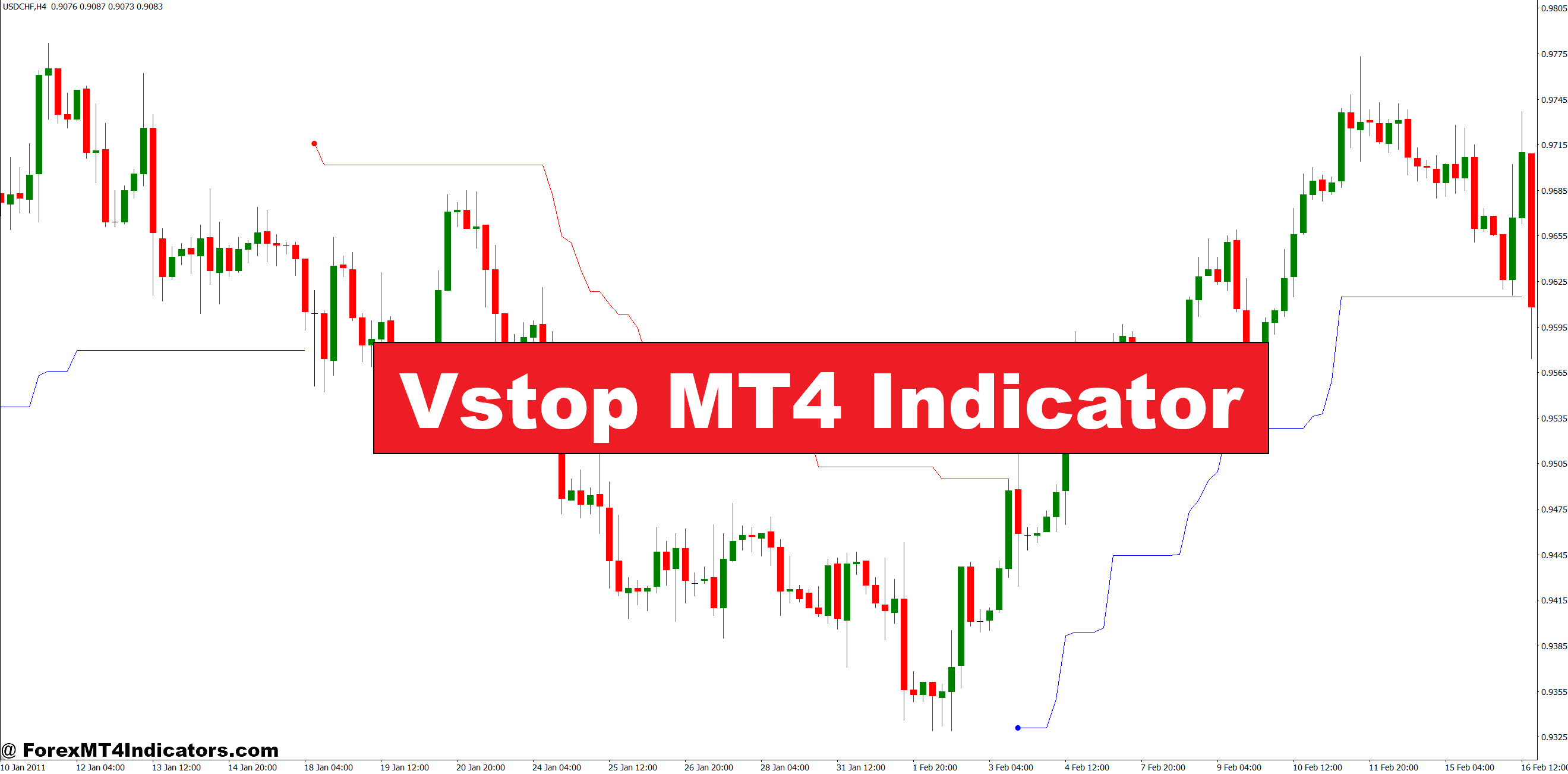
The Vstop MT4 indicator calculates dynamic stop levels based on Average True Range (ATR), a volatility measurement that considers the largest price movements over a specified period. Unlike static indicators that sit at fixed levels, Vstop plots a line that follows price action while maintaining a distance proportional to current volatility.
When price trends upward, Vstop creates a rising support line below the candles. If price trends downward, it forms a descending resistance line above. The indicator flips its position when price crosses the line, signaling potential trend reversals. This flip mechanism makes it both a stop-loss placement tool and a basic trend-identification system.
The calculation multiplies ATR by a user-defined coefficient (typically 2.0 to 3.0) and subtracts or adds that value from recent price extremes. A coefficient of 2.5 on EUR/USD’s 4-hour chart with an ATR of 80 pips would place stops roughly 200 pips away from the entry during volatile sessions—far enough to avoid random noise but close enough to protect capital.
How Traders Actually Use It in Practice
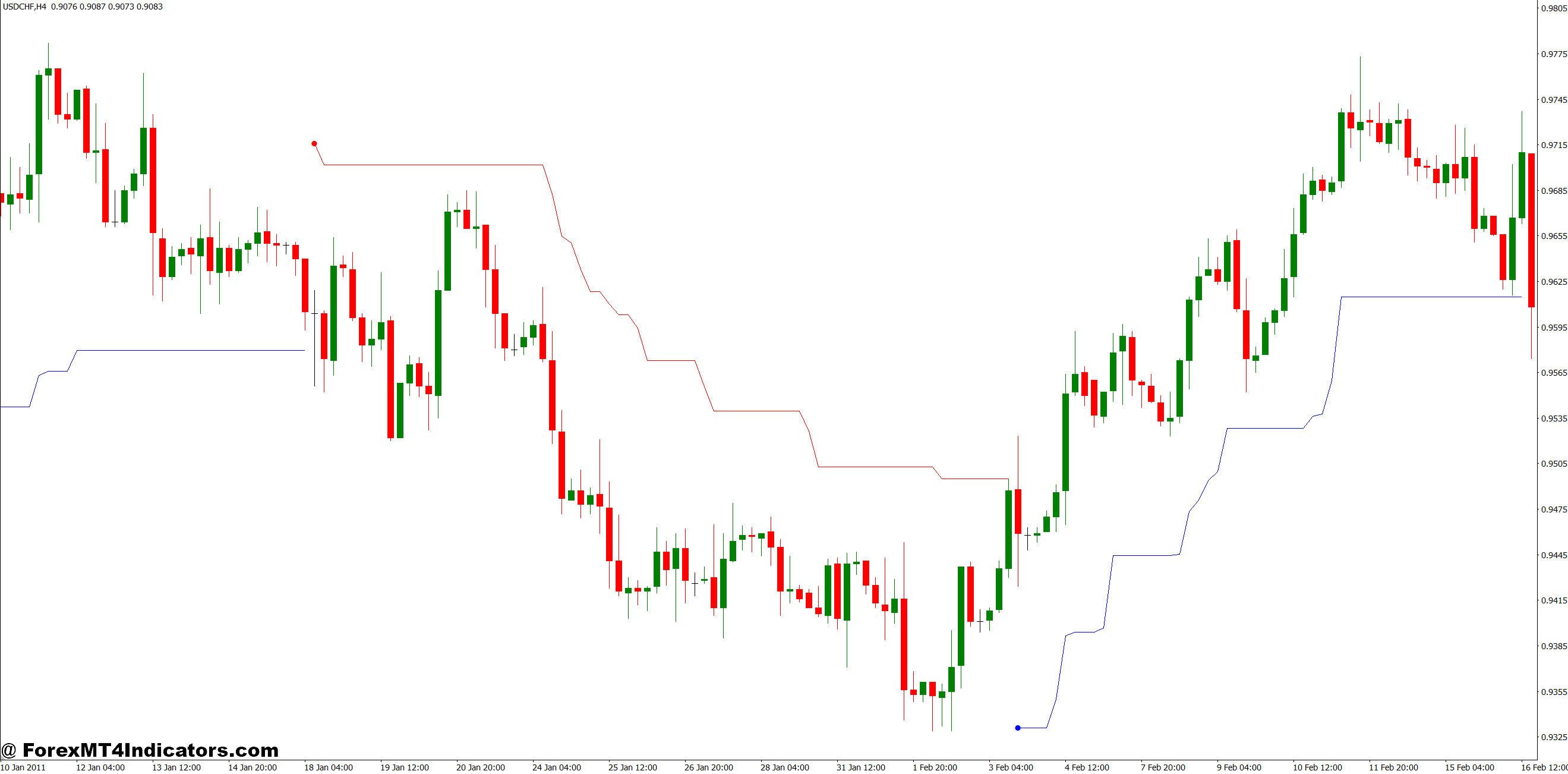
Most traders deploy Vstop as a trailing stop mechanism rather than an entry signal generator. Here’s a specific example: On September 12th, a trader enters long on USD/JPY at 147.20 on the 1-hour chart after a bullish engulfing pattern. The Vstop line sits at 146.85, giving a 35-pip cushion. As price climbs to 147.80, Vstop rises to 147.30. The protective stop has automatically moved 45 pips higher without manual intervention.
That said, some traders use Vstop flips as confirmation signals. When the indicator switches from below price (bullish) to above price (bearish), it suggests weakening momentum. On ranging markets like AUD/USD during Asian sessions, these flips happen frequently—sometimes three or four times in a 6-hour window. That’s why experienced users typically combine Vstop with directional filters like moving averages or trendlines.
The indicator shines during strong, sustained trends. On the GBP/JPY daily chart during October 2024’s rally, Vstop kept traders in positions for 400+ pip moves without premature exits. But during sideways consolidation on lower timeframes, it generates false signals that can rack up death-by-a-thousand-cuts losses.
Customizing Settings for Different Trading
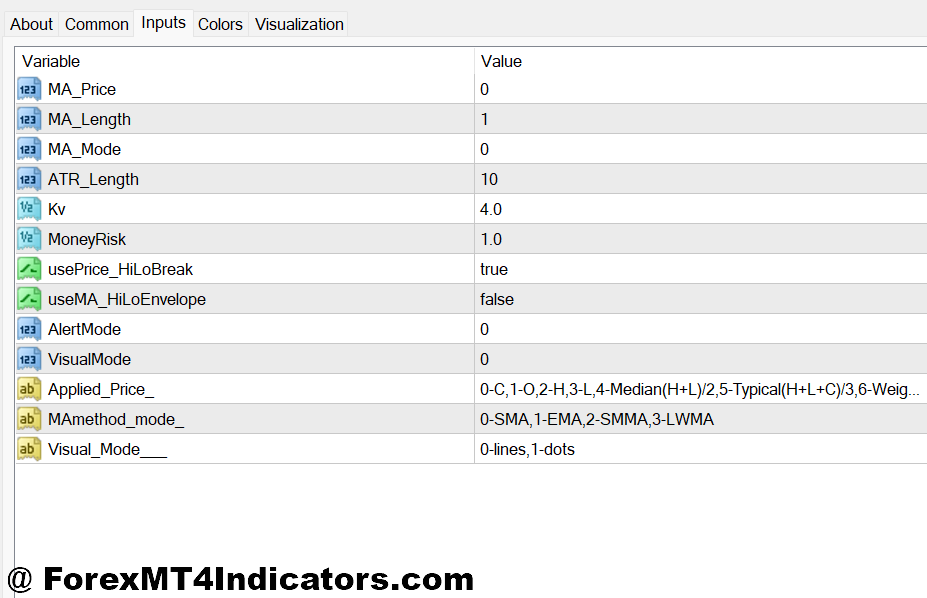
The two primary adjustable parameters are the ATR period and the multiplier coefficient. Default settings usually show 14-period ATR with a 2.0 multiplier, but these need adjustment based on your trading timeframe and risk tolerance.
Scalpers on 5-minute charts often reduce the ATR period to 7 or 10 for quicker response to volatility shifts. They might also lower the multiplier to 1.5, accepting tighter stops in exchange for faster trailing action. A scalper working EUR/GBP during London open might see Vstop 8-12 pips away from price—tight enough to protect against sudden reversals but loose enough to survive normal bid-ask fluctuations.
Swing traders on daily or 4-hour charts typically increase the multiplier to 3.0 or even 3.5. This accommodates larger pullbacks within established trends. When trading commodity currencies like AUD/CAD that experience wider daily ranges, a 3.5 multiplier prevents getting shaken out by normal retracements that respect the broader trend structure.
Some traders also adjust the ATR period based on currency pair volatility. Exotic pairs like USD/TRY or USD/ZAR might warrant a 21-period ATR to smooth out erratic price spikes, while major pairs like EUR/USD work fine with standard 14-period settings.
Strengths and Real Limitations
The biggest advantage of Vstop is its objectivity. There’s no emotional decision-making about when to tighten stops or let profits run. The math handles it automatically, removing the temptation to micromanage positions. Traders who struggle with exiting winners too early often find this systematic approach improves their average winner size.
Vstop also adapts to changing market conditions without reoptimization. During NFP releases or central bank announcements when ATR spikes, the indicator automatically widens stops to accommodate increased volatility. Two hours later when things calm down, it naturally tightens again. This dynamic adjustment beats manually widening stops every time high-impact news hits.
But let’s be clear about its weaknesses. Vstop lags price action because it’s based on historical volatility (ATR). During sudden trend reversals—think flash crashes or surprise rate decisions—it won’t protect you fast enough. The indicator might still show a bullish stop level while price is already plummeting. On August 5th, 2024, during the yen carry trade unwinding, Vstop users on JPY pairs took full hits before the indicator adjusted.
It also struggles in choppy, range-bound markets. On pairs like NZD/JPY during low-liquidity hours, Vstop flips back and forth, generating whipsaw losses. Traders who blindly follow every flip signal often end up with a 40% win rate and mediocre risk-reward ratios. The indicator works best when combined with higher-timeframe directional bias or price structure analysis.
How It Compares to Parabolic SAR and SuperTrend
Vstop shares DNA with Parabolic SAR and SuperTrend indicators—all three plot dynamic stop levels that flip based on price action. Parabolic SAR uses an acceleration factor that incrementally tightens stops as trends extend, making it more aggressive than Vstop’s ATR-based approach. During extended runs on USD/CHF or EUR/GBP, SAR often closes positions earlier than Vstop would.
SuperTrend also uses ATR but incorporates different calculation logic for its centerline. Some traders find SuperTrend’s flips more reliable during ranging conditions because it factors in median price rather than just highs and lows. Testing both on EUR/USD’s 15-minute chart during London-New York overlap typically shows SuperTrend generating fewer false signals in the 25-pip range chop that characterizes that session.
The choice between these indicators often comes down to trading style. Aggressive traders who want quicker stops prefer Parabolic SAR. Those who prioritize staying in trends longer lean toward Vstop. Swing traders who need a balance often split-test both SuperTrend and Vstop across their historical data before committing.
How to Trade with Vstop MT4 Indicator
Buy Entry
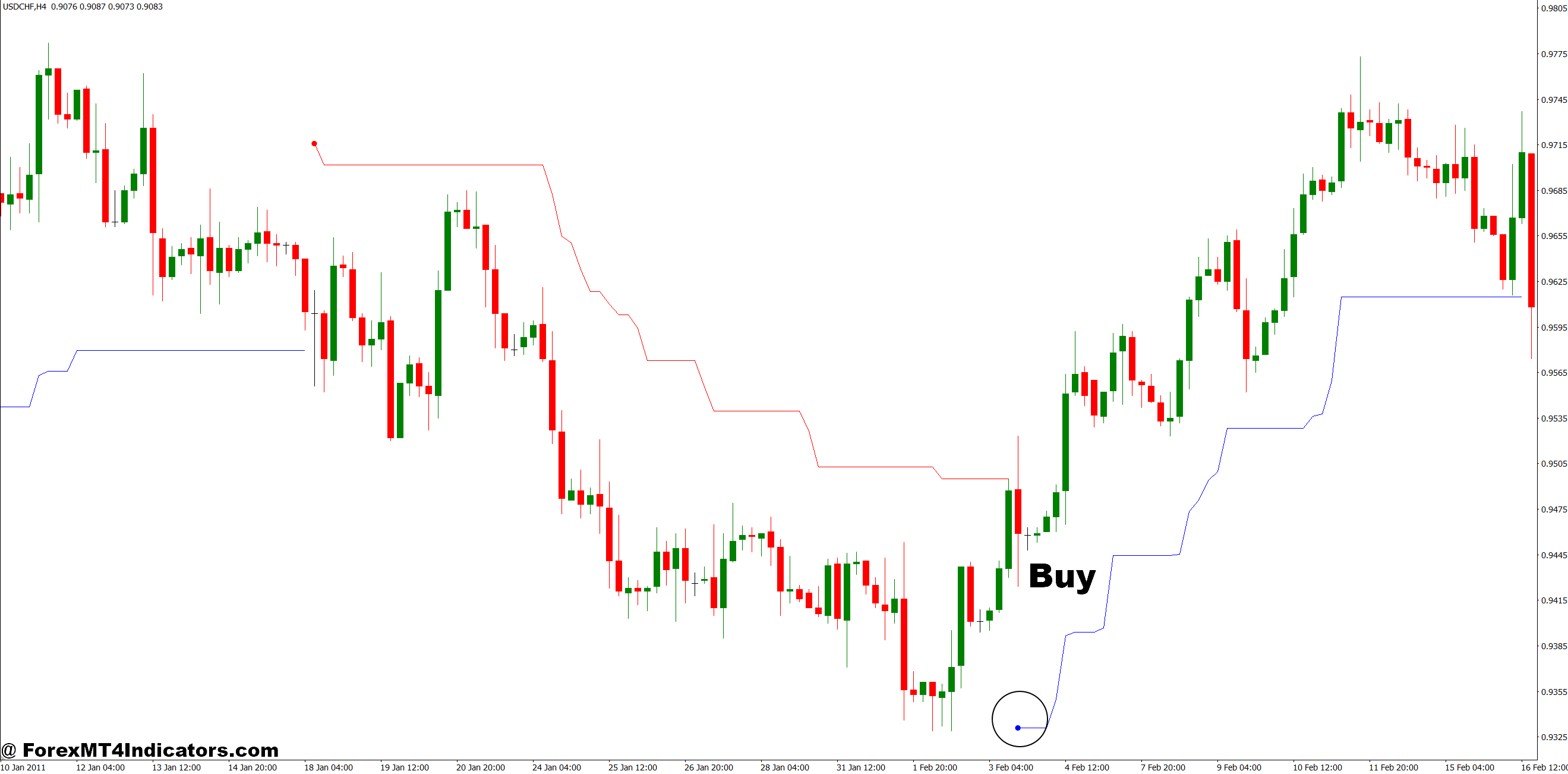
- Wait for Vstop line flip from above to below price – Enter long only after the indicator switches from red (bearish) to blue (bullish) and positions itself under the candles, confirming the trend shift rather than trying to predict it.
- Confirm with higher timeframe alignment – Check that the 4-hour or daily chart shows Vstop also trending upward; a buy on EUR/USD 1-hour chart works best when the daily Vstop already supports bullish momentum.
- Enter on first pullback after the flip – Don’t chase price immediately after Vstop turns bullish; wait for a 15-20 pip retracement on GBP/USD to enter closer to the Vstop line with better risk-reward ratios.
- Set stop loss 5-10 pips below the Vstop line – Place your protective stop just beneath the indicator’s level to account for spread and minor price spikes; on EUR/USD 4-hour chart, this typically means 30-50 pip stops during normal volatility.
- Avoid entries during major news releases – Skip Vstop buy signals 30 minutes before and after NFP, Fed decisions, or GDP reports when ATR spikes create unreliable flips that reverse within minutes.
- Look for volume confirmation on broker platforms – Strong buy signals coincide with increased tick volume or volume indicators showing accumulation; weak volume during Vstop flips often leads to false breakouts.
- Target minimum 1.5:1 risk-reward – Trail your stop using the rising Vstop line but don’t exit until price gives you at least 1.5 times your initial risk; on a 40-pip stop, aim for 60+ pips before considering manual exits.
- Skip the signal if Vstop flipped twice in last 4 hours – Multiple recent flips on GBP/JPY or other volatile pairs indicate choppy conditions where the indicator loses reliability; wait for cleaner trend structure.
Sell Entry
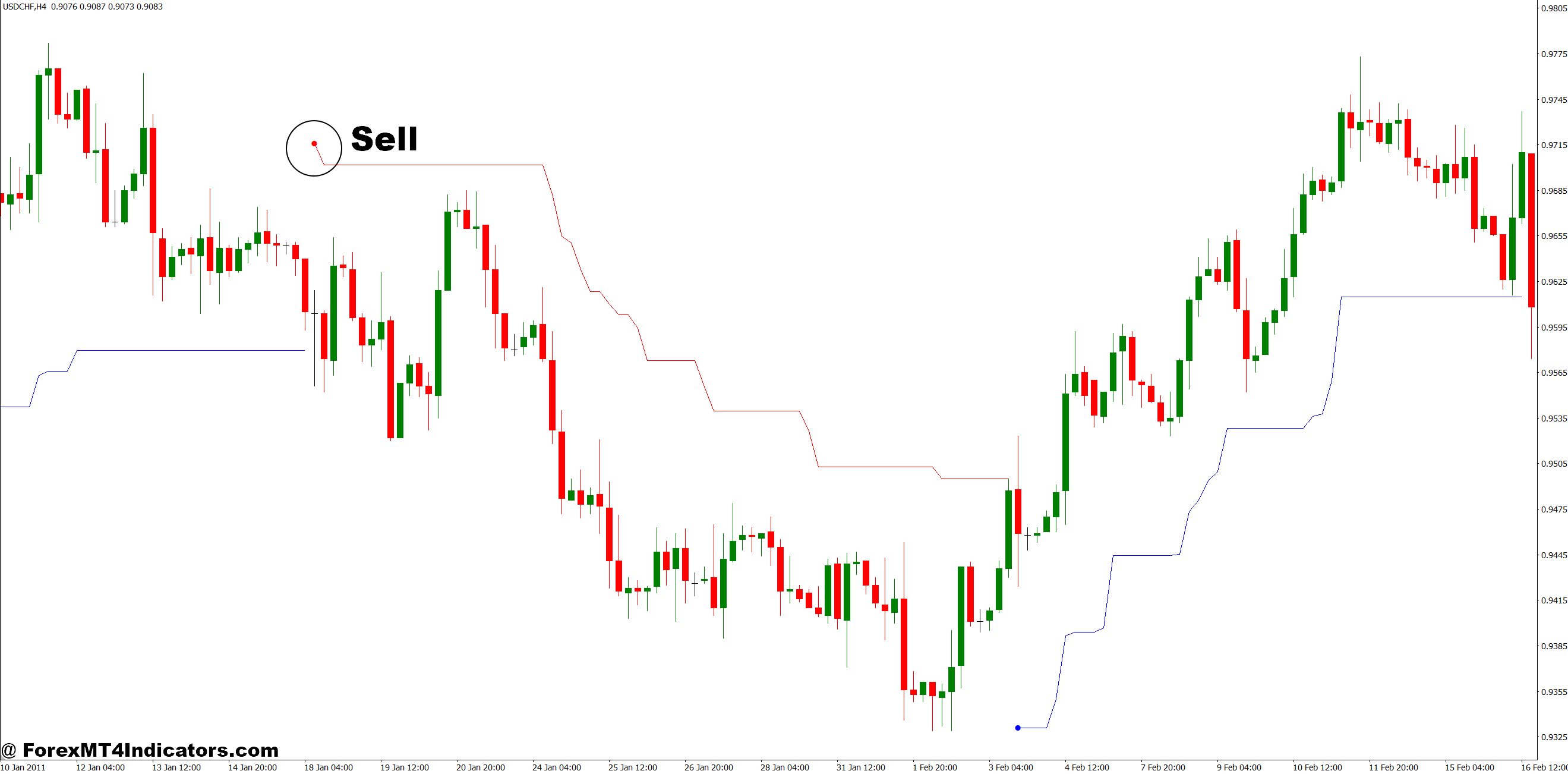
- Enter short when Vstop flips from below to above price – Go short only after the indicator changes from blue (bullish) to red (bearish) and positions itself above the candles, marking a clear momentum shift.
- Verify the flip occurs at resistance levels – Vstop sell signals gain strength when they align with previous swing highs or psychological levels; a flip at 1.1000 on EUR/USD carries more weight than mid-range flips.
- Wait for rejection candle confirmation – Let price test the newly formed Vstop resistance line and form a bearish rejection candle before entering; this filters out 30-40% of premature signals.
- Position stop loss 5-10 pips above Vstop – Place protective stops just over the indicator line; on USD/JPY 1-hour chart during Tokyo session, this usually means 20-35 pip stops depending on current ATR readings.
- Reduce position size in ranging markets – If EUR/GBP shows sideways action with three or more Vstop flips in the past 8 hours, cut your normal position size by 50% or skip the signal entirely.
- Trail stops aggressively once 2:1 is reached – After capturing twice your initial risk, move your stop to breakeven and let Vstop’s descending line manage the rest; this locks in profits while allowing for extended downtrends.
- Avoid selling into oversold RSI on daily charts – When RSI drops below 30 on GBP/USD daily timeframe concurrent with a Vstop sell signal, expect bounce risks; either skip the trade or take partial positions.
- Exit immediately if Vstop re-flips within 2 hours – Quick reversals on lower timeframes signal failed breakdown attempts; don’t hold hoping for recovery when the indicator itself contradicts your position on 15-minute or 5-minute charts.
The Bottom Line on Vstop
Vstop MT4 indicator brings structure to stop-loss management by tying protective levels directly to market volatility. It removes guesswork from trailing stops and keeps traders in winning positions longer than fixed stops would. The tool proves most valuable during clean trends on major pairs like EUR/USD, GBP/USD, or USD/JPY on 1-hour to daily timeframes.
That said, it’s not a standalone trading system. Choppy markets expose its lag-based weaknesses, and it won’t save you during black swan events. Trading forex carries substantial risk, and no indicator—including Vstop—guarantees profits or eliminates losses. The most effective application combines Vstop with solid price action reading, higher-timeframe trend filters, and disciplined risk management.
For traders tired of getting stopped out prematurely or struggling with exit decisions, Vstop offers a tested, objective framework. Just don’t expect it to think for you. Your job remains identifying high-probability setups; Vstop simply helps you stay in them longer when you’re right and exit efficiently when you’re wrong.
Level up your trading
Learn to read the chart — not just the indicator
eBook · Instant PDF
Video Course · 12 modules
Recommended MT4/MT5 Brokers
- ✓ *FREE *$50 to start (withdrawable)
- ✓ Deposit bonus up to $5,000
- ✓ Negative balance protection
Trading forex and CFDs carries a significant risk of loss and is not suitable for everyone. Broker links are affiliate links — we may earn a commission at no cost to you.
Free MT4 Indicator Download

Enter Your Email Address below, download link will be sent to you.