The XMaster Formula Indicator MT5 addresses exactly this problem. Instead of juggling half a dozen tools and second-guessing every setup, traders get a single visual system that aggregates multiple confirmation signals into straightforward buy and sell arrows. When the underlying indicators align—moving averages, MACD, RSI, and others—the XMaster plots an arrow. No guesswork about whether conditions are “good enough” to pull the trigger.
But here’s what matters more than the convenience: this indicator doesn’t repaint. Once a candle closes and an arrow appears, it stays there. You’re not staring at signals that vanish the moment you try to act on them, which makes backtesting reliable and forward testing honest. For traders tired of chasing phantom setups or dealing with analysis paralysis, the XMaster brings structure without complexity.
Looking for the MT4 version? This page covers the MetaTrader 5 build. For MetaTrader 4, download the XMaster Formula Indicator for MT4 instead — the same indicator family, packaged for each platform.
What the XMaster Formula Actually Does
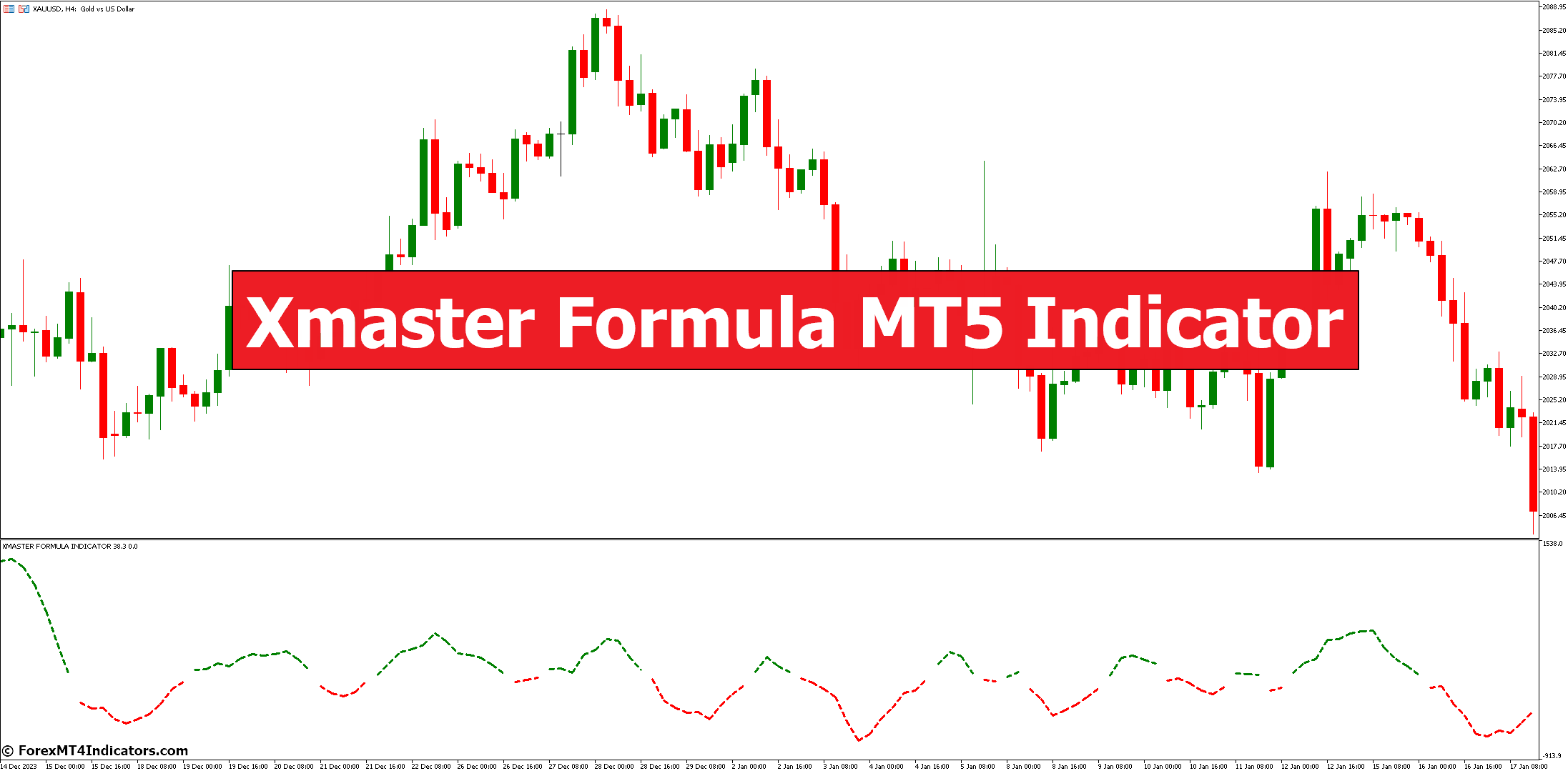
The XMaster Formula Indicator is a trend-following oscillator that appears in a separate window below your price chart on MetaTrader 5. It synthesizes data from moving averages and MACD, sometimes incorporating RSI, Stochastic, and Bollinger Bands depending on the version. When these components agree on directional bias, the indicator generates an arrow signal.
A green arrow signals bullish momentum—a potential long entry. A red arrow flags bearish momentum—a possible short setup. The oscillator line itself shifts color: green during uptrends, red during downtrends. Think of it as a multi-tool that listens to several indicators at once and only speaks up when they’re all saying the same thing.
The calculation formula isn’t publicly disclosed, which is typical for proprietary custom indicators. What traders do know is that the core logic relies on smoothed moving averages (often 40-period SMMA) combined with MACD crossovers and momentum filters. The result is a tool that waits for confirmation before signaling, which helps filter out noise but also means it won’t catch every single tick of a move.
How It Performs in Real Trading Conditions
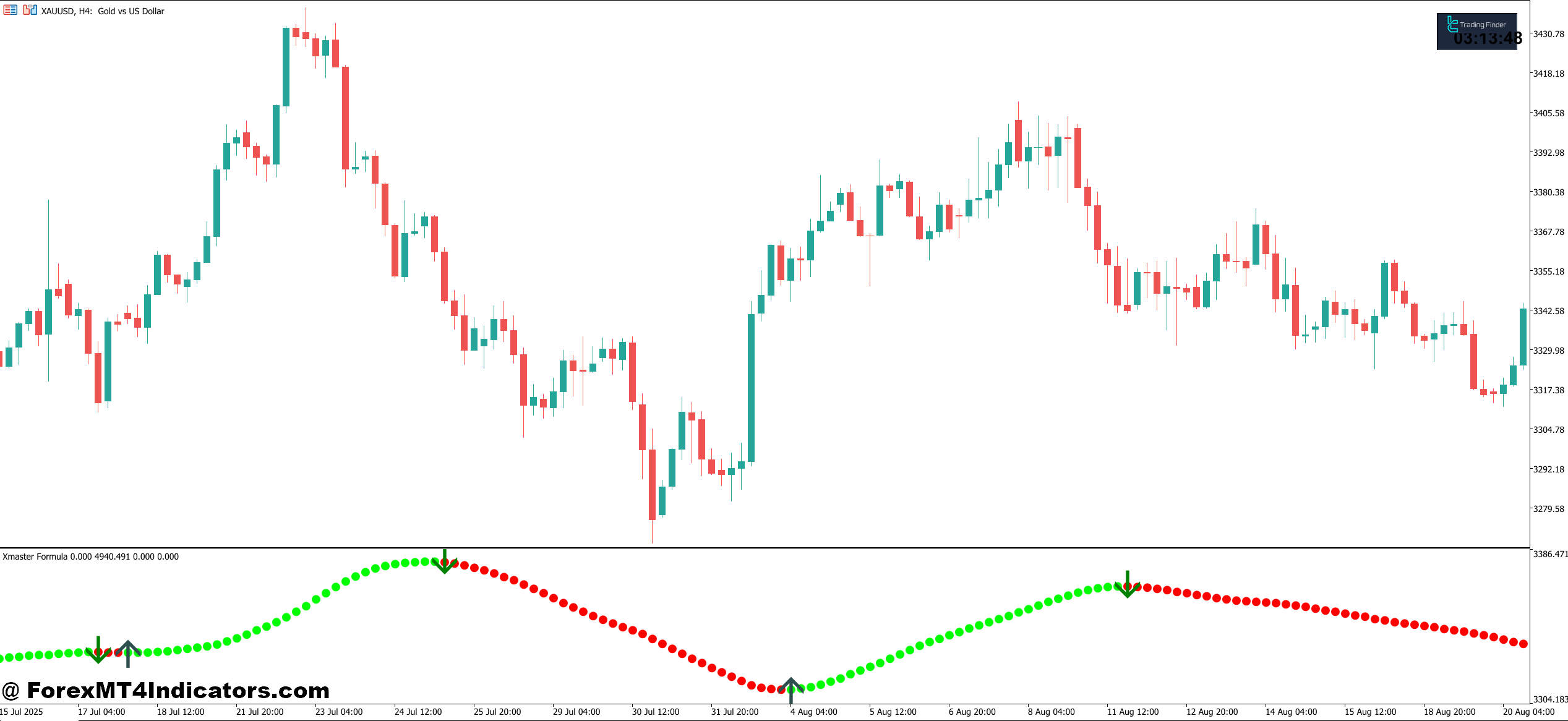
During strong trends, the XMaster shines. Testing on GBP/JPY during the August 2024 volatility spike showed clear arrow signals on H4 charts that aligned with major directional moves. Traders who entered on green arrows after price pulled back to the 50 EMA caught clean 100+ pip runs with minimal drawdown.
The catch? Choppy markets expose its limitations. On a Tuesday morning in December 2024, AUD/USD spent six hours in a 30-pip range on the M30 timeframe. The XMaster generated three arrows—two false, one breakeven. The indicator isn’t designed for tight ranges or low-volume sessions. It needs momentum to work with, and when price is grinding sideways, arrows appear but go nowhere.
That said, switching to higher timeframes helps. The same AUD/USD mess on M30 looked entirely different on H4—one clean red arrow at resistance, followed by a 60-pip drop. The lesson isn’t that the indicator fails in chop; it’s that traders need to match timeframe selection to current market conditions. Use H1 or higher when volatility is average, and lean on H4 or Daily during uncertain periods.
XMaster Formula Indicator MT5 Settings Worth Adjusting
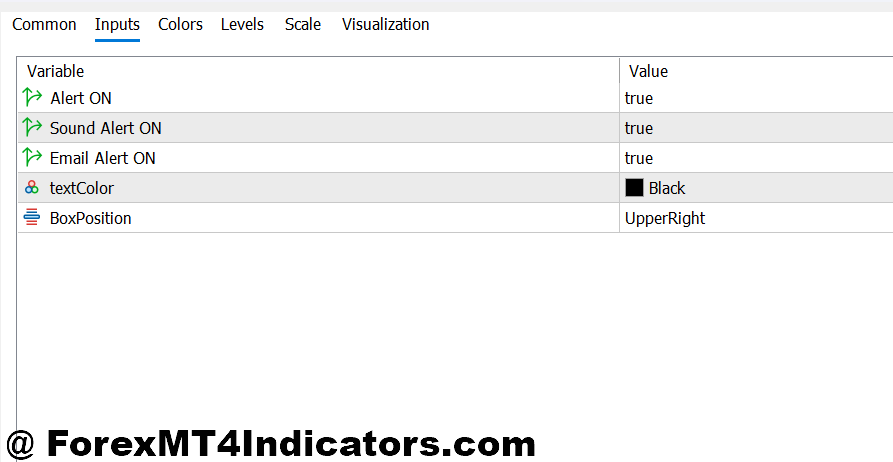
Out of the box, the XMaster uses a 40-period setting for its primary moving average calculation. For day traders working EUR/USD during London session, dropping this to 30 periods can make signals slightly more responsive without triggering excessive false alarms. Swing traders holding positions for days might push it to 50 or 60 to smooth out intraday noise.
Sensitivity adjustments matter too. Some versions let you tweak how aggressive the oscillator reacts to MACD crossovers or RSI thresholds. Lower sensitivity means fewer signals but higher quality—useful on pairs like GBP/JPY that whipsaw hard. Higher sensitivity works better on smoother movers like USD/CHF, where you want to catch every legitimate reversal without waiting too long.
Color customization isn’t just cosmetic. If you’re trading gold or BTC alongside forex pairs, switching arrow colors by asset helps you scan multiple charts quickly without mixing up signals. Green and red work fine, but some traders prefer blue for buys and orange for sells when dealing with multiple monitors.
Where the XMaster Stands Against Alternatives
Compared to using raw MACD or RSI alone, the XMaster offers aggregated confirmation. A standalone MACD might cross bullish, but if RSI is overbought and price is hitting resistance, do you really want that long? The XMaster won’t fire a green arrow until the pieces fit together, which reduces premature entries.
Against other arrow indicators like the SuperTrend or Parabolic SAR, the difference is recalculation behavior. SuperTrend repaints as price moves; the XMaster doesn’t. You can backtest it with confidence knowing the arrows you see now are the same ones that were there three months ago. That makes strategy development less frustrating and performance metrics more trustworthy.
Where it falls short: speed. Fast scalpers working M5 charts often find the XMaster too slow. By the time an arrow appears, the initial momentum burst is already fading. Tools like the Stochastic Oscillator or fast EMAs give earlier signals, even if they’re noisier. The XMaster trades speed for reliability—you get in later but with better odds the move will follow through.
Common Mistakes That Kill Results
Taking every arrow without checking the broader trend is the fastest way to rack up losses. An XMaster green arrow in the middle of a Daily downtrend might work for a 20-pip scalp, but it’s not a swing trade setup. Always confirm the H4 or Daily trend direction before acting on lower timeframe signals.
Over-optimizing settings to fit historical data is another trap. You backtest on USD/JPY from January to March, tweak the period down to 25, and suddenly your win rate jumps to 78%. Feels great until you test April forward and realize you’ve curve-fit the indicator to three months of unique price behavior. Stick with default or near-default settings unless you’ve got at least a year of forward-tested data proving an adjustment works.
Ignoring risk management because “the indicator is good” leads to blown accounts. The XMaster improves your entry timing; it doesn’t change the fact that stop losses matter and position sizing matters more. If you’re risking 5% per trade because you trust the arrows, you’re gambling, not trading.
What This Indicator Gets Right and Wrong
The XMaster handles trend-following scenarios extremely well. If you’re trading off Daily charts and looking for multi-day swing positions, this tool consistently identifies major reversal points with enough advance notice to enter near value zones. The no-repaint design means you can trust what you see, and the visual simplicity keeps your charts clean when you’re managing multiple positions.
It struggles during breakout fakeouts and post-news volatility. After an NFP report sends EUR/USD spiking 80 pips in two minutes, the XMaster might plot an arrow right at the exhaustion point where price reverses hard. The indicator isn’t built to handle sudden volume explosions or gaps—it needs time to process momentum shifts, and violent moves don’t give it that time.
Also, it’s not magic. Some traders download it expecting instant profitability and get frustrated when arrows don’t convert to winners 100% of the time. Anecdotal reports suggest 70-75% accuracy during strong trends, which sounds impressive until you factor in risk-reward ratios and the fact that choppy markets drop that number closer to 50-55%. No indicator, including this one, removes the need for sound trade management and realistic expectations.
Power of Confluence
While the Xmaster Formula provides valuable insights, no single indicator is a guaranteed path to riches in the forex market. The key lies in confluence, a strategy where signals from multiple indicators converge, strengthening the overall trading message. Here’s how you can leverage the Xmaster Formula alongside other technical indicators:
- Support and Resistance: Price tends to find support at historical lows and resistance at historical highs. By incorporating support and resistance levels with Xmaster Formula signals, you can refine your entry and exit points for increased confidence.
- Volume Analysis: Volume often rises alongside strong trends. Merging Xmaster Formula signals with rising volume can bolster your conviction in a trending market. Conversely, low volume during potential trend reversals might indicate a lack of conviction behind the price movement.
- Stochastic Oscillator: Similar to RSI, the Stochastic Oscillator measures market momentum. Using both indicators can provide a more comprehensive view of potential overbought or oversold conditions, potentially leading to more informed trading decisions.
Recognizing the Limitations
The Xmaster Formula, like any other technical indicator, has limitations. Here are some crucial considerations to keep in mind:
- False Signals: The forex market is inherently unpredictable, and no indicator can guarantee perfect accuracy. The Xmaster Formula might generate false signals, particularly during periods of high volatility or choppy market conditions.
- Overfitting: Over-reliance on a single indicator can lead to overfitting, where your trading strategy becomes too specific to historical data and might not perform well in new market environments.
- Risk Management: The Xmaster Formula is a tool to aid decision-making, not a replacement for sound risk management practices. Always prioritize stop-loss orders and position sizing strategies to manage potential losses effectively.
Making the XMaster Work for Your Style
For position traders holding through multiple sessions, pair the XMaster with weekly support and resistance levels. Wait for arrows that appear near major S/R zones on H4 or Daily charts. This filters out mid-range signals and focuses entries where institutional traders are also watching.
Day traders benefit from combining the XMaster with ATR for volatility context. If ATR is expanding and a green arrow prints on M30, that’s a higher-probability setup than an arrow during compressed ATR. The indicator tells you direction; ATR tells you whether the market has energy to follow through.
Swing traders can use the XMaster as a confirmation tool rather than a primary signal. Let your own analysis identify the setup—support holding on a pullback in an uptrend—then wait for the XMaster to flash a green arrow before entering. This layered approach catches moves with multiple forms of confluence rather than relying on any single tool.
How to Trade with XMaster Formula Indicator MT5
Buy Entry
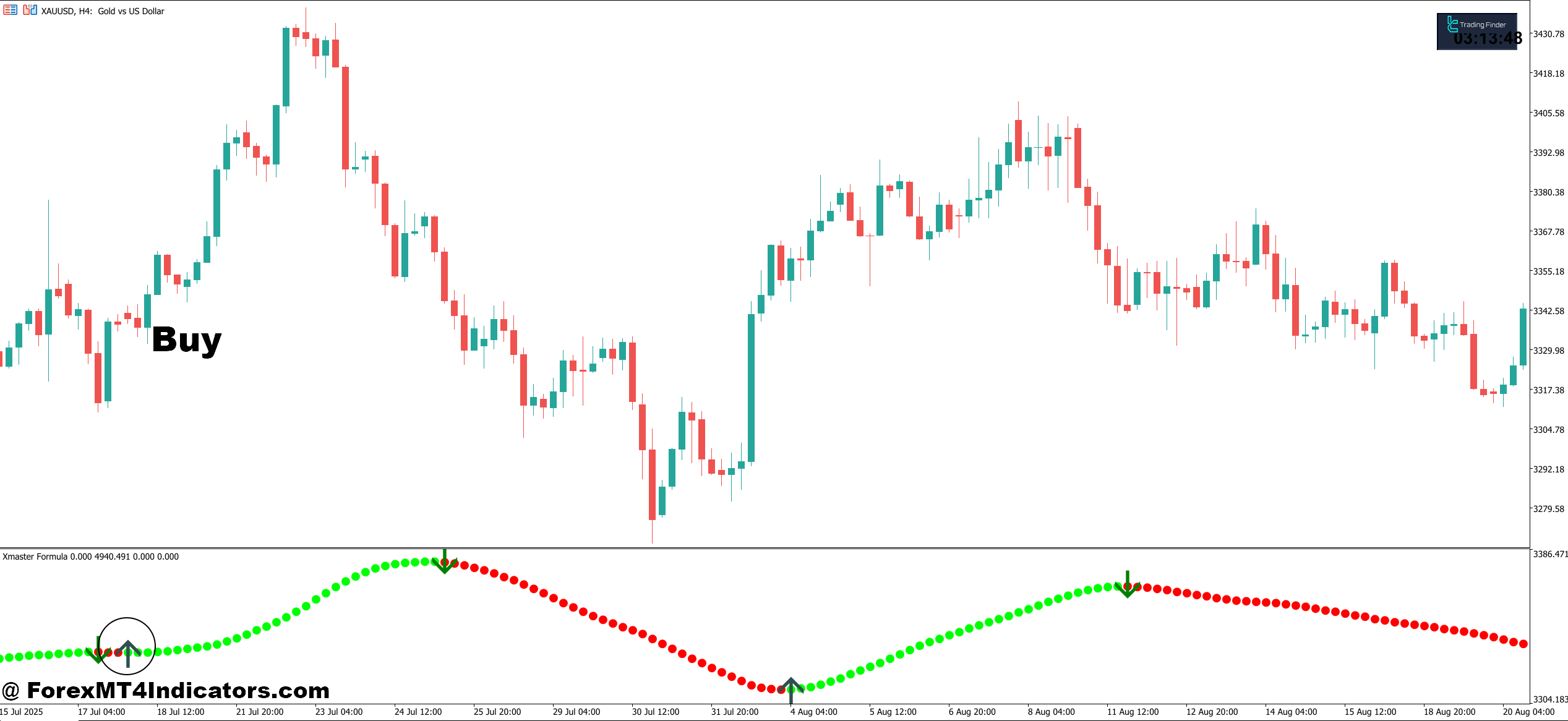
- Green arrow appears on closed candle – Wait for the candle to fully close before entering; mid-candle arrows can disappear or reverse, leading to false entries on volatile pairs like GBP/USD.
- Oscillator line turns green – Confirm the dotted line below the price chart shifts from red to green, signaling momentum alignment; enter only when both arrow and line color agree.
- Price above 50 EMA on H4 – Check that price is trading above the 50-period exponential moving average on the 4-hour chart to ensure you’re buying with the larger trend, not against it.
- ATR shows expansion – Verify the Average True Range is rising, indicating enough volatility for the move to develop; avoid entries when ATR is flat or declining below 50 pips on EUR/USD.
- Stop loss 20-30 pips below arrow – Place your stop loss just beneath the arrow candle’s low plus a 5-10 pip buffer to account for spread and normal price fluctuation.
- Risk 1-2% maximum per trade – Never risk more than 2% of your account on a single XMaster signal, even if it looks perfect; three losing trades shouldn’t devastate your capital.
- Skip signals near major resistance – Avoid green arrows that print within 10-15 pips of Daily resistance levels; wait for price to break and retest resistance as new support before entering.
- Confirm on higher timeframe – Check the Daily or H4 chart shows bullish structure; a green arrow on 1-hour means nothing if the Daily chart is in a clear downtrend.
Sell Entry
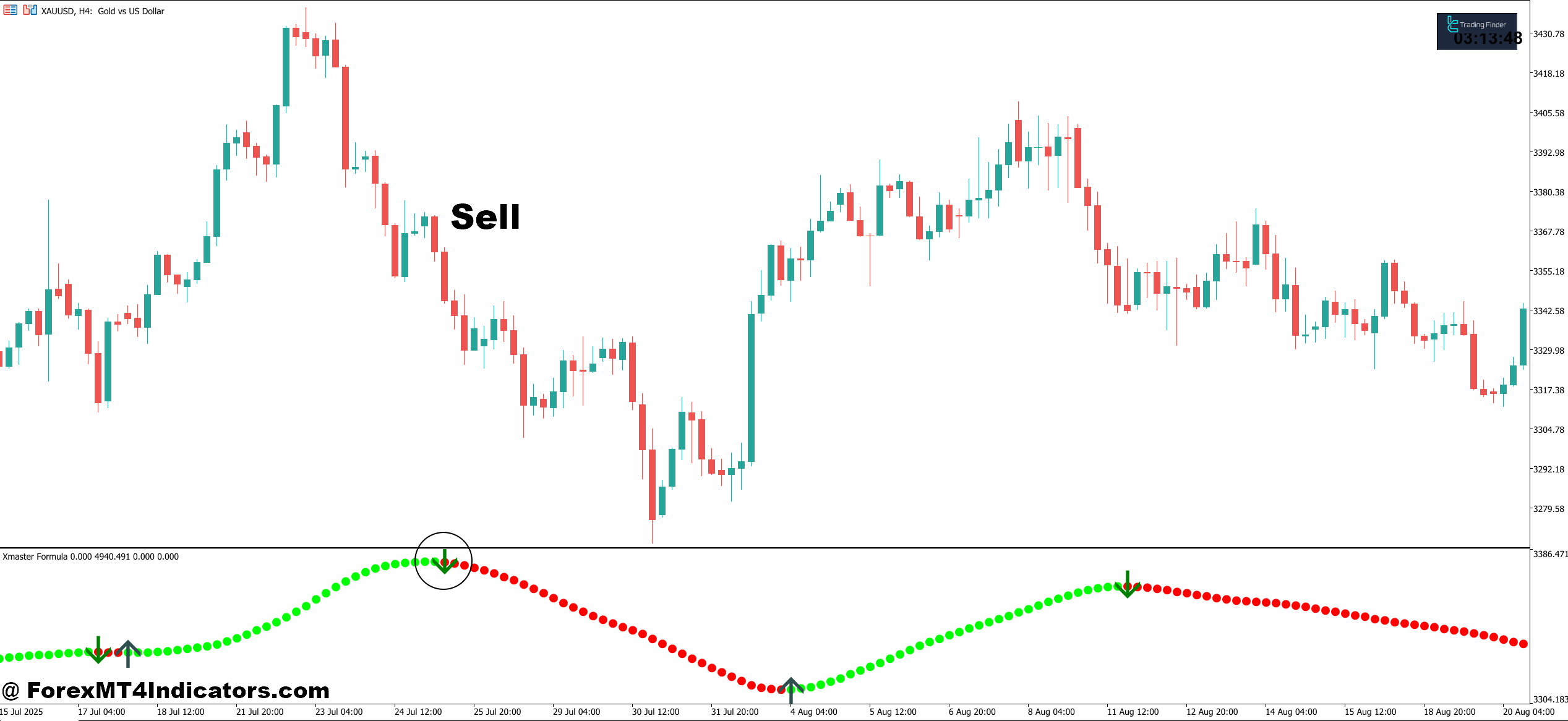
- Red arrow confirms on closed candle – Enter only after the bearish candle completely closes; premature entries during candle formation often result in reversal losses, especially during London open volatility.
- Oscillator line shifts to red – Watch for the indicator line to change from green to red in the sub-window, confirming bearish momentum has taken control of price action.
- Price below 50 EMA on H4 – Ensure price is trading beneath the 50-period EMA on the 4-hour timeframe to confirm downtrend alignment before shorting EUR/USD or GBP/JPY.
- Entry near fresh supply zone – Take red arrows that appear after price tests a recent swing high or supply zone on Daily charts, where institutional selling pressure typically emerges.
- Stop loss 25-35 pips above arrow – Set your stop loss above the arrow candle’s high with a 7-10 pip cushion to protect against sudden spikes while giving the trade room to develop.
- Target minimum 1:2 risk-reward – Aim for at least 40-60 pips profit when risking 20-30 pips; XMaster signals work best when you let winners run and cut losers quickly.
- Avoid signals during news events – Skip red arrows that print within 30 minutes before or after major economic releases (NFP, CPI, Fed decisions); whipsaws destroy stop losses regardless of signal quality.
- Ignore signals in tight ranges – Don’t short when Daily ATR drops below 60 pips on major pairs; the XMaster generates false bearish signals during low-volatility consolidation periods that go nowhere.
Practical Steps Forward
Trading forex carries substantial risk. No indicator guarantees profits, and the XMaster is no exception. What it does provide is a structured way to interpret multiple technical signals without cluttering your workspace or drowning in analysis.
The indicator works best when you understand its strengths—trend confirmation, no-repaint reliability, clean visual output—and respect its limitations—lag during chop, slower response in fast markets, occasional false signals in ranges. Use it on H1 or higher timeframes for clearer signals. Test it on a demo account for at least 30 trades before risking capital. Combine it with support/resistance analysis, risk management rules, and realistic expectations about win rates.
If your current challenge is sorting through conflicting indicators or missing entries because you’re not sure when all the pieces align, the XMaster Formula Indicator MT5 addresses that specific problem. Just don’t expect it to replace the hard work of learning market structure, managing risk, or developing discipline. Those parts are still on you.
Level up your trading Learn to read the chart — not just the indicator eBook · Instant PDF Video Course · 12 modules Trading forex and CFDs carries a significant risk of loss and is not suitable for everyone. Broker links are affiliate links — we may earn a commission at no cost to you.Recommended MT4/MT5 Brokers
Free MT4 Indicator Download

Enter Your Email Address below, download link will be sent to you.
To turn the indicator into a rules-based plan, see the Perfect Trendline + Xmaster Formula strategy, which pairs it with a trendline filter for entries and exits.