

FBS uses “swap-free” and “Islamic” to describe an account setting that changes overnight-charge treatment. Its help page says the option can be enabled when creating a real trading account or later in account settings. It should not be read as a promise that every position has no holding cost.
The international conditions describe a fixed weekly charge for certain longer-held exotic positions. This guide explains that rule and the documented settings route. It does not establish independent religious certification or whether a particular instrument or trading arrangement meets your personal requirements.
Affiliate disclosure: ForexMT4Indicators.com may earn a commission if you use our broker links. Trading leveraged forex and CFDs can result in substantial losses.
Check current FBS conditions and eligibility
What swap-free changes
A conventional leveraged account can apply an overnight swap debit or credit when a position crosses rollover. The amount and direction depend on the instrument and its current contract specification. Swap-free changes that treatment under the broker’s rules.
It does not remove the spread, eliminate price risk or turn a leveraged CFD into ownership of the underlying asset. It also does not automatically change your platform, deposit route or legal entity. Those questions should be checked separately in the account-types guide.
| Question | Practical answer |
|---|---|
| Is it a separate trading platform? | No, it is an account status or setting |
| Does it remove spreads? | No |
| Does it remove every holding charge? | No, the terms describe exotic-position charges |
| Is it independent religious certification? | That has not been established by this review |
| Can the status have restrictions? | Yes, read the account’s applicable terms |
The exotic-position charge to understand
FBS’s swap-free help refers to section 6.2 of its Trading Conditions. It describes a fixed weekly commission for long-term exotic strategies, starting from the second Sunday if the position remains open.
The exotic-instrument page explains the timing as the first weekend at least seven days after the initial rollover, with a recurring weekly charge while the position remains open. It describes calculating the amount from the relevant long or short swap value multiplied by seven.
The terminology can look surprising: an account called swap-free can still incur a charge described as commission. Read the rule’s substance, the instrument and the holding duration rather than relying on the account label.
Before calculating an amount, identify the unit used by the displayed swap value. Do not assume it is already a dollar amount. Ask FBS for the applicable calculation if the specification, currency or first charge date is unclear. We did not open a position to test the debit.
How to enable swap-free on the web
- Use the official Trader Area and select the correct real account on the Dashboard.
- Open or scroll to the account settings.
- Locate the “Swap-free” option.
- Read any displayed conditions and confirm that they apply to the intended account.
- Enable the option if you choose to accept those terms.
- Recheck the account status and the specification for any position you intend to hold overnight.
These are the steps described by FBS’s public help. The precise layout can change and the available controls may depend on the account. This article does not show a setting changed in our own funded account.
How the mobile route differs
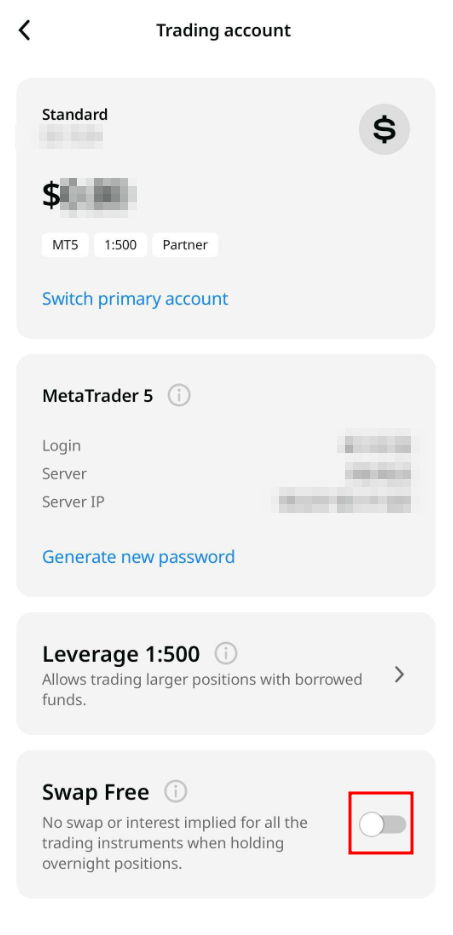
The documented FBS app route is “More,” then “Trading account,” followed by the “Swap Free” switch in account settings. Make sure the selected account number is the one you intend to use. Changing a setting on one account should not be assumed to change every account in your profile.
If you use MT4 or MT5 mobile for trading, do not assume the same switch is available inside MetaTrader. FBS’s account-management instructions point to its Trader Area or app. The login guide explains the difference between those profile credentials and a MetaTrader trading login.
Check current FBS conditions and eligibility
Read the restrictions before using a strategy
The international Trading Conditions describe circumstances in which FBS can revoke swap-free status, including prohibited arbitrage, carry-trade use or abuse. They also include provisions for recovering charges and other account action.
That is a reason to ask about the intended strategy in advance if its purpose depends on avoiding financing charges. Do not assume that holding opposite positions or using several accounts makes a financing strategy permitted. A platform allowing an order is not confirmation that the strategy complies with account terms.
We do not provide religious approval for the product. If that is central to your decision, obtain the contract details you need and review them with a suitably qualified adviser. Keep that question separate from whether a technical switch is available.
A useful pre-trade check
- Confirm the legal entity and account type.
- Verify that swap-free is active on the exact trading account.
- Identify whether the intended symbol is treated as an exotic instrument.
- Read long and short charge values, their units and the relevant weekly timing.
- Estimate the total cost over the intended holding period.
- Include the spread, potential slippage and market loss in the broader risk calculation.
The fees guide explains cost categories, while the margin guide explains why the account’s leverage remains a separate risk consideration. A Cent account, where available, also requires attention to monetary units.
If a charge appears unexpectedly
Record the account number, symbol, direction, opening time, charge entry and account-status evidence privately. Compare the holding period with the terms and read the symbol specification that applied. A charge appearing in history does not by itself establish a broker error.
If the entry remains unclear, ask support for the calculation and its contractual basis. Do not send passwords or one-time codes. Use the support and complaints guide if an ordinary explanation does not resolve the issue.
Frequently asked questions
Does FBS offer an Islamic account?
FBS’s international help describes a swap-free setting also labelled Islamic. Confirm availability and terms for your own account.
Can I enable it after opening an account?
The public help describes enabling the option in account settings as well as during real-account creation.
Are all overnight charges removed?
No. The reviewed terms describe a weekly charge for certain longer-held exotic positions.
Is the FBS account independently certified as Sharia-compliant?
This review did not establish independent religious certification. The broker’s label should not be treated as that evidence.
Can the broker revoke swap-free status?
The Trading Conditions describe revocation and other actions under their restrictions and anti-abuse provisions.
Public documentation checked 9 September 2026. No swap-free setting or charge was tested on a funded account.
Sources
Official broker websites
Read the current terms and restrictions for your actual residence. These links do not establish that a broker or service is available or authorised where you live.
Forex and CFD trading carries a significant risk of loss and is not suitable for everyone. These are affiliate links; we may earn a commission if you use them.