

FBS registration starts with the official site and your real country of residence. Check eligibility, create your profile, then choose the trading account separately.
Start with residence, company and account purpose
There are two decisions here: whether the provider can serve you and which trading account you want. Do not let a large leverage number or a small advertised deposit replace the first decision. The FBS country directory separates local questions from the general account-opening process.
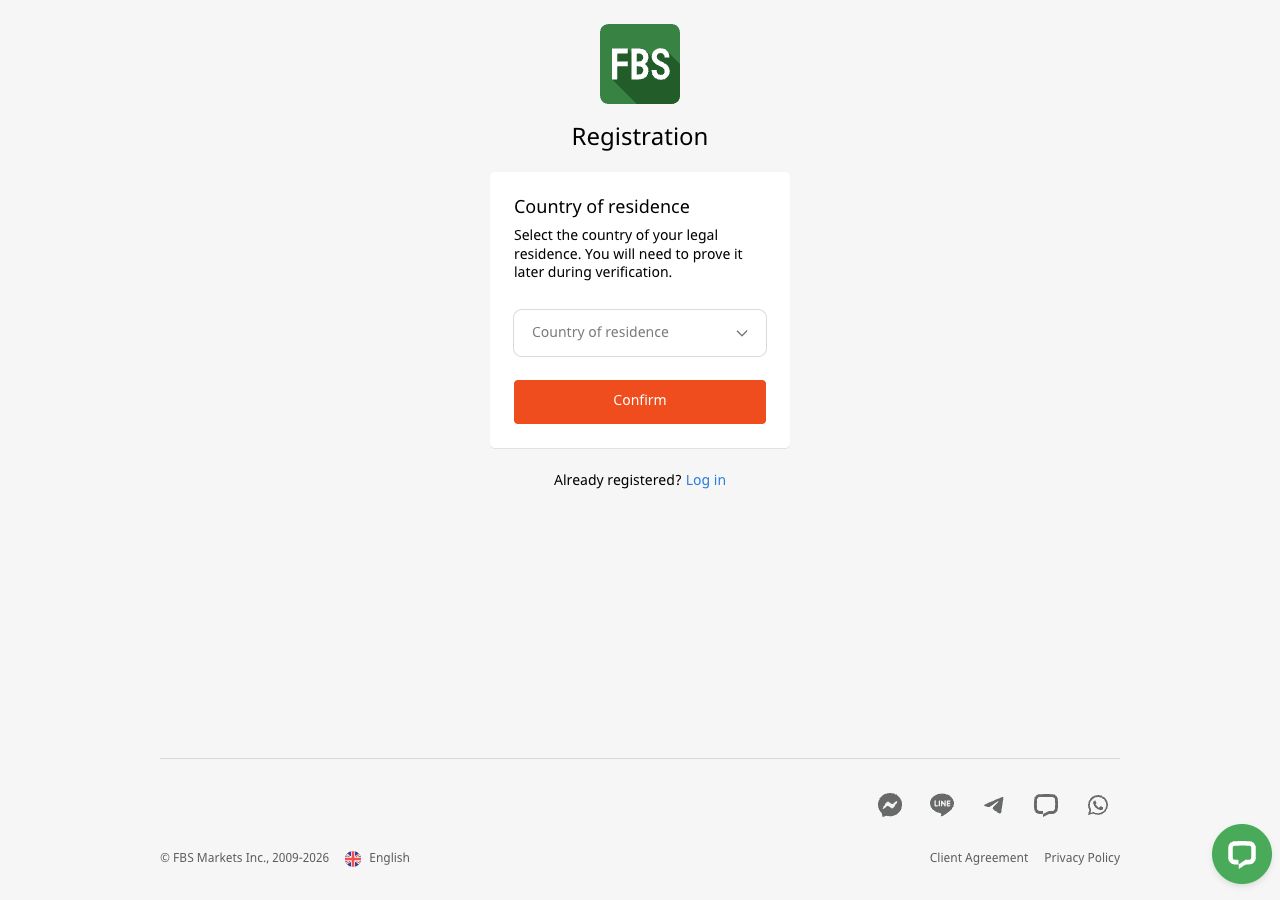
In the public registration screen we viewed, FBS first asked for the country of legal residence and said it would need to be proved during verification. We left that field blank. We did not test acceptance for any country. The provider registration guide includes later email and account screens; those illustrations should not be mistaken for the first screen every visitor sees.
What to have ready before starting
| Item | Why it matters |
|---|---|
| Your own email address | You need access for confirmation and later account messages. |
| Your correct legal name and residence | These need to match the documents requested during verification. |
| A platform decision | An MT4 trading account and an MT5 trading account are different account records. |
| A real or demo decision | Virtual-money practice does not require depositing real money. |
Use an email account you control. Do not ask a chat-group administrator or introducing broker to create a profile under their contact details. If you already have an FBS profile, use the login and recovery guide before creating another one.
Follow the registration sequence
Open the official route. Check the address before entering information. If a country screen appears, select only your actual residence. Stop if it is unavailable or the provider says you cannot proceed.
Read the terms for the named company. A brand name alone does not identify the agreement. Our FBS review explains the company and account distinctions.
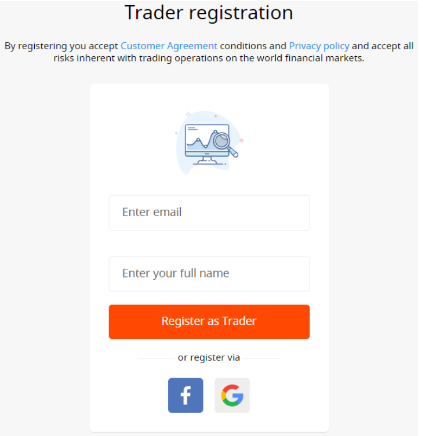
Complete the profile fields shown. The public help describes email/name entry or an available social-login route. Use matching information and a unique password; never put these details in a screenshot you share publicly.
Confirm the email if requested. Use the message generated by your own registration. Do not forward confirmation or one-time codes to another person.
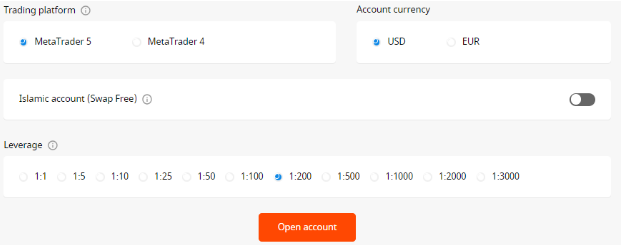
Create the trading account. Choose Real or Demo, then the available account category, MetaTrader version, currency and leverage. Menus can differ by residence and referral route. Compare the documented account choices before confirming.
Keep the account credentials separate. Save the assigned trading-account number, trading password and exact server privately. They are not interchangeable with your Trader Area email and password.
Complete the required verification. Follow the request inside the authenticated profile. The verification guide explains document preparation and rejected-file checks. Do this before relying on withdrawal access.
A completed form is not a promise that the provider will accept an application. Nor does acceptance by a website establish whether local rules permit the service. The process can stop while documents or eligibility are checked.
A sensible first account is one you can explain
If your immediate task is learning the terminal, choose demo practice rather than making a payment merely to find the buttons. Keep the account currency and intended instruments realistic. A simulation with a balance far above your likely trading budget can hide position-sizing mistakes.
Before a real deposit, write down the payment amount, account currency and intended position size. Use our position-size calculator to examine the size implied by your own risk limit. This calculation does not make a leveraged position safe or establish that the account permits it.
When registration does not go as expected
If the email is already registered, recover the existing login. If a country option is missing, do not substitute another country. If your spelling differs from an identity document, correct it through the provider process rather than editing the document. If you cannot tell which company will contract with you, pause and ask FBS support for the agreement that applies.
For a broader selection checklist, read how to choose a forex broker. Registration is only one part of that decision; payment rules, costs and client protections come with it.
Questions traders ask
Can I register with FBS without making a deposit?
The provider offers a demo route using virtual money. Creating a profile and depositing into a real trading account are separate actions.
Does choosing a country prove that FBS accepts me?
No. The country selection begins the process. Provider checks, documents and local restrictions still apply.
Is my FBS profile password also my MT4 password?
Do not assume so. Trader Area access and trading-account access use different credentials; MetaTrader needs the assigned account number, trading password and server.
Can I choose MT4 now and log the same account into MT5 later?
Do not treat the account records as interchangeable. Create or select an account for the intended MetaTrader version and use its own credentials.
Choose your next step
Prepare verification documents. Set up demo practice. Understand the separate logins. Check funding before a real deposit.
Sources and review scope
Reviewed on 9 September 2026. This guide uses public provider instructions and our educational explanation. We did not open or fund an FBS account, submit identity documents, place a trade, or test a withdrawal. Screenshots identify their source and show only the steps or documentation described in their captions.
Official broker websites
Read the current terms and restrictions for your actual residence. These links do not establish that a broker or service is available or authorised where you live.
Forex and CFD trading carries a significant risk of loss and is not suitable for everyone. These are affiliate links; we may earn a commission if you use them.