

FBS’s VPS is a remote-server service intended to keep trading software running independently of your own computer. Its help describes a qualifying one-time deposit of at least $450, a free first month, and a $33 monthly fee afterward unless the previous month’s trading volume meets the stated three-Standard-lot condition.
Those conditions matter before calling the service free. A remote server can reduce dependence on your home power and internet, but it does not guarantee uptime, better fills or profitable automated trading. This guide reviews public service terms; it does not report an installed or tested FBS VPS.
Affiliate disclosure: ForexMT4Indicators.com may earn a commission if you use our broker links. Trading leveraged forex and CFDs can result in substantial losses.
Check the current VPS qualification rules
FBS VPS conditions at a glance
| Item | Published condition |
|---|---|
| Qualifying deposit | At least $450 in one transaction; product page also describes €450 |
| Account | A real trading account |
| First month | Free under the described qualification |
| Later months | $33 unless the activity condition is met |
| Free-use activity condition | At least three Standard lots in the previous month |
| Insufficient funds and unmet volume | Help says the service is disabled |
Sources: FBS’s VPS product page and VPS help, checked 9 September 2026. Verify the current offer and billing currency in your account before activating. A deposit is still your trading money, subject to account rules; it is not the same thing as a service fee.
What a VPS does
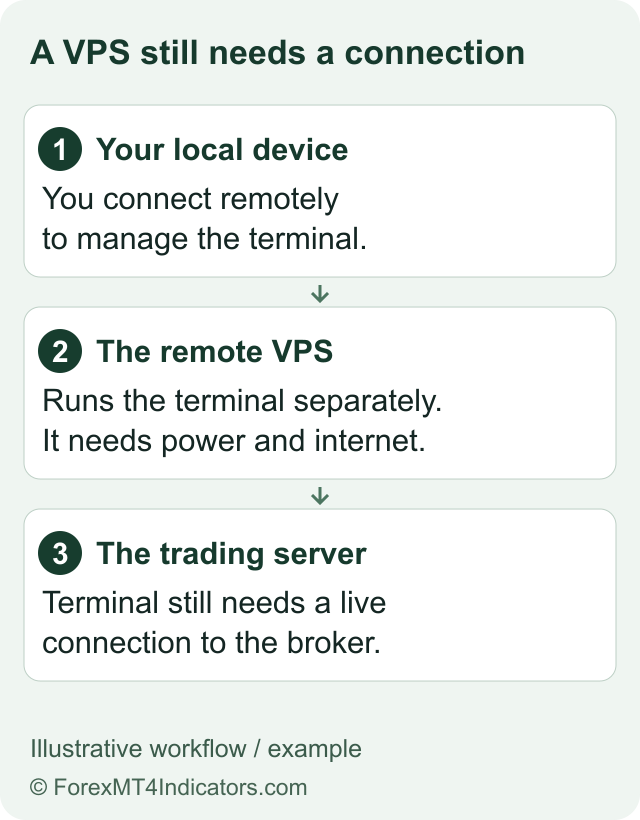
A VPS runs on a remote computer rather than your local laptop or desktop. Trading software installed there can continue operating while your own machine is switched off or disconnected, provided the remote service and its broker connection remain available.
This is the useful meaning behind language about operating while you are offline. The remote server still needs power, networking and a working connection to the broker. It does not send market orders through a disconnected broker service, and it cannot prevent every technical interruption.
A VPS also does not change a strategy’s logic. If an Expert Advisor takes excessive risk or has a coding defect, continuous operation can keep that problem running too. Evaluate the software and its permissions separately from the hosting service.
When “free” becomes a monthly cost
The help page says the first month is free after qualification. Starting with the second month, it describes deducting $33 from the account selected during setup unless the previous month met the three-Standard-lot requirement.
The product page says different instruments can have different lot sizes and directs users to the Trader Area’s promotion details. Check how qualifying volume is counted for the symbols you use. Do not assume a Cent lot is a Standard lot, or that one numerical lot represents the same exposure across all instruments.
Trading only to avoid the fee can create spreads, slippage, financing costs and market losses. Compare the charge with the trading you would have done anyway. The fees guide explains those costs; the account guide explains the account distinctions.
Before activating the service
- Confirm that the VPS offer appears for your account. Check residence, account type and current terms.
- Read the qualifying deposit rule. The product page specifies a single transaction, not simply an account balance.
- Check future billing. Identify the charged account, currency, renewal date and qualifying-volume calculation.
- Identify the software you need to run. Confirm platform version, resource needs and licence permissions.
- Check the supplied environment. Ask support for the actual server specifications and access instructions if they are unclear.
- Decide whether the service fits the existing strategy. Do not increase deposits or trading volume merely because a promotion exists.
FBS’s public page includes CPU, memory and storage figures under wording about the user’s computer requirements. We do not treat that wording as a verified specification of the allocated remote server. Obtain the actual service configuration before deciding how much software it can run.
Check the current VPS qualification rules
A practical setup and verification sequence
Once you have chosen to activate an eligible service, follow the official access instructions. Do not share remote-login credentials or trading passwords in public messages. Download trading software from the official MT4 or MT5 route, and connect only the intended account.
- Confirm the remote machine, operating system and access credentials.
- Install or inspect the required trading platform and its version.
- Verify the correct account number and assigned broker server.
- Check indicators, Expert Advisors and any separate software licences.
- Review permissions and risk settings before allowing any automation.
- Test the intended workflow in a suitable practice environment before relying on real-money operation.
- Confirm what happens after a platform or server restart.
- Keep a way to inspect positions and disable automation if necessary.
This is an operational checklist, not a claim that those steps were completed on an FBS server. The exact interface and restart behaviour need checking on the actual service.
What to monitor after setup
Regularly inspect connectivity, account identity, platform messages and the positions actually open. Confirm that the strategy has not been attached twice on different machines if it is meant to run only once. A remote desktop showing a chart is not proof that the account is connected or that automation is working as intended.
Check the billing condition separately. A successful platform connection does not establish that the next month is free. Keep the qualifying-volume and renewal information with your service records.
Cancellation and upgrades
FBS’s product page describes a “Cancel Server” option in the Trader Area and says the remaining month’s fee is not recalculated after cancellation. Before cancelling, make sure you understand which software will stop and how any open positions will be managed afterward.
The help page says upgrades require contacting support and cannot be completed through the Trader Area. It also says the current VPS need not be cancelled before upgrading. Use the support guide to ask for the proposed configuration, price and any interruption details before accepting a change.
Frequently asked questions
Is FBS VPS free?
The documented first month is free after qualification. Later months can cost $33 unless the previous month’s qualifying volume reaches three Standard lots.
Does a $450 balance qualify automatically?
Do not assume so. The product page specifies a deposit in one transaction. Check the current account offer.
Will trades continue if my home internet disconnects?
Software on the remote server can continue if that server and its broker connection remain operational. This is not an uptime guarantee.
Does VPS improve a trading strategy?
It changes where software runs. It does not establish better trading logic, profitability or suitable risk.
Can I upgrade from the Trader Area?
The reviewed help says upgrades are arranged through FBS support, without first cancelling the existing VPS.
Public conditions checked 9 September 2026. No VPS was activated, accessed or tested for this guide.
Sources
Official broker websites
Read the current terms and restrictions for your actual residence. These links do not establish that a broker or service is available or authorised where you live.
Forex and CFD trading carries a significant risk of loss and is not suitable for everyone. These are affiliate links; we may earn a commission if you use them.