

FBS’s documented withdrawal process uses the Trader Area’s Finances section or the FBS app’s Funds section. Select Withdrawal, choose the account and eligible payment route, enter the requested details and amount, then complete confirmation and the one-time code.
The route matters as much as the button. FBS describes returning deposited money through the payment methods originally used, with card deposits taking priority. The broker approving a request and the money reaching your bank are separate stages.
Affiliate disclosure: ForexMT4Indicators.com may earn a commission if you use our broker links. Trading leveraged forex and CFDs can result in substantial losses.
Check current FBS conditions and eligibility
What to check before requesting a withdrawal
Confirm that your profile verification is complete, your account and payment details match, and you understand which method is eligible for the amount being withdrawn. Review any open positions, pending transactions and promotion conditions that could affect the request.
FBS’s rejection help specifically says a request can be rejected when the withdrawal method differs from the deposit method. It also states that requests with open orders can receive an “Insufficient funds” rejection. Do not replace that wording with an invented rule that any positive balance guarantees withdrawal.
If a detail is unclear, check before submitting rather than trying several routes. Our verification guide and withdrawal-problems guide cover the main preparation steps.
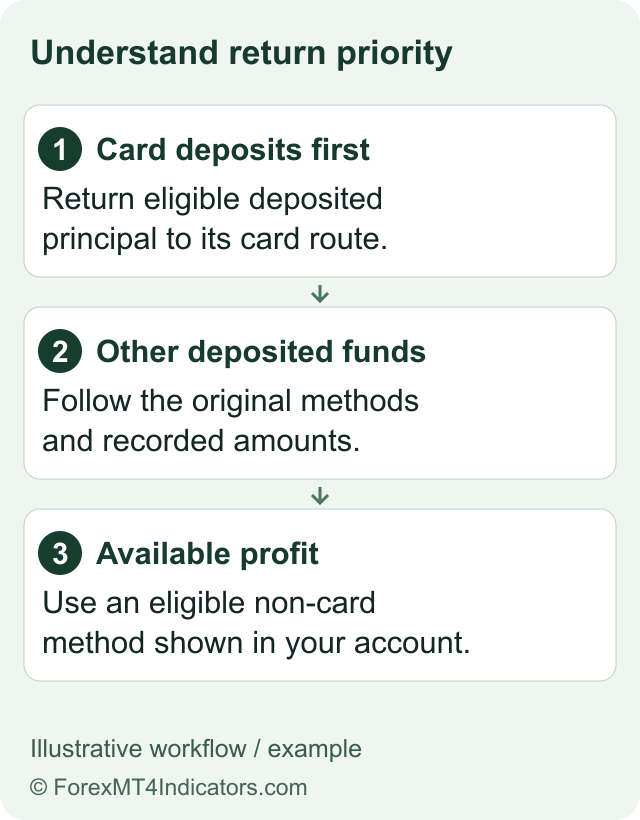
The payment priority FBS describes
| Priority | What is returned | Destination described by FBS |
|---|---|---|
| First | Money deposited by card | The original card or cards |
| Next | Money deposited by other methods | Original methods, within each deposited amount |
| After deposited amounts | Trading profit | An available non-card payment system |
Source: FBS withdrawal help. The rule means your deposit history can determine the permitted route. It does not mean the same method list will appear for every country.
For a simple illustration, suppose someone deposited $100 by card and $50 through a wallet. The documented priority returns the card principal before the other deposited amount; a later profit withdrawal would follow the eligible non-card route. This is an explanation of routing, not a report of a payment we completed.
How to request a withdrawal on the web
- Sign in through the official FBS website. Check the domain and select the intended profile.
- Open Finances and choose Withdrawal. Do not look for the process in a MetaTrader chart.
- Choose a permitted payment method. Compare it with the deposit history and the priority rules.
- Select the trading account. Check its number, currency and available amount.
- Enter the requested payment details and amount. Review currency, recipient information, limits and any displayed charges.
- Choose Confirm withdrawal. Read the final screen before proceeding.
- Enter the OTP yourself. FBS describes email or SMS confirmation according to the chosen confirmation method.
- Track the request in Transaction History. Keep its reference and any status explanation privately.
These steps follow FBS’s public documentation. We did not sign in, request a withdrawal or receive a payment for this guide.

How the FBS app route differs
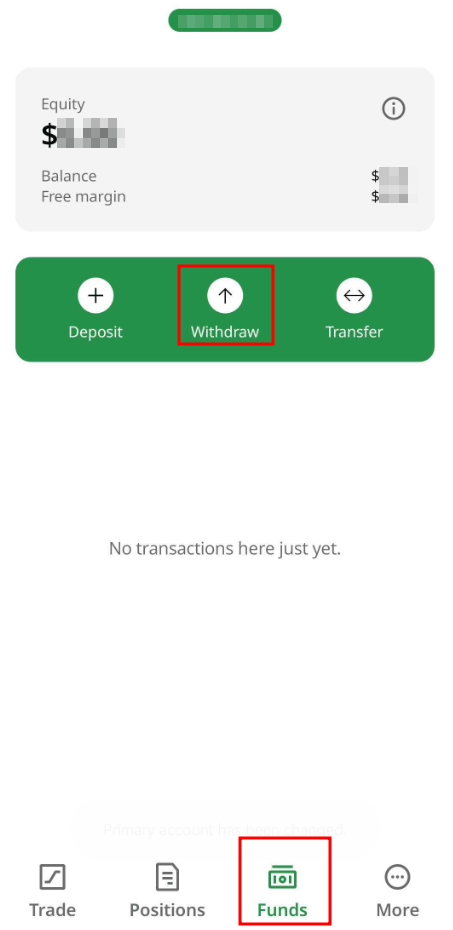
In the documented mobile flow, open Funds and select Withdraw. Choose the trading account and available method, supply the requested recipient information and amount, confirm, and complete the OTP. Then inspect transaction history.
Layout and payment options may differ from the provider’s example screenshots. Use the current instructions displayed inside the official account, particularly for document requests or payment-provider changes.
How long does an FBS withdrawal take?
FBS’s public pages do not give one fully consistent timetable. Its main withdrawal help describes processing within 24 hours, with wallet receipt the same day and bank or card receipt within 2–7 business days. Its dedicated timing help gives a different breakdown after approval.
| Stage or route | Published wording |
|---|---|
| FBS processing | Main guide says within 24 hours |
| Electronic payment systems after approval | Dedicated timing guide says usually immediate, sometimes up to 30 minutes |
| Cards after approval | Dedicated timing guide gives an average of 3–4 business days |
| Bank transfers | Dedicated timing guide says usually 7–10 business days |
The dedicated timing article explicitly separates FBS approval from the payment system’s work. Because the pages differ, use the current estimate shown for your method and ask support which timetable applies. These are provider estimates, not guaranteed deadlines or our measured results.
Check current FBS conditions and eligibility
Fees, conversion and bonus effects
The funding page advertises commissions from zero and instant automated withdrawals as available. That does not establish that every bank, wallet or currency conversion is free or instant. Compare the amount requested with the expected received amount.
A promotion can introduce another dependency. Some published FBS bonus terms describe reducing non-withdrawable credit when money is withdrawn. Review the effect on account resources and open positions before confirming. The fees guide explains the wider cost categories.
If the money has not arrived
Start with the status. If the request is pending, determine whether FBS has approved it or requested more information. If it is rejected, read the reason. If it is completed but the recipient account is not credited, ask for the payment reference needed to trace the transfer with the bank or wallet.
A balance screenshot alone does not establish payment progress. Preserve the request ID, amount, currency, method, submission time and status updates. Avoid submitting duplicate requests until the original status is clear.
Use the withdrawal-problems guide for the decision sequence and the support guide for a formal complaint route. Plan future funding with the deposit guide so the return route is understood in advance.
Frequently asked questions
Can I withdraw through a different method?
FBS’s documented routing generally returns deposited amounts through the original methods, with card priority. Profit has a separate available non-card route.
Are FBS withdrawals always instant?
No such conclusion is supported. FBS advertises instant automated withdrawals as available, while help articles describe processing and bank or wallet receipt times.
Why do published withdrawal times differ?
The public pages use different estimates and stages. Confirm the current method-specific timetable; broker approval and recipient credit are not the same event.
Can open trades affect a withdrawal?
FBS’s rejection help says requests with open orders can be rejected as insufficient funds. Check the account’s current instructions before submitting.
Did this guide verify a successful payout?
No. It documents public procedures and identifies their limits. It does not report a tested withdrawal.
Documentation checked 9 September 2026. Current account and payment-method instructions control the practical process.
Sources
- Withdraw funds from FBS
- Withdrawal rejection help
- FBS withdrawal timing help
- Verify FBS Trader Area
- FBS funding overview
Official broker websites
Read the current terms and restrictions for your actual residence. These links do not establish that a broker or service is available or authorised where you live.
Forex and CFD trading carries a significant risk of loss and is not suitable for everyone. These are affiliate links; we may earn a commission if you use them.