

Most avoidable verification problems start before the upload: an address that differs from the account, a document cut off at the edge, or a photograph whose small text cannot be read. The useful goal is a complete, consistent application, not repeatedly uploading different documents without understanding the rejection.
Check the document before photographing it
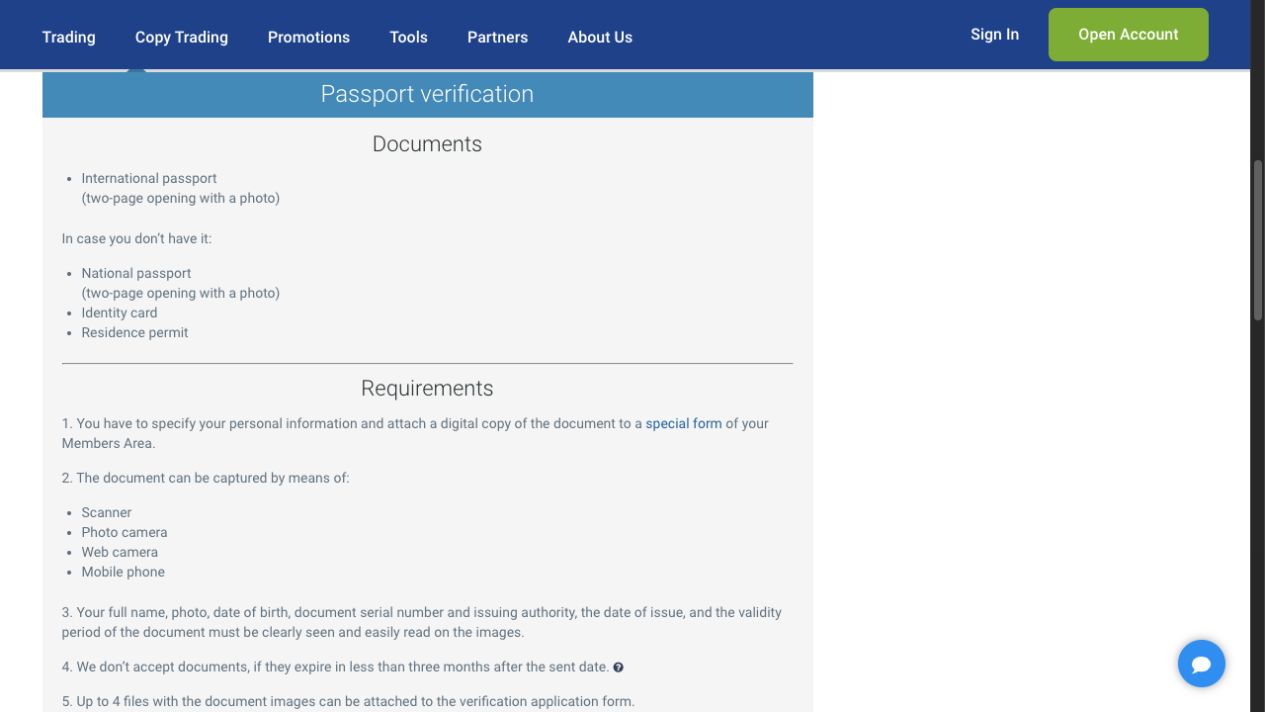
The provider’s verification requirements distinguish identity from address evidence. Its published criteria include an identity document with at least three months remaining validity and address evidence generally issued within six months, subject to listed exceptions. The account-specific document list remains the place to confirm what is accepted for your case.
| Evidence | What the reviewer needs to see | Practical preparation |
|---|---|---|
| Identity | Name, photograph and identifying/validity details | Capture the required sides or spread with every edge visible. |
| Address | Your name, residential address and document date | Use the original statement or bill, with the issuing body visible. |
| Phone | Control of the number registered to the profile | Keep the number available for the provider’s confirmation. |
| Card, if requested | Ownership evidence using the provider’s masking instructions | Follow the secure form; never send the security code to a chat contact. |
The source lists several document categories and some country-specific examples. Those examples are not a country-acceptance list. In particular, an older document exception must not override the current service restrictions. Ask the provider if your available document does not fit the current form.
Make the file readable without altering it
- Use the original document. Lay it flat on a plain surface. Avoid an image forwarded through a messaging app, which may already be compressed.
- Control reflections. Use even light and move the light source or camera when a glossy surface produces glare over text.
- Keep the complete document. Check all corners and the required reverse side. A clear close-up is still incomplete if it hides the issuer or expiry field.
- Inspect at readable size. Open the saved file before uploading and read the small print yourself. Check that focus has not shifted to the background.
- Follow the current form limits. The published page lists accepted image/PDF formats and file-size limits. Use those shown in the secure form; do not add decorative labels or edit document details.
A scanner is not essential. RoboForex’s document-image FAQ also permits a camera, webcam or mobile phone when the required information is clear. That does not make a screenshot of an unrelated account page equivalent to an issued identity or address document.
Submit and confirm that the request exists
Follow the sign-in steps in our login guide and open the verification area. Select the correct evidence category, attach the file and review the submitted details. Record the resulting status and submission time. A file selected on your device is not proof that the server received an application.
Use one clear document set for each requirement. If your name or address differs from the profile, resolve the mismatch first instead of trying to explain several conflicting versions in successive uploads. The registration guide covers the initial account details; support should guide changes to an existing verified identity.
Separate a pending review from an upload failure
The published review window is up to two business days. It is a provider estimate, not a stopwatch-tested result from us. If the form never changed to a pending status, investigate the upload itself. If the application is pending, note business days and check the provider’s email, including spam, for a request or rejection.
When a reason is supplied, make the smallest correction that answers it. For “unreadable date,” send a readable original showing the date; for “address mismatch,” establish which address field or document is wrong. Sending the same file again without a change is unlikely to resolve the underlying problem.
Phone, payment and promotion checks are separate
Identity verification should not be treated as blanket approval for every transaction. The Welcome programme has its own verification conditions. The payment department may ask for additional evidence during a withdrawal request. Keep those requests linked to the specific official case.
For a card-image request, use the provider’s secure masking instructions and conceal the security code. Do not give someone a one-time code or remote control of your device to “speed up KYC.” Documents contain sensitive information, so use official authenticated upload routes wherever available.
Prepare a useful support question
Include the application category, submission time, visible status and exact rejection wording. Explain the correction you already tried. Ask which requirement remains unsatisfied and where the replacement should be uploaded. Our support and complaint guide explains how to organise that record without publishing private documents.
Frequently asked questions
Do I need a scanner?
No. The provider permits suitable camera, webcam or phone images when all required information is readable. Check the completed file before uploading it. Every required edge and identifying detail should remain visible, without glare or cropped information.
How long does verification take?
RoboForex publishes a review period of up to two business days. Check the application status and any email request; a file that failed to upload has not necessarily entered review.
Can I edit a document image to make it clearer?
Do not alter document content or add graphics. Improve lighting, focus and framing, then capture the original again. Follow the provider’s separate masking instructions for payment cards. Do not conceal identity or address details required by the verification reviewer.
Does an accepted document mean my withdrawal is approved?
No. Document verification and a payment request are different checks. The chosen method, account ownership and any additional payment evidence still matter. Check the payment status separately and retain its transaction reference when asking about a delay.
What if my document is not on the list?
Ask official support which current alternative applies to your case. Do not treat historical country-specific document examples as proof of present account eligibility. Use your real circumstances and obtain an answer before repeatedly submitting the same unsuitable evidence.
Sources and scope
Checked 15 September 2026. This guide concerns RoboForex Ltd and its current public instructions. Public pages and blank forms were reviewed; we did not open or fund an account, upload identity documents, place an order or test a withdrawal. Source conditions and the account-specific screen take priority where availability differs.
- Verification requirements
- Photographing verification documents
- Members Area functions
- Welcome Bonus FAQ
For the wider broker context, return to our Forex broker guide library.