

A successful signup should leave you knowing which company holds the account, which platform it uses and where its credentials are stored. A welcome email alone does not tell you that every payment method or promotion is available. Start with our country and company restrictions before entering personal details.
Prepare the details you will use
Have an email address you control, your own mobile number and the spelling of your name shown on your identity document. Use a private device and a connection you trust. If you already have a Members Area, use the returning-client login guide rather than creating another profile to solve a password problem.
Decide whether you are preparing a demo or a real account. Think about the platform you intend to use before clicking through account choices. Someone who needs an existing MT4 indicator has a different compatibility requirement from someone evaluating R StocksTrader. Our account comparison explains those differences without treating a low minimum as a recommendation.
Complete the current registration form
The public form reviewed on 15 September 2026 shows email, first name, last name and mobile-number fields. It also offers an expandable partner-code field. The following sequence describes that observed entry screen; later account-specific questions were not submitted or tested.
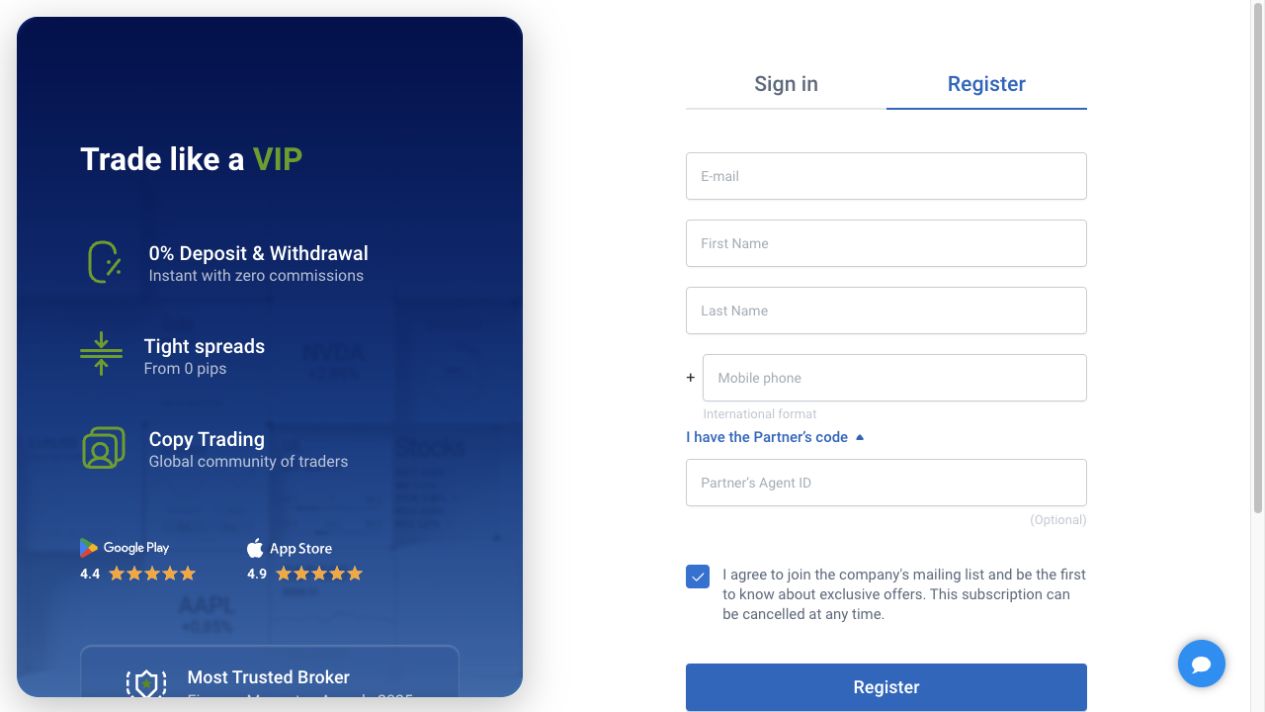
- Enter through the provider. Open the official registration page from a known RoboForex route. Check the full address before typing, especially after an advertisement or message.
- Use your own contact details. Check the email for typing errors and enter the mobile number with the correct international prefix. A number you cannot access creates a recovery problem later.
- Match your name. Use the document spelling rather than a nickname. If the form cannot represent part of your name, ask support how to enter it before submitting inconsistent details.
- Review the optional partner field. Our referral ID is nzxb. The field was blank in the observed form even with a tracked entry URL, so do not assume it displays or confirms referral attribution automatically. A referral does not change your responsibility to read the terms.
- Read each consent. Distinguish acceptance of the legal terms from marketing preferences. Review any preselected marketing option and choose deliberately.
- Follow the provider's next instructions. Confirm contact details and save the account information through the official interface. Do not send confirmation codes to somebody offering to complete registration for you.
Choose a trading account after the profile
The Members Area is the management profile. An MT4 or MT5 trading account is a separate record with its own login and server. Write down the account type, base currency, platform and whether it is demo or real. Keep the password in a password manager rather than a public screenshot.
A practical comparison is to create a small decision note before proceeding: “I need this platform because my software uses it; I understand this account's commission basis; I can interpret its balance currency.” If one answer is missing, pause and read the relevant guide. With ProCent accounts, recognising a cents balance is especially important before using an EA's default lot setting.
Verify before planning a payment
Follow the verification document guide for identity and address preparation. An accepted profile and an approved document are different statuses. Promotions may require additional checks; the Welcome programme guide explains why a “no deposit” search does not describe the current advertised offer.
Compare the account and payment minimums before moving money. Do not deposit because a screen offers a larger leverage setting or a larger reward. Choose the amount and potential loss you can afford independently, then use the deposit guide to check ownership, currency and payment records.
If registration does not finish
Identify where it stopped: validation beside a field, a missing email, a phone confirmation or an account-selection screen. Record the exact error and time. Check spam and the address you entered before requesting repeated emails. If the email already exists, switch to recovery rather than opening duplicate profiles.
For a country or identity rejection, use our support guide to prepare a clear question for the provider. Do not select another residence to force access. A translated website, working form or downloaded app does not override the company's service restrictions.
Frequently asked questions
Where should I register?
Use the registration route linked from RoboForex’s official website and verify the full destination before entering your details. Avoid forms sent by unknown chat contacts. Keep registration separate from verification and funding decisions.
Does registration create an MT4 or MT5 account automatically?
A Members Area manages accounts. Check the actual account record for its platform, type, login and server rather than assuming the profile and terminal credentials are identical. Save those trading-account details before trying to connect a terminal.
Must I enter a partner code?
The observed form offered an optional partner-code field. Our referral ID is nzxb, but the blank field did not independently establish how a tracked visit was attributed. A referral does not replace reading the account terms or confirming the selected provider.
Can I choose a different country if mine is unavailable?
No. Use your real residence and ask the provider about eligibility. A different selection can make the account details and verification documents inconsistent. Do not use another person's details or an inaccurate selection to bypass the restriction.
Should I deposit immediately after signup?
First understand the selected account, complete required checks and confirm the available payment method and its limits. Registration alone is not evidence that an offer or funding route applies. Compare the account currency and payment conditions before committing money you may need elsewhere.
Sources and scope
Checked 15 September 2026. This guide concerns RoboForex Ltd and its current public instructions. Public pages and blank forms were reviewed; we did not open or fund an account, upload identity documents, place an order or test a withdrawal. Source conditions and the account-specific screen take priority where availability differs.
For the wider broker context, return to our Forex broker guide library.