

To deposit with FBS, use the official Trader Area’s Finances section or the FBS app’s Funds section, select Deposit, and follow the instructions for a method available to your account. Before confirming, check the trading account, currency, minimum amount, fees and the route you will later use to withdraw.
The general international offer starts at $5, but a payment system can require more. This guide describes public FBS instructions checked on 9 September 2026. We did not log in, submit a payment or test how quickly a deposit arrived.
Affiliate disclosure: ForexMT4Indicators.com may earn a commission if you use our broker links. Trading leveraged forex and CFDs can result in substantial losses.
Check current FBS conditions and eligibility
Check these details before sending money
| Check | Why it matters |
|---|---|
| Residence and legal entity | FBS account and payment availability are country-dependent |
| Account number and type | A profile can contain more than one trading account |
| Account currency and units | Conversion and Cent balance displays can change interpretation |
| Payment minimum and maximum | The method’s transfer limits may differ from the account floor |
| Charges and conversion rate | The amount credited may differ from the amount sent |
| Withdrawal route | Deposited money generally returns through the original method |
Use the country guide for residence limitations and the account guide to identify the account structure. Seeing a broker website in your country does not itself establish account eligibility.
FBS minimum deposit versus method minimum
FBS’s minimum-deposit help gives a general $5 starting amount, with examples of $10 for Neteller, $12 for Skrill and $5 for Perfect Money. Those examples are not a promise that each method is available in your country.
The current Cent legal terms separately describe an account floor from $1 and partner-dependent access. That does not force a bank or wallet to accept a $1 transfer. If you are considering Cent, read the Cent guide before comparing amounts.
A funding minimum is not a suggested trading budget. The smallest permitted trade may still create a large percentage loss on a small balance. Decide what you can afford to risk and check the intended position independently of the deposit button.
How to deposit through the web Trader Area
- Open the official FBS site and sign in. Confirm the domain before entering profile credentials. Follow any residence or verification checks shown.
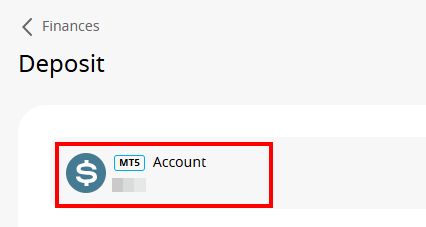
- Choose Finances, then Deposit. Use the account-management area rather than looking for a payment button inside a MetaTrader chart.
- Select the trading account. Check its number, currency and account type.
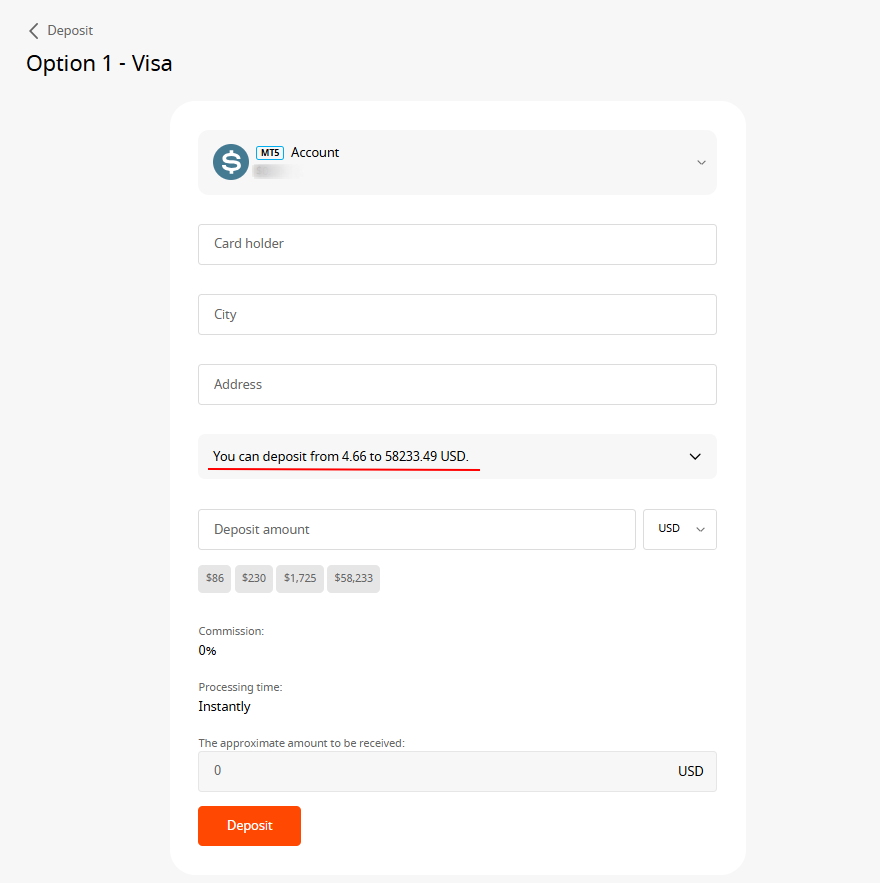
- Choose an available payment method. Inspect cards, local banks or wallets actually shown for your profile.
- Enter the requested details. Follow the secure payment instructions and use the correct amount and currency.
- Review limits, charges and conversion. Stop if the displayed recipient, method or credited amount is unclear.
- Confirm only if the details are correct. Complete any bank or payment-provider authentication yourself.
- Check Transaction History. Keep the reference and status privately until the money is credited or the issue resolved.
FBS’s card guide and local-bank guide illustrate these menus. Their public screenshots are documentation examples; the current screen may use a different layout.

Depositing through the FBS app
The documented mobile route starts with Funds, then Deposit. Select the method and supply the requested information. Before confirming, verify the destination trading account and the limits shown for that method. Track the result in transaction history.
Do not assume a payment method shown in another person’s app will be available to you. Country, account status and payment-provider availability can change the list. The same caution applies to an old screenshot shared on a broker review or social channel.
Where verification fits
FBS’s public funding page presents verification before depositing. Its help also connects verification with account safety and withdrawals. Complete the checks shown in your own account rather than trying to bypass a missing payment option.
The verification guide explains the documented identity and address-proof process. Submit documents only through the official secure flow. This article does not ask for identity documents or payment details.
Check current FBS conditions and eligibility
Plan the withdrawal before the deposit
FBS’s withdrawal rules prioritise returning card deposits first. Other deposited amounts return through the original methods within their respective limits, and profit uses an available non-card method.
For that reason, using several deposit methods can create a more complicated withdrawal sequence. Check whether the method supports the later withdrawal you expect and what happens if a card or wallet becomes unavailable. Ask support before paying if the return route is unclear.
The withdrawal guide explains the sequence. The fees guide separates broker commission from payment-provider costs and currency conversion.
If the deposit is missing or fails
Start with Transaction History and the payment-provider record. A bank authorisation, a completed transfer and a credited trading balance are different stages. Note the amount, currency, date, time and reference privately.
Do not repeatedly submit the same payment just because the first attempt has not appeared. First establish whether the original payment was declined, pending or completed. If money left the payment account but has not been credited, provide support with the transaction evidence through an official channel.
Check that you selected the intended trading account. If the destination is Cent, remember that its monetary display can be in cents. If you cannot resolve the discrepancy, use the support and evidence guide for a structured evidence record.
Frequently asked questions
What is the minimum FBS deposit?
The general international offer starts at $5, but method minimums can be higher. Partner-access Cent terms describe a separate account floor.
Can I deposit directly through MT4 or MT5?
FBS’s documented funding routes use its Trader Area or app. MetaTrader trading credentials and the profile’s payment management are separate.
Are local bank deposits available everywhere?
No universal availability is established. Use the methods shown for your verified residence and account.
Why is the amount credited different?
Check account units, currency conversion, any stated charges and the transaction record. Those checks identify possibilities; they do not prove the cause of a particular discrepancy.
Have you tested a deposit?
No. This is a guide to FBS’s public instructions and practical checks, not a completed-payment report.
Public sources checked 9 September 2026. Method availability and payment-screen instructions can change.
Sources
- FBS minimum deposit help
- Deposit via bank card
- Deposit via local bank
- Withdraw funds from FBS
- FBS funding overview
- Verify FBS Trader Area
Official broker websites
Read the current terms and restrictions for your actual residence. These links do not establish that a broker or service is available or authorised where you live.
Forex and CFD trading carries a significant risk of loss and is not suitable for everyone. These are affiliate links; we may earn a commission if you use them.