

Tickmill offers virtual-money MT4 and MT5 demos. Its published rule expires either platform’s demo after seven days without a valid terminal login using the master password.
A demo is most useful when it answers a practical question: can you place the intended order, size it correctly and close it without guessing at the controls? A large virtual balance and a profitable afternoon do not answer whether the same approach will survive live costs and losses.
How to create and open a demo
- Choose the official demo route. Tickmill’s public form distinguishes existing clients from new visitors. Follow the route that fits your situation.
- Decide between MT4 and MT5. Use the platform you intend to practise. A demo on one does not test the other’s interface or custom programs.
- Complete the requested fields truthfully. Read the current form and privacy terms. We inspected public information without submitting an application.
- Save the demo account details securely. Keep the account number, master password and server together. Label them as demo.
- Download the matching platform. Use the official MT4 or MT5 download route.
- Log in and confirm virtual status. Check that the account and server are the intended demo before practising an order.
Tickmill notes that demos created through the external public route may not appear in a Client Area created later. Verified clients should follow the Client Area demo route if they want the account created there. Missing it from one dashboard does not by itself mean the terminal credentials are wrong.
The seven-day expiry rule
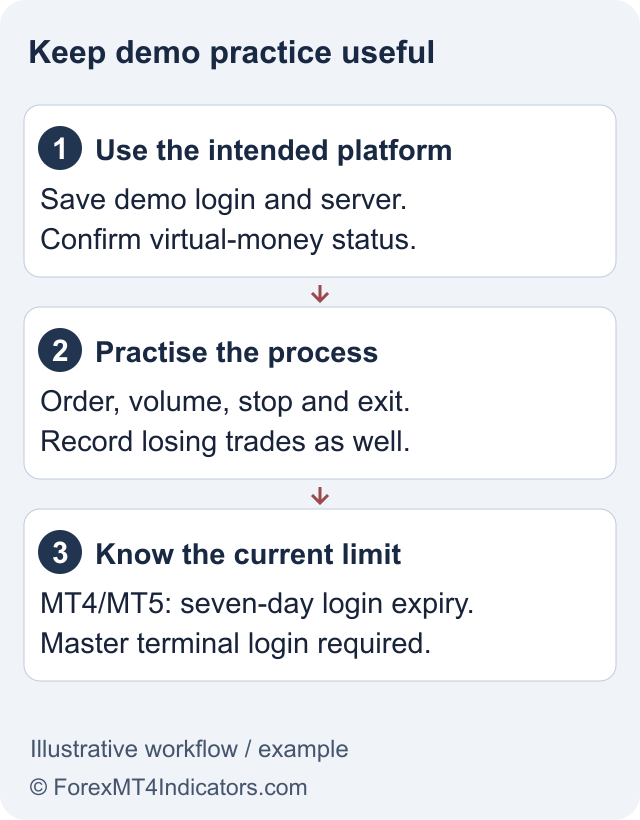
The current public page applies the same rule to MT4 and MT5: a demo expires after seven days without a valid terminal login using the master password. An investor-password login does not qualify. Merely opening the website or viewing a saved screenshot is not that terminal login.
The page lists up to seven demo accounts per registered email. Treat this as the current provider limit, not a reason to create disposable accounts whenever a practice session goes badly. An expired demo and a forgotten password need different fixes; use the login guide to distinguish them.
Save your trading journal outside the platform. Demo history is useful for reviewing decisions, but it should not be your only copy of the practice record.
A practice plan that teaches something useful
Session one: learn the controls. Open a chart, inspect the symbol specification and find volume, stop-loss and take-profit fields. Practise placing, modifying and cancelling an order. Confirm whether you are looking at balance, equity or free margin.
Session two: practise a risk limit. Choose a hypothetical cash risk and a stop distance before setting volume. Record the symbol’s contract size and currency rather than applying a memorised forex pip value to gold or an index. Use the site’s forex calculators as a cross-check, then compare with the terminal specification.
Session three: document execution. Record the requested price, displayed spread and actual demo fill. Include an example of a losing trade and how you handled it. A journal that only contains winning screenshots cannot show whether the process is repeatable.
Session four: test the workflow you actually need. If the plan uses an indicator or Expert Advisor, install it in the correct desktop platform and understand its permissions. Start with one tool so that you can identify what changed.
What the demo cannot prove
Virtual funds are not withdrawable money. A demo does not test deposits, document approval, withdrawals or the provider’s handling of a live account review. Those require separate evidence.
It also cannot guarantee live liquidity, slippage, emotional discipline or the same trading costs. Compare the current fee structure and chosen account type before drawing conclusions from simulated results.
A normal demo is also different from the Welcome Account promotion. That offer has specific eligibility and profit-transfer conditions; it does not make ordinary demo profits withdrawable.
When to move beyond practice
There is no required number of profitable demo days that proves readiness. A more useful checklist is whether you can explain the order, calculate its risk, follow a loss limit and identify the charges without relying on a promotional headline.
If you decide to apply for a live account, read the main Tickmill review, confirm country eligibility and follow the registration guide. Funding remains a separate decision.
Frequently asked questions
Does Tickmill MT5 demo expire?
Yes. The current public rule applies seven-day inactivity expiry to both MT4 and MT5, based on a valid master-password terminal login.
Can I withdraw demo profits?
No. Demo balances and profits are virtual. Do not confuse them with the separate Welcome Account promotion.
Why is my demo not in the Client Area?
Tickmill says an externally created demo may not appear there, including when a Client Area is created later. Check how it was opened and use the correct terminal credentials.
Does an investor login keep the demo active?
The published rule says an investor-password login does not count as the required valid login.
How many demos can I create?
The current public page lists a maximum of seven per registered email. Check the current rule before creating another account.
Sources and review scope
Checked on 11 September 2026 using public provider documents and public screens. We did not open or fund an account, submit identity documents or test live order execution. Screenshots show the public interface; instructions after sign-in describe the documented workflow. Available features depend on your residence, legal entity and account.
Official broker websites
Read the current terms and restrictions for your actual residence. These links do not establish that a broker or service is available or authorised where you live.
Forex and CFD trading carries a significant risk of loss and is not suitable for everyone. These are affiliate links; we may earn a commission if you use them.