

Tickmill Trader is Tickmill’s proprietary trading platform, separate from MT4 and MT5. Check its supported Raw account, instruments and regional availability before choosing it for your trading workflow.
Tickmill Trader suits a different workflow from installing a desktop MetaTrader terminal and adding MQL programs. The public platform page describes browser-based charting and trading, with mobile access through the wider Tickmill app offering.
The useful comparison is the task you need to complete: manage a profile, place a manual order, connect TradingView or run a particular desktop EA. One brand name across several screens does not make every feature interchangeable.
Where Tickmill Trader fits
| Service | Main role | Keep separate |
|---|---|---|
| Client Area | Profile, verification, wallet and account administration | Administrative login is not proof a trade was placed |
| Tickmill Trader | Proprietary charting and order workflow | It is not the MT4 or MT5 terminal |
| Tickmill App | Current global mobile trading and account-management offering | Functions vary with region and account |
| TradingView integration | TradingView chart and broker connection | Uses the supported Tickmill Trader Raw account and regional restrictions |
Read the dedicated app guide and TradingView guide if either is your main reason for choosing this route.
Check the account specification
The current global account overview groups the TradingView and Tickmill Trader route under TradingView Raw. It lists USD as the base currency, a starting deposit of USD 100 and a minimum volume of 0.01 lot. Check each instrument’s specification: a lot is not the same economic exposure across every CFD.
The published relevant forex and metals commission is USD 3.50 per lot per side, while the platform page lists commission exceptions for certain other markets. A “zero commission” instrument can still have spread and financing costs. Use the full cost guide and current terminal values.
Dynamic leverage on selected instruments also changes the margin calculation as exposure grows. Do not assume the largest displayed leverage applies to every order or country. The margin guide separates these questions.
A careful first-session workflow
- Confirm availability. Check your actual residence, entity and account menu. Start with the country directory.
- Choose a supported practice or live account. Follow the official route and label the account clearly as demo or live.
- Open the platform from the provider. Use the official platform or Client Area link rather than a lookalike login page.
- Check the account and instrument. Read the symbol specification, currency, market hours and available order types.
- Prepare an order on demo first. Set volume from a risk plan, inspect the entry conditions and review any stop-loss or take-profit settings.
- Read the resulting status. Distinguish an accepted pending order, an open position and a rejected request. Record the reason for any rejection.
We reviewed public platform information; we did not connect a private account or submit an order. The exact authenticated controls should be checked in your current interface.
Use the chart tools to answer specific questions
The provider describes watchlists, chart indicators, order controls and account information. Start with a small workspace: the instrument, one or two useful charts and the account/order panel. Add a tool only when it answers a question you can name.
A stop-loss setting is an instruction, not a guarantee of an exact execution price in all market conditions. Market gaps, liquidity and the account’s execution terms can affect the result. Likewise, market-depth information does not promise that every displayed quantity will be available when your order reaches the market.
Keep a journal outside the platform as well. Record the trade reason, planned risk, fill, charges and outcome. That record is more useful for reviewing decisions than a screenshot of an unrealised profit.
When another platform may fit better
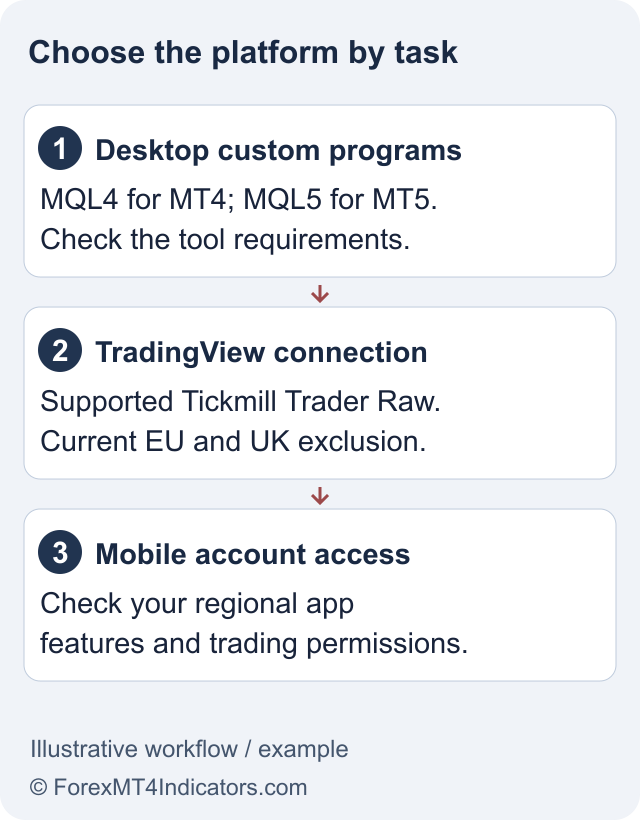
If an existing workflow depends on an MQL4 EA, use a compatible MT4 desktop environment. For an MQL5 program or MT5 tester, use MT5. Do not assume Tickmill Trader imports those program files.
If your priority is TradingView’s chart workspace, confirm the specific integration account and region. If it is account administration from your phone, check the app’s supported functions rather than downloading every available platform.
The main review brings the platform choice back to costs, entity, funding and customer-review evidence. Software convenience is only one part of that decision.
Frequently asked questions
Is Tickmill Trader the same as MT5?
No. It is a separate proprietary platform. Its account connection and supported tools should not be assumed to match MT5.
Can I run an EX4 or EX5 EA in Tickmill Trader?
Do not assume compatibility. Those files belong to the MetaTrader platform families; use the supported desktop environment and the developer’s instructions.
What is the published starting deposit?
The global account overview lists USD 100 for the relevant Raw route. Actual account and payment requirements must be checked for your entity.
Are all instruments commission-free?
No. The provider publishes commission for relevant forex and metals pricing and lists some other-market exceptions. Spread and financing can still apply.
Does a platform login confirm my withdrawal will succeed?
No. Trading access and withdrawal processing are separate. Verification, payment ownership and account review can still matter.
Sources and review scope
Checked on 11 September 2026 using public provider documents and public screens. We did not open or fund an account, submit identity documents or test live order execution. Screenshots show the public interface; instructions after sign-in describe the documented workflow. Available features depend on your residence, legal entity and account.
Official broker websites
Read the current terms and restrictions for your actual residence. These links do not establish that a broker or service is available or authorised where you live.
Forex and CFD trading carries a significant risk of loss and is not suitable for everyone. These are affiliate links; we may earn a commission if you use them.