
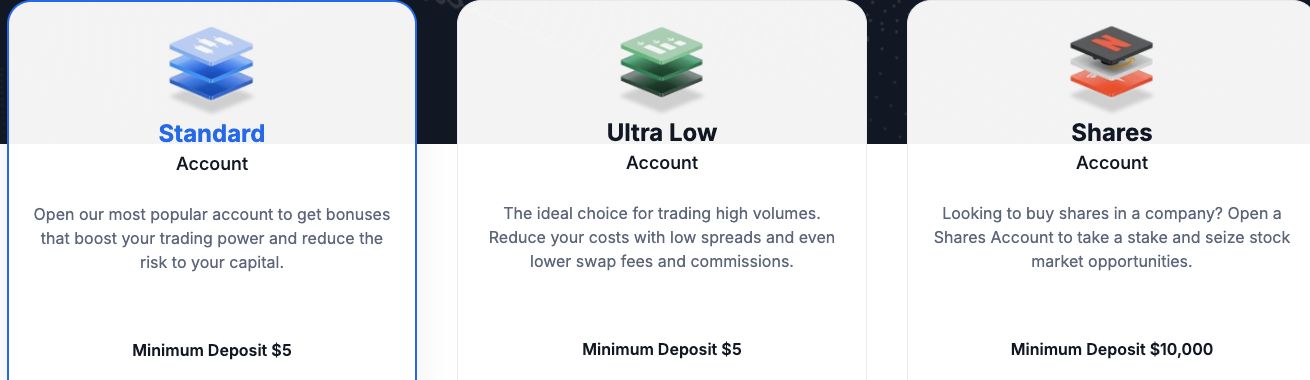
XM’s account choice depends on the company offering it. The Global page checked on 12 September 2026 shows Standard, Ultra Low and Shares; the separately observed Cyprus/EEA menu shows Ultra Low and Zero. Start with the company in your agreement, then compare the account’s contract size, costs and currency. Our XM broker review explains the provider decision.
Choose the account around the trading plan you can afford. A cheaper spread is useful, but it cannot correct an oversized position, an incompatible platform or an account currency you did not intend to use.
Which XM account types are currently displayed?
The regional examples below identify the menu before comparing individual accounts. The Global list was rechecked in English on 12 September 2026; the Cyprus/EEA entry records the separate 7 September observation.
| Provider identified on the page | Account names displayed | Source |
|---|---|---|
| XM Global Limited, Belize | Standard, Ultra Low, Shares | XM Global account page |
| Trading Point of Financial Instruments Limited, Cyprus/EEA | Ultra Low, Zero | XM Cyprus/EEA account page |
These are separate offerings, not a worldwide menu. Confirm the provider and products offered for your actual residence. Our XM country guides connect the company with the relevant local rules.
Our XM minimum deposit guide gives the dated minimums alongside the provider names. Funding and payment-route requirements deserve their own check after you have chosen a suitable account.
Global account differences shown on 12 September 2026
| Field | Standard | Ultra Low | Shares |
|---|---|---|---|
| Account minimum | USD 5 | USD 5 | USD 10,000 |
| Micro account option | Shown | Shown | Not shown as available |
| Commission on the account card | No | No | Yes; check the applicable rate |
| Maximum advertised leverage | 1000:1 | 1000:1 | 1:1 |
| Stop-out level on the card | 20% | 20% | 0% |
| Deposit-bonus eligibility on the card | Shown, with country exclusions | Not eligible | Not eligible |
These are the expanded Global account cards, not a quote for every instrument or an approval of an application. No commission does not mean no spread or overnight cost. The cards show a swap-free distinction too, but the instruments and conditions need their own terms; see the Islamic and swap-free section below. An advertised maximum leverage is not the leverage necessarily available for your symbol or account.
What should you decide before comparing accounts?
- Your instrument: identify the currency pair, gold symbol or other product you intend to study.
- Your position size: know the cash loss at your planned stop and the smallest order that fits it.
- Your holding period: distinguish intraday positions from trades held through overnight charging times.
- Your platform: identify whether your existing indicators or Expert Advisors need MT4 or MT5.
- Your money flow: note the currency you earn, fund with and expect to withdraw.
- Your account provider: identify the legal entity and the country information used in the application.
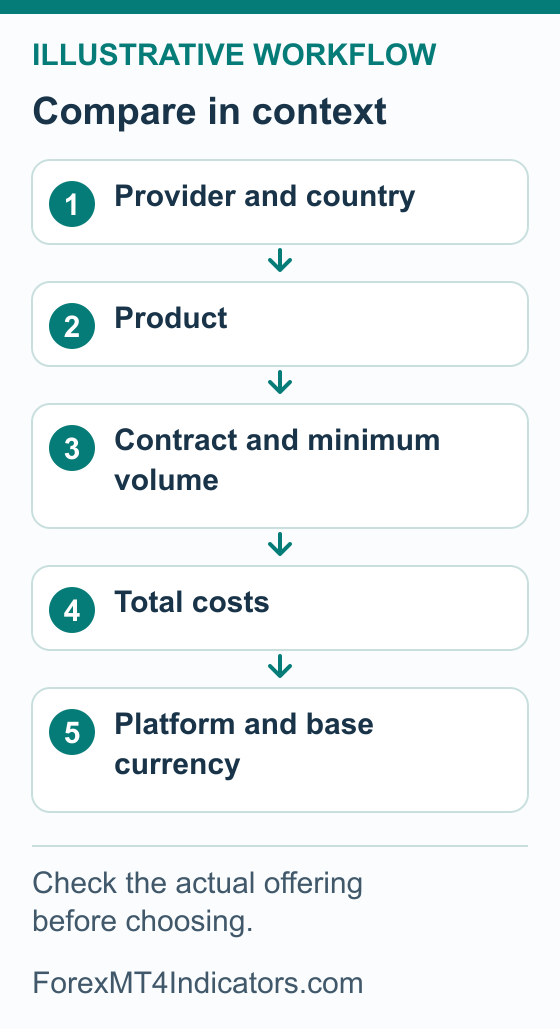
These details turn a comparison into a decision. “I trade EUR/USD on MT4 and close before overnight charges” is a more useful starting point than “I want the cheapest account.” You can then ask what that particular plan costs and whether its order sizes fit.
If you cannot yet estimate a position’s loss in money, begin with our forex risk management guide. A live account choice can wait while you learn that calculation on a demo.
How do you compare the accounts available to you?
- Start with the correct provider. Check the company in the account documents and use its current account list. If a country or product is unavailable, do not select different residence information to obtain it.
- Match the product to your aim. Read whether you are comparing leveraged forex or another instrument, rather than assuming every account name describes the same product. Keep the separate Shares offering out of a forex spread comparison.
- Record the contract and order limits. For the intended symbol, note contract size, minimum volume, volume step and the value of a price movement. These determine whether your planned exposure is possible.
- Record the full cost model. Compare spread, any commission, overnight charges and currency conversion on equivalent positions. Keep promotional credit separate from your own deposited balance.
- Check the platform and base currency. Confirm that the actual account can use the platform you need and that you understand how profit and loss will be reported.
- Resolve missing information before opening. Ask official support a precise question about any absent field. Keep the answer with the account terms, then follow the XM account opening guide once the choice is clear.
A Kenya example of account-specific conditions
The XM Kenya public account page provides a useful comparison example. This capture, taken on 7 September 2026, shows expanded Ultra Low details for the Kenyan provider. It is not a worldwide XM account menu.
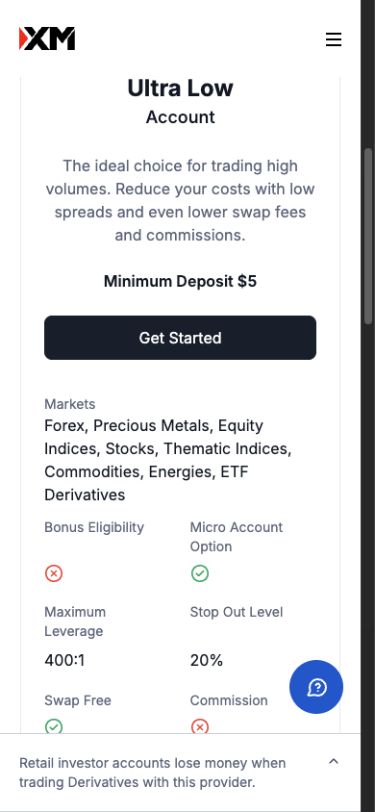
- Check the account name and provider before reading the minimum-deposit figure.
- Notice that bonus eligibility, maximum leverage and stop-out level have separate rows. They answer different questions.
- Compare the current terms in your own account; this screenshot does not establish personal leverage entitlement or eligibility for a promotion.
Compare the same instrument, exposure and holding period across the accounts. Leave an unverified field blank until the provider supplies the relevant specification.
How do Standard, Ultra Low and Zero costs compare?
The XM Global page associates Standard with promotions and Ultra Low with lower trading costs. The Cyprus/EEA page describes Zero using commissions alongside low spreads. These labels do not establish the cheapest account for your particular instrument or holding period.
For an intraday forex trader, compare the spread and any commission for the same quantity during the hours the strategy operates. For a trader holding positions overnight, add the relevant holding charges. A narrow advertised minimum spread does not show the entire cost of either plan.
| Input | Keep consistent | Why it changes the answer |
|---|---|---|
| Instrument | The same underlying market and comparable contract | Gold, forex and shares have different specifications |
| Exposure | The same underlying quantity | The same lot label may not represent the same position |
| Timing | The same trading period and intended holding length | Spread and overnight costs can differ |
| Currency | Convert costs to the same account currency | Unconverted figures cannot be compared directly |
| Charging basis | Check whether commission is per side or for the complete trade | One entry charge may not be the whole commission |
Our spread comparison tool helps organise the cost check. Enter verified values for your scenario rather than assuming that an account’s name supplies them.
A bonus deserves its own decision. Read the XM bonus terms guide before accepting an offer. Extra trading credit does not remove the need to compare costs or understand what happens when you withdraw.
Are a Micro account and a micro lot the same thing?
No. A micro lot is a quantity convention; a Micro account is a provider’s product name. A cent account is another label often used for accounts that display money in cents. None of those labels, on its own, tells you the contract size, minimum order or cash value of a price move.
In the usual forex quantity convention, a standard lot represents 100,000 units of the base currency and a micro lot represents 1,000 units. A broker’s account label is a separate matter. Read the actual symbol specification before applying that convention, especially outside forex.
As an illustration, where one lot equals 100,000 units, 0.01 lot represents 1,000 units. That arithmetic does not prove that every XM account offers that order size, nor that a lot on a differently specified account means 100,000 units.
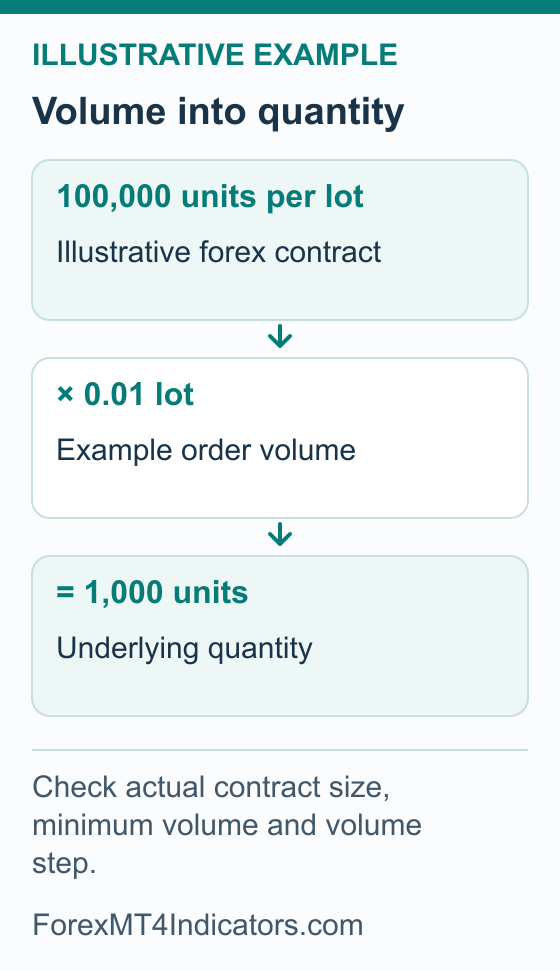
Use the lot size calculator with the relevant contract assumptions and check cash movement with the pip value calculator. Do not transfer a forex lot convention to XAU/USD without checking the gold contract.
How should you choose the account’s base currency?
The base currency is the currency in which your account balance is maintained. It is distinct from the currency pair you trade and the currency your bank uses. Funding a USD account from a bank account in another currency does not automatically change the trading account’s base currency.
If you live in Kenya, use the Kenya account-company and currency checks alongside this comparison. It separates the account decision from KES costs and questions about local payment options.
Start with the currencies actually offered for your account. Compare how deposits, trading profit and loss, and withdrawals would be converted. Choosing a familiar reporting currency can make record-keeping easier, but it does not eliminate currency exposure from instruments quoted in another currency.
Before opening, ask whether the selected currency can be changed later or whether a separate trading account would be required. If a new account is needed, check the funding process, any conversion and the platform details. Do not assume changing an account label changes its currency or product.
If you need a particular base currency, look for it in the choices offered to your account. A local website or local funding method does not establish that the trading account can use that currency. The separate XM South Africa guide covers the distinction for rand and local-bank examples.
How do you check an Islamic or swap-free option?
An Islamic account conversion and an account’s swap-free instruments are different arrangements. The XM Global agreement treats them separately in sections 80 and 81. Do not apply either arrangement to another XM company merely because its account uses the same name.
For the Global Islamic conversion, section 80 describes a request based on religious need. XM may ask for supporting evidence, and accepting the request also converts the client’s other real accounts. The same section specifies overnight Fair Value Adjustments for cash-energy and spot-metal CFDs, with current rates in the Members Area. Approval and the applicable rates matter before you hold a position.
For instruments advertised as swap-free within an account type, section 81 sets separate conditions and permits the status to be revoked. Read those conditions for the exact symbol. Neither a swap-free icon nor a zero-commission label describes the complete cost of a trade.
- Find the applicable terms. Use the account provider’s current documents and identify the exact account or option they describe. Avoid substituting an old document from another XM company.
- Check eligibility and activation. Establish whether a request is needed, what conditions apply and how you can confirm the account’s actual status. A request sent is not an approval received.
- Check the instruments and holding conditions. Read which products are covered, any limits and whether administration or other charges are stated. Do not assume that removing a swap removes every cost.
- Ask about unclear terms before holding a position. Confirm how charges will appear in the account records and what can change the status. Keep the answer with the relevant terms.
If a term is unclear, ask the provider to identify the relevant instrument, rate and account status. This product explanation does not replace religious advice where you need a ruling on the arrangement.
Which account makes sense for a particular trading plan?
A reader practising small forex positions: start with demo access and learn the minimum volume and cash risk. A low funding threshold is irrelevant if the smallest permitted position is larger than the planned risk budget.
A reader using existing MT4 tools: confirm the account’s platform before choosing on spread alone. An MT4 indicator or Expert Advisor cannot be assumed to work in MT5. Use the XM MT4 setup guide for the connection checks.
A reader holding trades for several days: compare holding charges and account conditions alongside spread. If swap-free status matters, establish it before relying on it in a trading plan.
A reader who wants company shares: investigate the separate Shares product, including its costs and ownership terms, rather than treating it as another forex pricing plan. The broker selection guide gives a wider checklist when an essential requirement is missing.
Which account-selection mistakes should you avoid?
- Comparing account names across countries: compare the legal entity and current terms first.
- Assuming equal lots mean equal exposure: multiply volume by the actual contract size.
- Choosing by minimum spread alone: include commission, holding period and conversion.
- Confusing payment and base currencies: check the account’s permitted currency choices.
- Assuming swap-free means cost-free: read the covered products and all applicable charges.
Take the account decision into the detailed checks
Use the comparison above to shortlist the accounts actually available to you. Then test that choice against the way you plan to use it.
| Planned use | Check next |
|---|---|
| Frequent short-duration trades | Convert spread and commission into the same units in the fees guide; do not compare a per-side fee with a round-turn amount |
| Positions held overnight | Read symbol financing and holding conditions in the applicable account terms |
| A leveraged position | Use the margin guide to distinguish required margin from loss at the planned stop |
| Gold | Verify the exact symbol, contract and volume step with the gold-trading guide |
| Copy trading | Use the copy-trading guide to check the investor account and permitted funding separately |
| Another base currency or platform | Read account management before creating or changing an account |
The Islamic or swap-free checklist above remains part of account selection. Check the applicable instruments, holding conditions and any other charges before treating the label as a complete cost comparison. For Japan, use the separate XMTrading account guidance and Japanese fee comparison.
Frequently asked questions
Which XM account is best for beginners?
Choose an available account whose contract size, minimum volume, costs and platform you understand. Practise those conditions on demo first. A promotional label or low opening deposit does not establish suitability, and there is no single account that fits every beginner’s budget and trading plan.
Is Ultra Low always cheaper than Standard or Zero?
Compare the total cost of equivalent positions in the actual accounts offered to you. Include the spread at the relevant time, any commission, overnight charges and conversion. A product’s lower-cost positioning is not a guarantee about every instrument or holding period.
Does XM offer a cent account?
This guide has not established a universally available XM cent account. Check the current list for your provider if that is the product you want, then verify its balance units and contract size. A micro lot, an account named Micro and a balance displayed in cents are different concepts.
Can I change my XM account currency later?
Check the rule for the company holding your account before choosing a currency. Ask whether a change is possible or a separate trading account is required. If another account is needed, confirm its platform, base currency and funding implications before transferring any money.
Does Zero or an Islamic option mean there are no trading costs?
No. Read the complete charging model. A low minimum spread can sit alongside commission, while a swap-free arrangement can have specific eligibility, instrument and holding conditions. Compare the actual costs of the position you intend to trade and confirm the account’s status before relying on an option.
Sources and review scope
Public sources were checked on the dates below. Provider descriptions and public screens are distinguished from account tests; no funded account, execution or payment was tested.
- XM account types, Cyprus/EEA page · 2026-09-07 · The observed page identifies Trading Point of Financial Instruments Limited, Cyprus and EEA service scope; Ultra Low and Zero both USD 5. Scope belongs to the observed page, not every xm.com route or every reader. Checked 2026-09-07.
- XM Global expanded account comparison. Checked 12 September 2026. Global/Belize public cards; no authenticated eligibility or pricing test.
- XM Global client agreement, sections 80–81. Checked 12 September 2026. Islamic-account conversion and swap-free instruments are separate contractual arrangements.