The Point of Control Indicator MT4 helps solve that problem by highlighting the price level where the highest trading volume or market activity has taken place within a selected range. Instead of guessing where buyers and sellers are likely to react, traders can focus on levels that have already proven their importance. This often leads to better trade timing and more disciplined decision-making.
Many experienced traders combine the Point of Control with support and resistance, candlestick confirmation, and trend analysis instead of relying on it by itself. The sections below explain how the indicator works, where it performs best, and how traders can apply it in real market conditions.
What Is the Point of Control Indicator MT4?
The Point of Control (POC) Indicator is based on Market Profile or Volume Profile concepts. It identifies the price level where the greatest amount of trading activity occurred during a selected period. This price becomes the Point of Control, often acting as a strong support or resistance area because many market participants previously agreed on its value.
Unlike traditional indicators that rely only on moving averages or momentum calculations, the POC focuses on market participation. Even though the Forex market doesn’t provide centralized volume, many MT4 versions use tick volume, which has shown a strong relationship with actual trading activity.
When price revisits the Point of Control, traders often watch closely for either a rejection or a breakout. Both situations can create high-probability trading opportunities when combined with price action confirmation.
How the Indicator Calculates Important Price Levels
The indicator studies historical price movement over a selected number of candles. It records how frequently price traded at each level while using available tick volume to estimate market participation.
Once all price levels are analyzed, the indicator marks the level with the highest concentration of trading activity as the Point of Control.
Here’s a simple example.
Suppose EUR/USD trades between 1.1150 and 1.1250 during the previous trading session. Most transactions occur around 1.1205. The indicator will identify 1.1205 as the Point of Control because that’s where buyers and sellers spent the most time exchanging positions.
Professional traders often view these levels as areas where institutions accumulated or distributed positions. While no indicator can reveal institutional orders directly, repeated reactions around the POC suggest that many market participants consider the level significant.
During testing on volatile Non-Farm Payroll (NFP) sessions, the POC often remained an important reference after the initial price spike settled. That doesn’t mean it always holds, but it frequently helps traders avoid chasing emotional moves.
Using the Point of Control Indicator in Real Trading
The indicator becomes much more effective when traders combine it with market structure instead of treating it as a standalone signal generator.
For example, GBP/USD on the 1-hour chart may establish a Point of Control at 1.3570 after several hours of consolidation. If price later pulls back to this level during an established uptrend and forms a bullish engulfing candle, many traders view it as a stronger buying opportunity than entering randomly in the middle of the trend.
Another situation appears during ranging markets.
Imagine USD/JPY moving between 145.80 and 146.60 for two days. The Point of Control develops near 146.15. As price repeatedly returns to this level before reversing, traders can use it as a decision zone instead of guessing entries across the entire range.
What makes this useful? It reduces unnecessary trades during market chop where false signals are common.
Still, traders should wait for confirmation. Candlestick patterns, trend direction, or momentum indicators like RSI or MACD can increase confidence before opening a position.
Trading forex carries substantial risk. No indicator guarantees profits.
Adjusting Settings for Different Trading Styles
Most versions of the Point of Control Indicator MT4 allow traders to customize several parameters.
Scalpers often reduce the calculation period to around 50-100 candles on the M5 or M15 charts. This creates faster adjustments to changing market conditions.
Swing traders usually prefer 200-500 candles on the H1 or H4 charts. Larger datasets produce more stable Point of Control levels that remain relevant for several trading sessions.
For major currency pairs such as EUR/USD, GBP/USD, and USD/CHF, the default settings often work well because liquidity remains relatively consistent throughout the trading week.
Gold (XAU/USD), however, may require testing different lookback periods because volatility changes significantly during London and New York sessions.
Many traders also remove outdated Point of Control lines after major trend reversals. This keeps charts cleaner and prevents confusion when new market structure develops.
Strengths, Weaknesses, and Comparison With Similar Indicators
The biggest strength of the Point of Control Indicator is its focus on areas where actual trading activity has concentrated. Instead of reacting to every small price movement, traders gain a clearer picture of where the market previously accepted value.
Another advantage is flexibility. It works alongside moving averages, Fibonacci retracements, supply and demand zones, and support and resistance analysis.
There are limits, though.
The indicator may generate less reliable levels during major economic announcements when volatility expands rapidly. A strong interest rate decision or unexpected geopolitical event can push price through the Point of Control without meaningful reaction.
It’s also worth remembering that MT4 relies on tick volume rather than centralized exchange volume. While tick volume generally reflects market activity well, it isn’t identical to futures volume.
Compared with the VWAP Indicator, the Point of Control highlights a single dominant price level rather than an average weighted price throughout the session.
Compared with traditional Pivot Points, the POC adapts to actual market participation instead of relying on mathematical formulas based only on previous highs, lows, and closes.
Many experienced traders use all three tools together because each offers a different perspective on market behavior.
How to Trade with Point of Control Indicator MT4
Buy Entry
- Buy at POC Support – Enter when EUR/USD on the 1-hour chart bounces from the Point of Control with a bullish candle. Target 30-50 pips.
- Confirm the Uptrend – Only buy if the price is above the 50 EMA on the 4-hour chart to improve trade quality.
- Wait for Candle Close – Enter after the confirmation candle closes above the POC to avoid fake-outs.
- Use Tight Risk – Place the stop-loss 15-25 pips below the Point of Control or the recent swing low.
- Trade High-Liquidity Sessions – Focus on the London and New York sessions for stronger reactions.
- Combine with RSI – Buy when RSI is above 50 and the POC acts as support.
- Avoid High-Impact News – Skip buy entries 30 minutes before and after major news releases like NFP or FOMC.
- Lock in Profits – Move the stop-loss to breakeven after 20-25 pips in profit.
Sell Entry
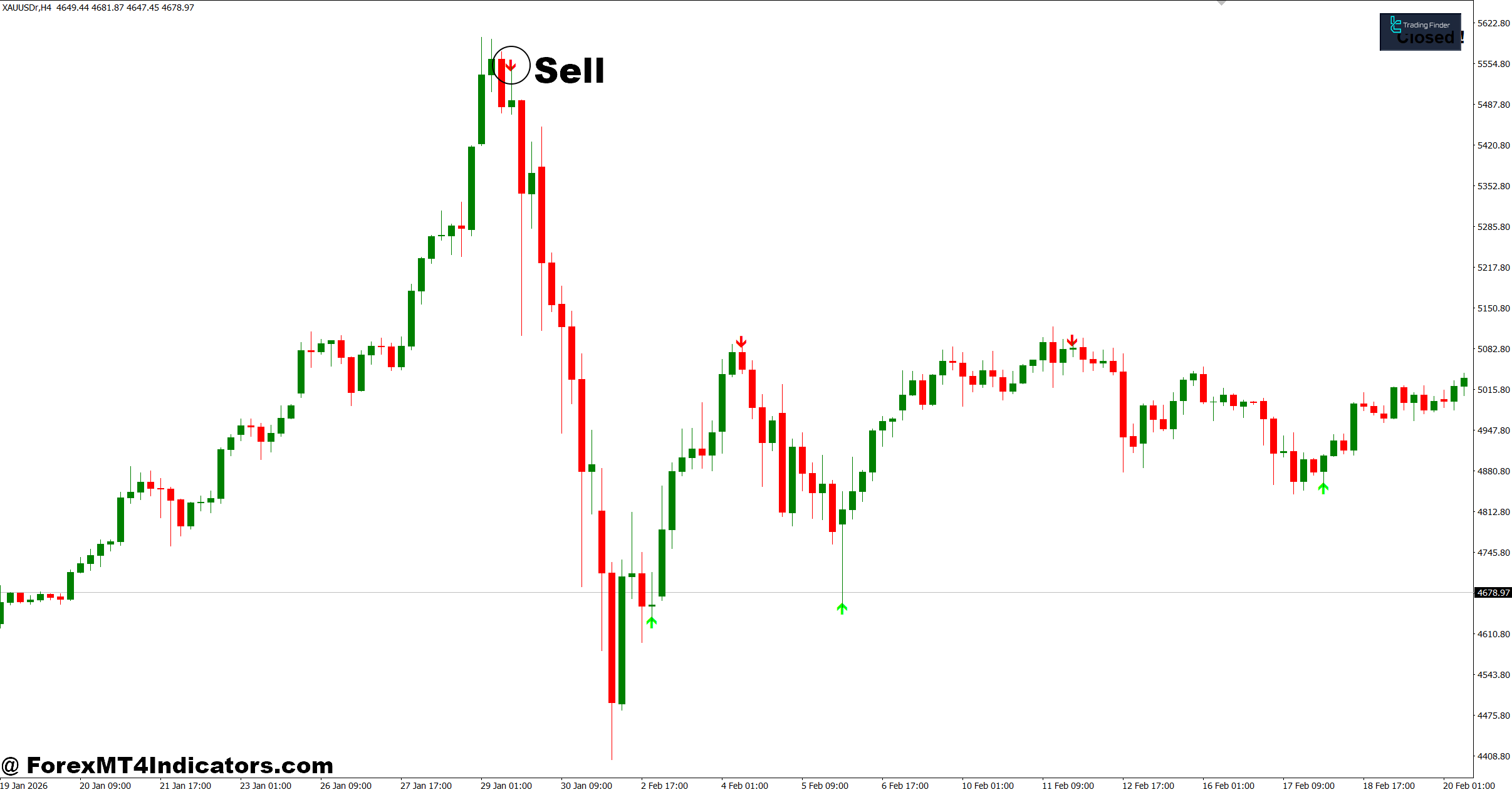
- Sell at POC Resistance – Enter when GBP/USD on the 1-hour chart rejects the Point of Control with a bearish candle. Aim for 30-50 pips.
- Follow the Downtrend – Sell only if the price remains below the 50 EMA on the 4-hour chart.
- Wait for Bearish Confirmation – Open the trade after a bearish engulfing or pin bar forms at the POC.
- Protect Your Capital – Set the stop-loss 15-25 pips above the Point of Control or the recent swing high.
- Use Trend Strength – Sell when ADX is above 25, showing strong bearish momentum.
- Trade Major Pairs – Look for clean setups on EUR/USD, GBP/USD, and USD/JPY during active sessions.
- Skip Choppy Markets – Don’t sell if price keeps crossing the POC without clear direction on the daily or 1-hour chart.
- Secure Partial Profit – Close 50% of the position after 25-30 pips and trail the remaining trade.
Final Thoughts
The Point of Control Indicator MT4 offers traders another way to understand where the market has shown the greatest interest. The key ideas are straightforward: identify high-activity price zones, combine them with price action instead of trading blindly, adjust settings to match the trading timeframe, and always respect risk management because market conditions constantly change. It won’t eliminate losing trades, and it shouldn’t replace a complete trading plan. Used alongside solid technical analysis and disciplined execution, the Point of Control Indicator MT4 can become a valuable reference that helps traders make more informed decisions instead of reacting emotionally to every market move.
Level up your trading
Learn to read the chart — not just the indicator
eBook · Instant PDF
Video Course · 12 modules
Recommended MT4/MT5 Brokers
- ✓ *FREE *$50 to start (withdrawable)
- ✓ Deposit bonus up to $5,000
- ✓ Negative balance protection
Trading forex and CFDs carries a significant risk of loss and is not suitable for everyone. Broker links are affiliate links — we may earn a commission at no cost to you.
Free MT4 Indicator Download
Enter Your Email Address below, download link will be sent to you.