
A useful XM China guide should help you answer the questions that appear before and after registration: which company holds the account, how to prepare documents, why a login fails, and what a currency conversion costs. Those details matter more than a translated home page or an account balance shown in someone else’s screenshot.
This guide uses public XM pages and official platform documentation checked on 7 September 2026. The diagrams explain the checks; they are not screenshots of a tested mainland account. For the wider picture, start with our XM review and guide or find your residence in the XM country guides.
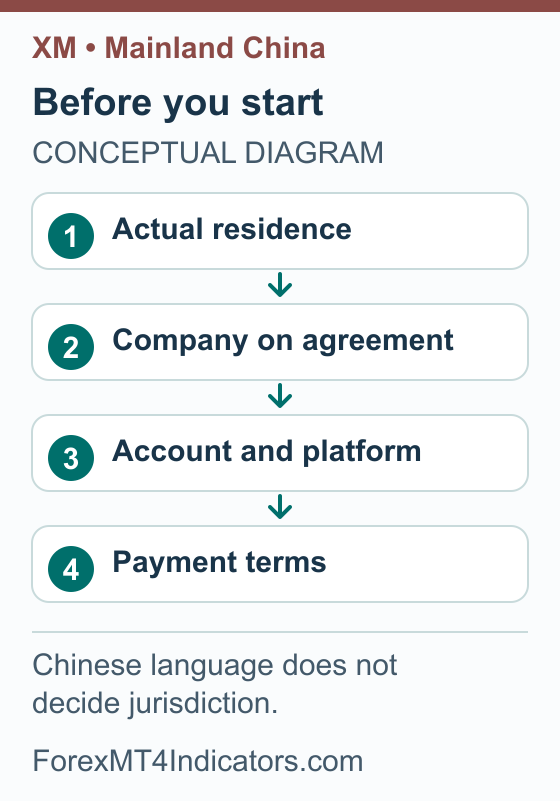
Why the company behind the account matters
The official Chinese XM website uses Simplified Chinese. The Chinese regulation page retrieved for this guide identifies XM Global Limited and attributes its regulation to Belize’s Financial Services Commission, licence 8557558. That identifies the provider in that page response; it does not establish authorization in mainland China or assign every applicant to that company.
The current residence-specific application outcome and company assignment for a new mainland applicant were not independently verified for this guide. Existing accounts and new applications can have different requirements, so an older successful registration does not settle a new application.
Read the company name in the agreement presented to you and keep a copy with its date. Compare it with the company shown in the legal documents and the support channel attached to your profile. If they differ, resolve the mismatch before relying on account conditions from another page.
Mainland China, Hong Kong and Macau
This article concerns mainland residence. It does not treat Hong Kong or Macau as alternate settings for a mainland applicant, and it does not apply the mainland regulatory summary to those jurisdictions. Use the residence that matches your circumstances and documents; a preferred website language is a separate choice.
The mainland regulatory context
In a 15 July 2026 notice, SAFE’s Tianjin branch states that no institutions have been approved to conduct or act as agents for forex margin business domestically. It describes online forex-margin platforms as unlawful in mainland China and warns that participants lack legal protection. An overseas licence does not establish domestic permission.
The notice is a general warning, not an XM-specific finding of fraud. Broker acceptance and the local position remain separate matters. Read the notice before making a funding decision; this guide does not offer a personal legal assessment.
Prepare your profile and documents step by step
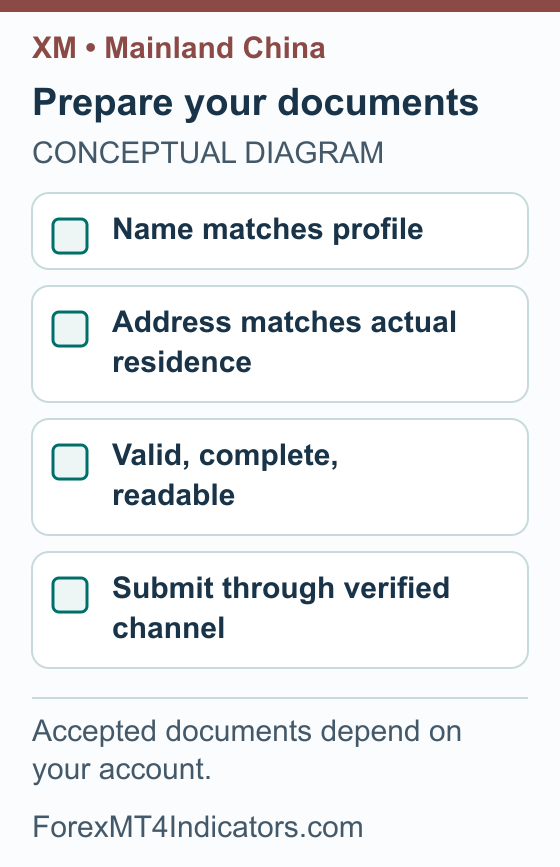
The aim is a consistent record of who you are, where you live and which account you mean to use. The following steps are a preparation workflow, not a claim that every mainland applicant sees the same form. Follow the document types and requirements actually presented for your application.
- Start from the official source. Open XM’s official Chinese site and use its own account or help links. Check the destination before entering personal information, especially when arriving from an advert or a message.
- Record your residence accurately. Keep residence, nationality and correspondence address distinct wherever the form asks for them. Do not change residence to make an unavailable option appear.
- Prepare a consistent name. Compare your profile details with the identity document you intend to submit. If the form requires Latin characters but your document uses Chinese, ask the account’s official support channel which spelling or supporting document it accepts.
- Check address evidence requirements. Read the accepted document list, permitted age and required fields before uploading anything. A document can be readable yet still be the wrong type for the request.
- Check the images. Use clear, complete images of the requested originals, with required edges and information visible. Retake a blurred photo rather than altering its contents or combining unrelated documents.
- Review before submitting. Compare the name, address and document validity against the profile. Keep a private note of what was submitted and when, then follow the status or correction request shown by the provider.
We have not verified a universal mainland identity-card, passport or address-document rule for XM. The Chinese support page provides a route to its help centre, but a public Chinese-language contact page does not establish local approval times or a mainland office.
If a document is rejected, work on the stated reason. A spelling mismatch calls for a profile or spelling clarification; a cropped image calls for a new image; an unsupported document calls for an accepted alternative. Uploading the same rejected file repeatedly does not address any of those problems.
Keep identity documents out of public comments and trading groups. When asking us about a general process, describe the issue without posting an account number, document image or password. Account-specific evidence belongs in the provider’s verified private channel.
Understand the public account menu
The Chinese account-types page displayed the following cards when checked. Its footer identified XM Global Limited. These are public page figures, not a confirmed account offer for every mainland resident, and they do not establish an available funding method.
| Public account card | Displayed minimum deposit | Check before choosing |
|---|---|---|
| Standard | USD 5 | Available instruments, contract size and trading costs in your terms |
| Ultra Low | USD 5 | Applicable spreads, commissions and overnight charges |
| Shares | USD 10,000 | Product terms and whether this is the account you need |
Do not read USD 5 as CNY 5 or as a recommended trading balance. The page says amounts are converted when the deposit currency differs from USD, but it does not establish CNY as an available account base currency. A payment service can also have a different transaction minimum from an account’s advertised opening threshold.
When comparing accounts, write down the platform, base currency, smallest trade size and cost structure alongside the name. An account label cannot tell you the cash risk of a trade without the instrument specification and position size. Our XM account-types guide explains the comparison, while the minimum-deposit guide separates account thresholds from practical funding needs.
Before using any balance for a trade, calculate the position from the loss you can afford and the stop distance. The position size calculator helps with that calculation. Use the account currency and the actual instrument inputs rather than copying another trader’s lot size.
Work through a CNY funding quote
There are three currencies to identify: the currency leaving your bank or payment service, the currency credited to the trading account, and the currency used to display its balance. They may match, or a conversion may occur between them. A Chinese website does not answer that payment question.
We have not verified current mainland availability for specific banks, UnionPay, Alipay, WeChat Pay or other named payment services. Nor have we verified a CNY base-currency option. Use only the methods and instructions shown for your own account, and resolve any unexplained payment recipient with official support before proceeding.
An illustrative calculation
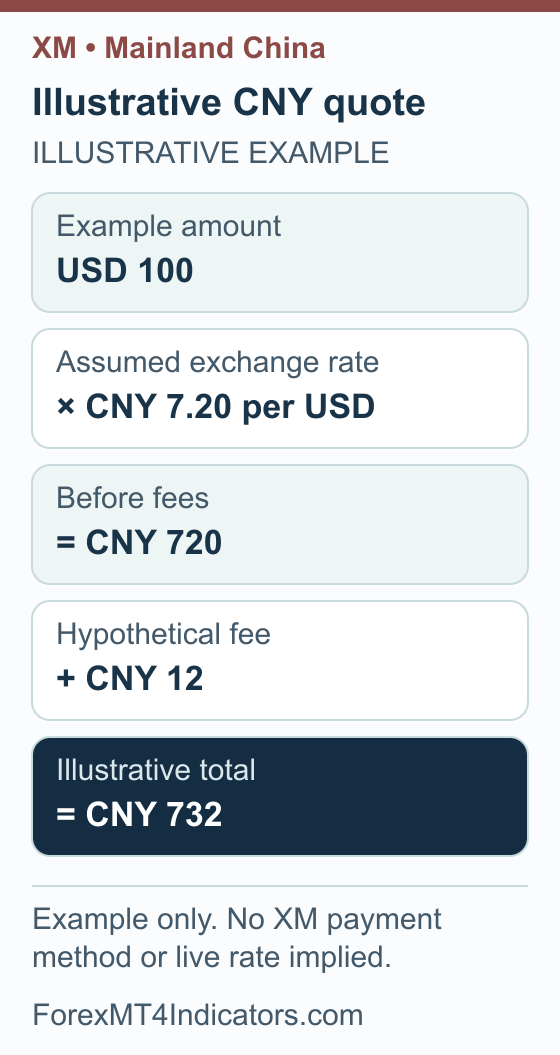
Suppose a hypothetical quote would credit USD 100, using CNY 7.20 for each USD, with a separate CNY 12 fee. The conversion is USD 100 × CNY 7.20/USD = CNY 720. Adding the hypothetical fee produces a total payment of CNY 732.
This is arithmetic, not a live rate, XM quotation or confirmed mainland payment route. It assumes the fee is added to the amount paid. If a provider instead deducts a fee from the funds credited, the same starting payment would lead to a different account credit.
Check the quote before confirming
- Identify the destination account. Match its number and currency to the account you intended to fund.
- Read the method’s terms. Check the payer-name requirement, permitted currency, transaction minimum and any limits shown.
- Separate the two amounts. Record the total charged and the amount expected to be credited. Identify where any conversion occurs.
- Check all disclosed charges. Compare the provider quote with any charges or conversion terms disclosed by your bank or payment service.
- Check the return route. Find out how money would be returned through that method and what happens if the original method becomes unavailable.
- Retain the reference. If you decide to proceed, keep the confirmation and transaction reference privately. Do not treat a payment confirmation as proof that the trading account has already received the funds.
A missing local payment option is a question for the account’s support team. Changing residence, using an unrelated person’s payment details or relying on a stranger’s payment instructions does not verify an alternative. Keep the decision tied to your actual account and its documented terms.
Connect the correct MT4 or MT5 account
XM publishes official Chinese pages for MT4 and MT5. Use the platform associated with the trading account. Installing an application does not create an approved brokerage account, and an account created for one platform is not interchangeable with the other.
For desktop connection, have the broker-issued trading account number, trading password and exact server name ready. Your profile email and password may be different credentials. Keep demo and live account details clearly labelled so you know which environment you are opening.
- Open the matching MT4 or MT5 terminal obtained through an official source.
- Use the account-login command under File or Navigator.
- Enter the trading account number, its password and the exact broker-issued server.
- Check that the account shown after connection is the one you intended to open.
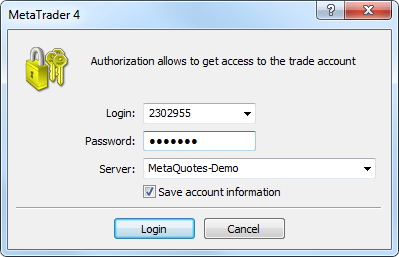
These are generic platform steps from the MT4 authorization documentation and MT5 connection documentation. Investor access permits viewing but not trading; normal or master credentials have trading permissions. We did not complete a mainland account login for this guide.
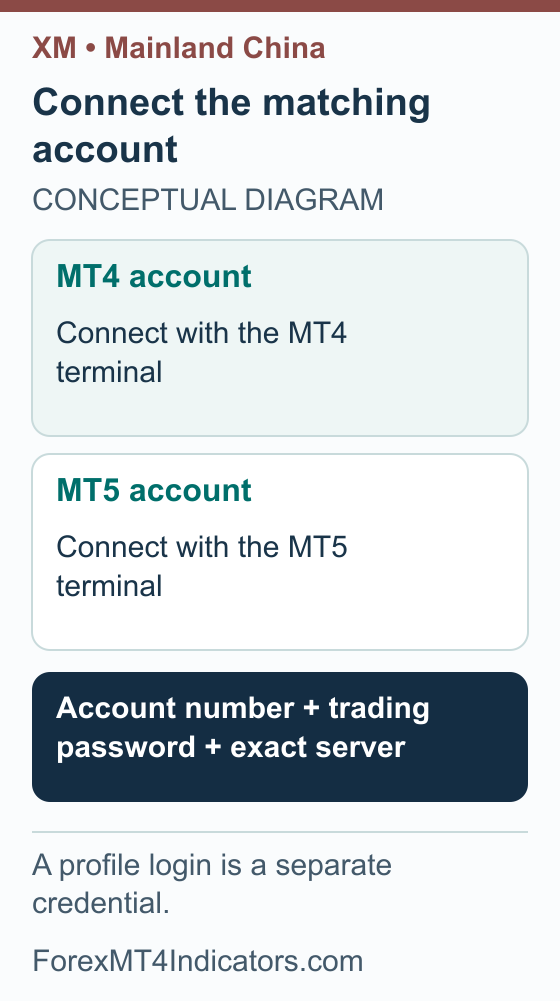
If the login fails, check the account number, platform and server before resetting passwords. If the account is visible but trading is unavailable, check whether you used investor credentials, then read the displayed status or error. Record the exact message instead of assuming that every connection problem is a funding problem.
Our XM MT4 setup guide and XM MT5 setup guide cover the wider platform workflow. For Mac installation background, see installing MetaTrader 4 on Mac, while using the current installer linked by the official provider.
Before risking capital, practise on a demo account if one is available to you. Check instrument specifications and the difference between margin required and planned loss; the margin calculator helps illustrate the former. The risk/reward calculator helps compare an intended stop and target without predicting that either price will be reached.
XM bonus in China: identify the offer and its currency
Bonus review: 8 September 2026. We have not verified a current XM bonus amount for a mainland China resident. The useful benefit of eligible deposit credit is extra trading margin, not withdrawable cash. A promotion in Simplified Chinese does not establish mainland eligibility, and an offer intended for Hong Kong or Macau should not be treated as interchangeable.
Keep the offer beside the CNY quotation you worked through earlier. If the account uses a different currency, a CNY payment amount and a bonus cap expressed in dollars describe different quantities. A large translated figure can be especially misleading when a screenshot leaves out the currency, date or account type.
- Identify the audience and issuer. Record the exact residence conditions and legal company in the promotion. Ask whether those details match your own account documents.
- Find the operative terms. Save the official offer page and its dated conditions, including any language-precedence clause. Do not rely on a cropped message, referral-group post or translated banner.
- Separate payment and credit. Ask which net deposit currency qualifies and whether an advertised allowance is cash, trading credit or a percentage of an eligible deposit. This does not establish support for UnionPay, Alipay or WeChat Pay.
- Check removal before accepting. Read the withdrawal and transfer conditions for that specific credit, and keep the reply with the offer if anything is unclear.
These checks do not replace the mainland funding and regulatory questions above. The XM bonus eligibility guide explains the general credit mechanics. Its published dollar examples should not be presented as an offer available to you in China.
Track a withdrawal and get useful support
A withdrawal has more than one stage: request, provider review, release, and receipt through the destination payment service. Keep those stages separate when reading an estimated time. A status saying that a provider processed a withdrawal does not itself prove the receiving bank has credited it.
Use our XM withdrawal guide for the general workflow. For your own account, first confirm that any requested verification is complete and read the withdrawal methods actually displayed. Check the amount, return route, currency and any conditions affecting available funds before submitting a request.
If the money has not arrived, prepare a short timeline: request date and time, withdrawal reference, latest status, amount and currency, and the destination method. Ask support whether the request is awaiting review, has been released, or needs further information. If released, request a traceable payment reference appropriate to that method and use it with the receiving provider.
When contacting Chinese-language support, use one clear issue per message. Include the exact error or status and a redacted screenshot where helpful. Do not send passwords, verification codes or unrestricted remote access to resolve an account question; use the secure document process if support requires identity evidence.
Frequently asked questions
Does XM’s Chinese website prove mainland residents can open an account?
No. An official Chinese-language route does not establish the current company assignment or application outcome for a mainland resident. Use your actual residence, read the agreement presented to you and resolve any conflicting eligibility information with the provider, alongside the local context above.
Can I deposit through Alipay, WeChat Pay or UnionPay?
This guide has not verified those methods for a mainland XM account. A payment logo elsewhere on the internet is not enough. Check the methods inside your verified account and read their currency, payer-name, minimum and return-route conditions before making a decision.
Can I use CNY as the account base currency?
We have not verified that option for a mainland applicant. A payment charged in CNY and an account whose balance is recorded in CNY are different arrangements. Check the base-currency field and the complete conversion quote; do not infer one from the other.
Is a Chinese identity card enough for verification?
We have not established a universal accepted-document rule. Read the current request for your account, including any address evidence, translation or image requirements. If the document name or spelling does not match the form, resolve the mismatch through official support before submitting it.
Why does my XM profile open but MT4 will not connect?
The profile and trading terminal can use different credentials. Check the trading account number, platform version, trading password and exact server from the broker’s account details. Keep demo and live credentials separate, and send support the precise error if those details match but connection still fails.
Does this guide cover Hong Kong and Macau accounts?
No. Its country-specific discussion concerns mainland China. Hong Kong and Macau require their own residence, provider and local-rule checks. Do not choose either as a substitute for your actual residence or assume that the mainland regulatory notice answers their separate questions.
Forex and CFD trading carries a high level of risk and may not be suitable for all traders. This guide is educational. Past performance does not guarantee future results. Always test on a demo account before risking real capital.
Sources and review scope
Sources checked on 7 September 2026 unless a different date is shown. Provider documentation and public examples are distinguished from personal account tests.
- 畅享全球金融市场并开始交易 | XM. Checked 2026-09-07.
- 我们提供的所有服务皆获得监管机构授权. Checked 2026-09-07.
- 选择您的交易账户. Checked 2026-09-07.
- 守住钱袋子 护好幸福家丨拒绝网络炒汇. Checked 2026-09-07.
- XM Chinese contact and help-centre page. Checked 2026-09-07.
- XM Chinese MT4 platform page. Checked 2026-09-07.
- XM Chinese MT5 platform page. Checked 2026-09-07.
- MetaTrader 4 Help: Authorization. Checked 2026-09-07.
- MetaTrader 5 Help: Connect to an Account. Checked 2026-09-07.
- XM public deposit-bonus explanation: Current public XM Global deposit-credit explanation; region-dependent availability/percentage, nonwithdrawable credit. A 100% illustration does not identify a universally available 100% promotion. Bonus-section source checked 2026-09-08.
- XM account-applicable legal documents: Account-applicable documents are identified during registration. Bonus-section source checked 2026-09-08.