
Perhaps you already have an XM account and need to reconnect MT5. Or you are comparing costs and want to know what happens when money leaves an SGD bank account. Those are practical questions, and a useful answer needs more than an advertised minimum deposit.
The sources below were checked on 7 September 2026. We reviewed public documents; we did not open, fund or test a Singapore account. Read this alongside our main XM review, and use the XM country guides when your actual residence is somewhere else.
What does XM Singapore actually mean?
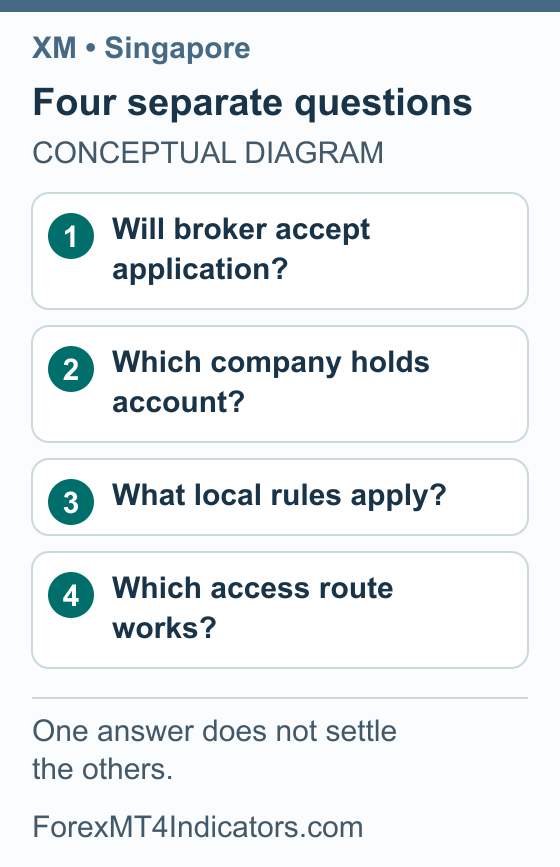
A country name in a search result can describe the reader, a marketing page or a historical event. It does not necessarily identify a locally licensed company. Start by separating these four questions, because they lead to different evidence.
| Question | Evidence to look for |
|---|---|
| Will XM accept my application? | Current instructions and outcome for your actual residence |
| Which company holds my account? | The agreement and legal documents attached to the account |
| What is the local regulatory position? | Relevant Singapore authority publications and licence records |
| Can I access the service? | Current provider information and your own connection situation |
Current company assignment and application outcomes for Singapore residents were not independently verified for this guide. XM’s January 2024 Singapore webinar terms referred to Singapore-resident clients of XM Global Limited, but that historical document does not establish today’s onboarding terms.
The Singapore notice to read
The Singapore Police Force release dated 6 June 2025 names XM Global Limited, described as incorporated in Belize. It states that the operator offered and marketed services without the requisite capital markets services licence, and announces website blocking through Singapore-based internet access providers from 20 June 2025. SPF and MAS encourage dealing with appropriately licensed platforms.
This is a provider-licensing and access notice. It does not, by itself, establish that an individual is prohibited from merely owning an account. We have not tested present-day access from a Singapore network or completed a fresh MAS directory result for this guide; an offshore regulatory disclosure does not establish Singapore authorization.
Identify the account before choosing its settings
If you already have an account, start with the agreement and account details you received. Record the legal company name, trading account number, platform and base currency privately. These details give support a concrete account to discuss and help you avoid applying another entity’s fees or product list.
If you are considering an application, use your actual residence and review the legal documents presented before agreeing. XM’s public regulation page identified XM Global Limited with a Belize FSC licence disclosure when checked. That page does not assign a new Singapore applicant to the entity or settle the local notice above.
Public pages can also differ within the same website. The English account-types view retrieved for this guide showed Ultra Low and Zero with a Cyprus/EEA footer. The Malay-language view showed Standard, Ultra Low and Shares with an XM Global footer, so neither menu is labelled here as a confirmed Singapore offer.
Use our XM account comparison to understand the fields, then compare only the accounts actually offered to you. Write down the base currency, platform, minimum trade volume, spread, commission and overnight charges. If an advertised minimum uses USD, do not silently read it as SGD.
A low opening threshold says little about whether a trade fits your balance. Check the XM minimum-deposit guide for the distinction between an account threshold and a payment-method minimum. Start your trading calculation with an affordable loss and a defined stop, rather than trying to make a position fit an advertising figure.
Prepare an application or correct an existing profile
A useful document check starts before an upload. The sequence below is general preparation; it does not reproduce an authenticated Singapore application screen. Exact accepted documents and verification requests depend on the provider and account.
- Use the verified account channel. Start from the provider’s official source or an existing trusted account record. Check the destination before entering credentials or identity information.
- Separate residence from citizenship. Enter each field accurately. A Singapore bank account, telephone number or preferred language does not replace a residence declaration.
- Match the name. Compare your profile with the identity document and, where relevant, the payment-account name. Resolve differences through official support rather than creating a second profile to avoid a correction.
- Read the document request. Check the accepted document type, required information, validity and any permitted age for address evidence. Do not assume that NRIC or Singpass is a supported submission method.
- Prepare a clear copy. Keep requested information and document edges visible. Retake unreadable photographs instead of altering the document’s contents.
- Keep the outcome. Note the submission date and status. If a correction is requested, address the stated issue and retain the provider’s response privately.
When moving country, ask how the change affects an existing account before changing unrelated settings. A profile correction, a residence change and opening another trading account are different requests. Our XM registration and verification guide explains the broader workflow.
Do not send identity documents to public comments or a stranger offering to speed up approval. For a support screenshot, show the relevant error and redact unrelated balances, personal identifiers and payment details. Never include the trading password or a one-time verification code.
Understand SGD before choosing a payment method
Funding currency is what you pay. Account base currency is what the trading account uses to record its balance. Quote currency is part of a traded instrument’s price, such as USD in EUR/USD; none of these labels alone proves that you can fund an XM account in SGD.
We have not verified a current Singapore-specific list of base currencies or payment services. That includes SGD funding, PayNow, FAST, GIRO and individual banks. Check the options actually displayed for your account instead of treating familiar local services as supported by default.
An illustrative SGD conversion
Imagine a hypothetical quote that would credit USD 100, with a conversion rate of SGD 1.30 per USD and a separate SGD 3 fee. Multiplying 100 by 1.30 gives SGD 130. Adding the hypothetical fee gives a total payment of SGD 133.
This example assumes the fee is added to the amount charged. It is not a current exchange rate, XM price or available funding route. If the fee were deducted from the credited amount, or another conversion occurred, the amount reaching the account would need a different calculation.
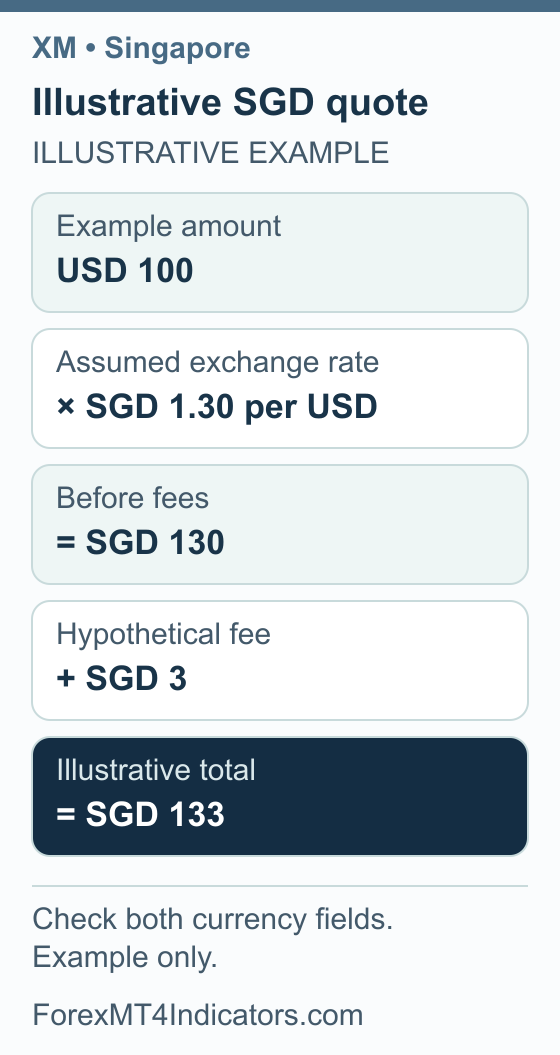
Compare quotes using the same target amount credited, not two different deposit sizes. Record the total cost in the currency leaving your payment account. That makes a conversion charge visible even where a separate line says the provider charges no deposit fee.
Check a deposit quote step by step
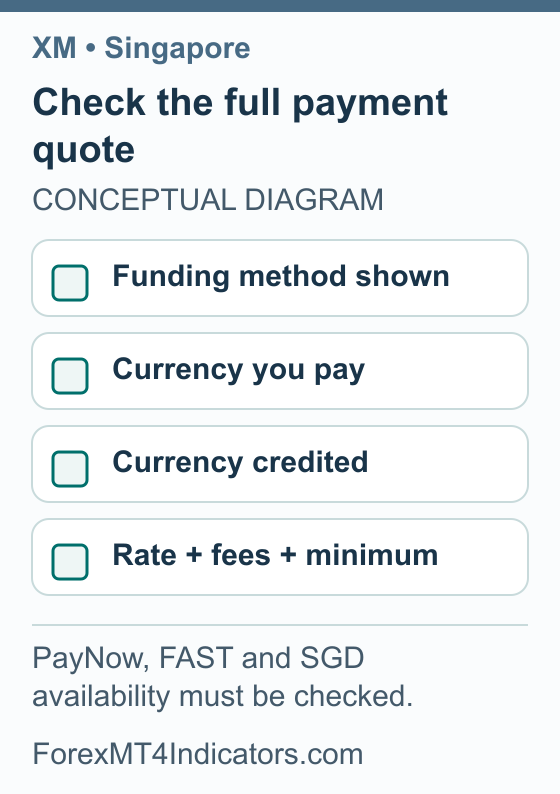
- Choose the intended trading account. Confirm its number and base currency before reading the payment options.
- Read the method conditions. Check the currency accepted, payer-name requirements, minimum, maximum and any other instructions shown.
- Record both amounts. Identify what you will pay and what is expected to reach the trading account.
- Find the conversion. Note the rate, who provides it and whether a fee is added, deducted or incorporated into the quote.
- Check the return conditions. Understand where withdrawals or refunds would go, including what to do if the original payment method is later unavailable.
- Keep the payment reference. If you proceed, save the confirmation privately and compare it with the account’s transaction status.
If a payment is debited but the trading account is unchanged, first inspect its transaction status and any review request. Ask the provider what the reference shows before attempting another payment. A duplicate payment can create a second issue while the first is unresolved.
Connect MT5 or MT4 using the account credentials
XM’s public MT5 page lists desktop, web and mobile options; its MT4 page documents that platform separately. Use an official download source and the platform named in your own trading account details. The existence of these public pages is not a Singapore connection test.
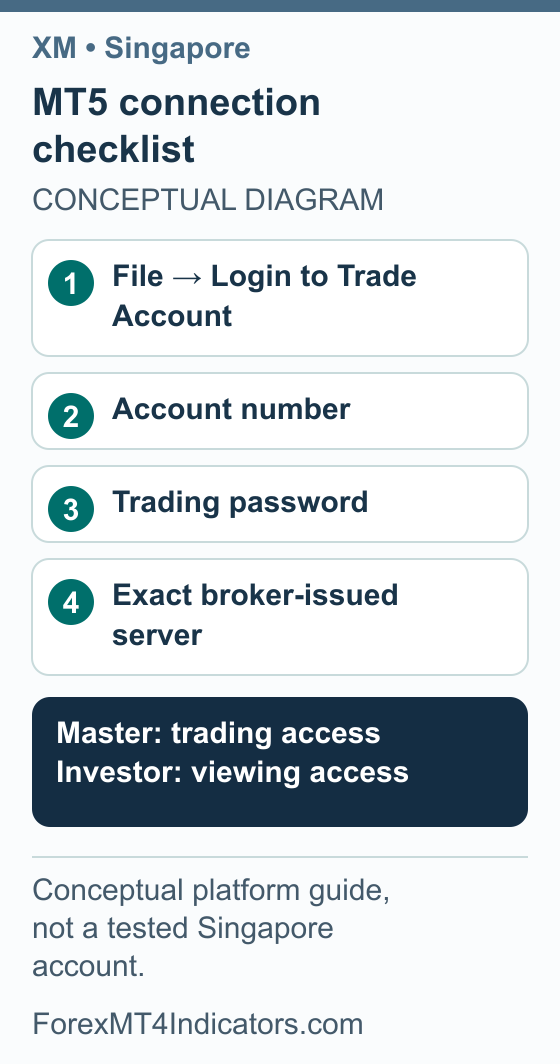
For MT5 desktop, MetaQuotes’ account connection instructions use the following sequence:
- Open File → Login to Trade Account.
- Enter the broker-issued trading account number.
- Enter that account’s trading password and select its exact server.
- Verify that the intended account appears after connection.
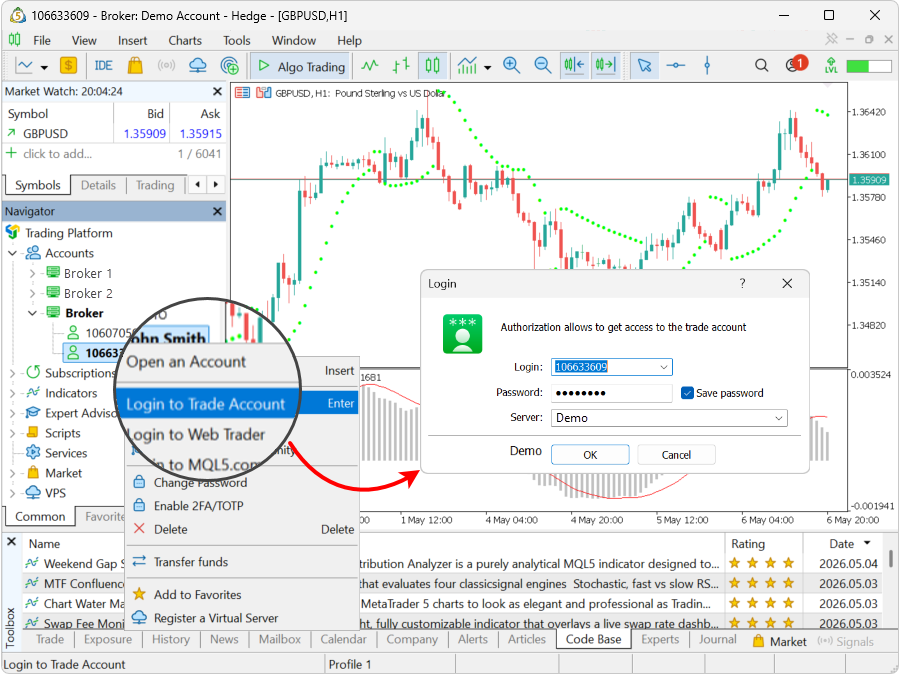
Master credentials allow trading; investor credentials allow viewing. Do not copy a server or sample account number from an illustration. A profile email and password are not automatically your trading-terminal credentials.
MT4 likewise requires its account number, password and server through the terminal’s login command, as explained in the official MT4 authorization guide. Keep MT4, MT5, demo and live account details clearly labelled. Our XM MT4 guide and XM MT5 guide cover the longer setup process.
When the connection or trading controls fail
| What you see | What to check first |
|---|---|
| Profile opens but terminal rejects login | Trading credentials, rather than profile credentials |
| Login error after changing accounts | Correct platform, exact server and account number |
| Account is visible but trading is unavailable | Investor access, account status and the displayed reason |
| Website access fails | Provider information, local access context and a verified support channel |
A generic error is not proof that the balance has disappeared or that a withdrawal was rejected. Save the exact message, terminal version and time it occurred. Send those details privately to support so the issue can be investigated without exposing your password.
For installation background on Apple computers, see our MT4 for Mac guide, while following the current official installer’s requirements. Once connected to a demo account, practise changing symbols, reading specifications and reviewing an order before placing it. Our XM demo-account guide explains how to keep that practice separate from a live account.
Check risk separately from the money transferred
Depositing SGD 133 in the hypothetical example says nothing about how much a trade can lose. Position size, the instrument, price movement and exit execution determine that exposure. Decide the amount you can afford to lose before translating it into a lot size.
Use the position size calculator with the correct account currency and instrument inputs. Compare an intended stop and target in the risk/reward calculator. Then check the separate capital requirement with the margin calculator; margin is not the same as a limit on loss.
Treat those calculations as planning aids. They do not approve a trade, reproduce every broker condition or promise an exit at the planned price. Practise the workflow on demo before using real capital.
XM Singapore bonus: what happened to the old $100 offer?
Bonus review: 8 September 2026. We have not verified a current $100 XM no-deposit offer for Singapore. Older promotion pages should not be used as a promise that a new registration will receive that amount. Our separate XM Singapore $100 bonus status review owns the detailed explanation of that historical claim.
Start with the dated Singapore notice discussed above, before comparing incentives. A provider’s willingness to accept an account or display a promotion does not resolve local authorization or access. This bonus review did not create an account, claim credit or test a Singapore payment route.
If you already hold an account and need to understand a credit entry, keep the account statement, offer name and governing terms together. Eligible deposit credit can add margin for trading; it is not an SGD cash payment. A cash balance, promotional credit and a bank transfer are separate records.
- Check the origin of the claim. Look for the original offer date, legal company and eligible residence. A Singapore label on an old page is not a current eligibility decision.
- Ask about your exact account. Request the applicable promotion document and account type. Do not accept a general link to another country’s campaign as the answer.
- Keep the units clear. If the offer uses USD and your bank statement uses SGD, record both currencies and any conversion. Neither figure proves SGD account support.
- Understand an existing withdrawal. Ask whether the requested amount would remove credit and how that would affect open positions before giving an instruction.
The global XM bonus guide explains these credit distinctions. It does not confirm a current Singapore offer or replace the local notice.
Follow a withdrawal through to receipt
Read the withdrawal methods and conditions for your account before requesting a transfer. Confirm any outstanding verification requests, the available amount and the return route. If several deposit methods were used, ask how the provider allocates the return rather than assuming the newest method receives everything.
XM’s public funding FAQ, retrieved with an XM Global footer, distinguishes its processing from the receiving provider’s clearing. It also discusses original deposit return routes and possible third-party charges. That source does not establish a Singapore bank’s receipt time or an available local withdrawal method.
For a delayed request, gather its reference, amount, currency, submission time and latest status. Ask whether it remains under review or has been released; if released, ask for the appropriate payment reference. Compare the response with the receiving provider’s records rather than counting all elapsed time as XM processing time.
Keep both currencies in your records when they differ. The amount returned to an SGD payment account can depend on the return route, its conversion and charges; do not assume it will recreate the original conversion quote. Our XM withdrawal guide provides the wider troubleshooting sequence.
Use support linked to your own account or verified official provider documents. We have not established a Singapore office, telephone number or local support schedule for this guide. A focused message with the reference and requested next step is more useful than a long thread mixing login, payment and account-type questions.
Frequently asked questions
Can Singapore residents open an XM account?
Check the current instructions for your actual Singapore residence and the company named in the agreement. This guide has not independently verified a new Singapore application outcome. Historical XM documents describe Singapore clients, but they do not replace current account checks or the separate provider-licensing and access notice discussed above.
Is XM regulated by MAS in Singapore?
The June 2025 SPF release states that the named XM Global operator lacked the requisite licence for the activities described. An offshore licence is not a Singapore licence. We have not completed a fresh MAS directory result, so this guide does not present a new register determination.
Does XM support SGD accounts or deposits?
We have not verified a current Singapore-specific list confirming either option. Check the trading account’s base currency and the currencies accepted by the payment method separately. Paying from an SGD account does not necessarily mean that the trading balance is held in SGD.
Can I use PayNow or FAST to fund XM?
This guide has not confirmed either service for a Singapore XM account. Use the payment methods actually displayed for your account and verify the recipient, conditions and total quote. A familiar bank or payment-service name elsewhere is not evidence that the route is supported.
Why can I log into XM but not MT5?
Check the trading account number, trading password and server from the account details. MT5 credentials can differ from the profile login. Also confirm that the account belongs to MT5 rather than MT4, and keep demo and live details separate when selecting a server.
Does processed mean my withdrawal is already in my bank?
No. Provider processing and the receiving service’s settlement are different stages. Check the latest status and request a payment reference if the transfer has been released. Use that reference with the receiving provider; this guide does not promise a Singapore-specific arrival time.
Forex and CFD trading carries a high level of risk and may not be suitable for all traders. This guide is educational. Past performance does not guarantee future results. Always test on a demo account before risking real capital.
Sources and review scope
Some provider links use affiliate tracking. We may earn a commission if you open an account through them.
Sources checked on 7 September 2026 unless a different date is shown. Provider documentation and public examples are distinguished from personal account tests.
- All Services Provided Under License. Checked 2026-09-07.
- Choose Your Trading Account. Checked 2026-09-07.
- Pilih Akaun Dagangan Anda. Checked 2026-09-07.
- Download the MT4 Trading Platform to Start Investing. Checked 2026-09-07.
- Download the MT5 Trading Platform to Start Investing. Checked 2026-09-07.
- XM Reviews: public funding/support FAQs. Checked 2026-09-07.
- Connect to an Account: MetaTrader 5 Help. Checked 2026-09-07.
- Blocking Of Unregulated Overseas Online Trading Platforms. Checked 2026-09-07.
- The Wonders of Gold Trading: Grand Webinar 2024 terms. Checked 2026-09-07.
- MetaTrader 4 Help: Authorization. Checked 2026-09-07.
- XM public deposit-bonus explanation: Current public XM Global deposit-credit explanation; region-dependent availability/percentage, nonwithdrawable credit. A 100% illustration does not identify a universally available 100% promotion. Bonus-section source checked 2026-09-08.
- Singapore SPF/MAS notice dated 6 June 2025: Dated 6June2025 SPF/MAS release names XM Global as lacking required CMS licence and announces ISP blocking from20June2025. This is a dated official statement, not a new test of all current ISP access or a claim about every individual account. Bonus-section source checked 2026-09-08.
- Download the MT5 Trading Platform to Start Investing